
Troubleshooting Cryptography Module
To troubleshoot Cryptography Module, become familiar with app logs, PGP protocol, attached and detached signatures, and interpreting commonly thrown messages.
View the App Log
If you encounter problems while running your Mule runtime engine (Mule) app, you can view the app log as follows:
-
If you’re running the app from Anypoint Platform, the output is visible in the Anypoint Studio console window.
-
If you’re running the app using Mule from the command line, the app log is visible in your OS console.
Unless the log file path is customized in the app’s log file log4j2.xml, view the app log in the default location MULE_HOME/logs/<app-name>.log.
Enable Cryptography Module Debug Logging
To begin troubleshooting the Cryptography module, enable debug logging to see the exact error messages:
-
Access Anypoint Studio and navigate to the Package Explorer view.
-
Open your application by clicking the project name.
-
Open the
src/main/resourcespath folder. -
Open the
log4j2.xmlfile inside the folder. -
Add the following line:
<AsyncLogger name="com.mulesoft.modules.cryptography" level="DEBUG" />
-
Save your changes.
-
Click the project name in Package Explorer and then click Run > Run As > Mule Application.
In FIPS-enabled environments, not all PGP operations are equally supported. Refer to the Cryptography Module migration guide for a full FIPS support matrix by operation.
Understand PGP Encryption and Decryption Configuration
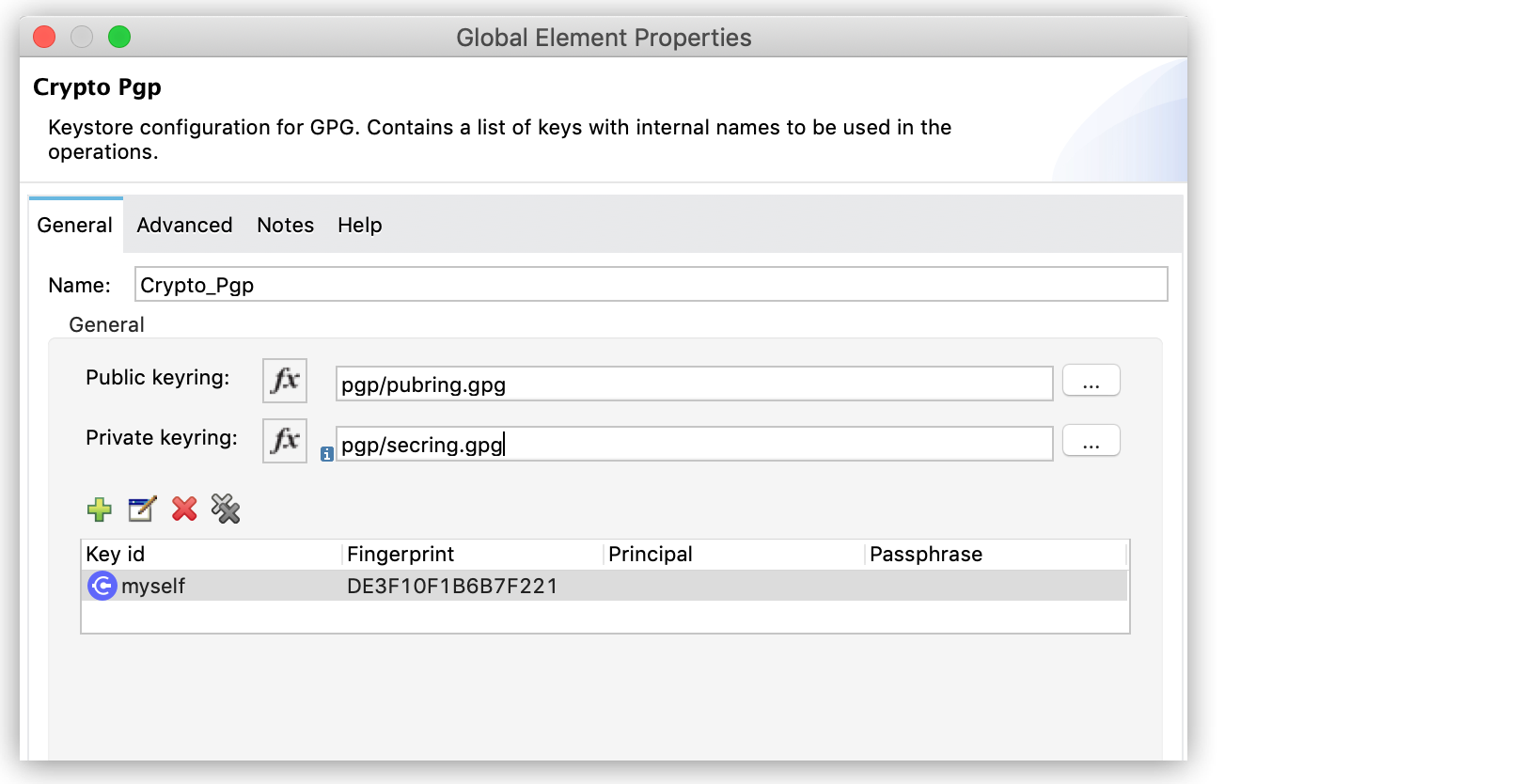
During PGP encryption, the sender of the message must encrypt its content using the receiver’s public key. To encrypt messages in your Mule app using someone else’s public key, in the Crypto Pgp global configuration add the receiver public keyring file in the Public keyring field.
During PGP decryption, the receiver of the message must use its private key to decrypt the contents of a message that was encrypted using a public key. To decrypt the message, in the Crypto Pgp global configuration add the receiver private keyring file in the Private keyring field.
Understand PGP Signature Configuration
In addition to encrypting, you can sign a message. The signature provides an integrity check of the original message.
To create a signature, in the Crypto Pgp global configuration add the sender private keyring file in the Private keyring field.
To validate a signature, in the Crypto Pgp global configuration add the sender public keyring file in the Public keyring field.
PGP Signature Types and Operations
The Cryptography module has two PGP signature operations:
-
Pgp sign: Creates a PGP armored signature in ASCII format.
-
Pgp sign binary: Creates a PGP binary signature.
In both cases, signing includes the private key of the sender, so the secret passphrase must be provided.
There are two types of signatures:
-
Attached signature
Generates a single document file that contains both the signature and the original document. -
Detached signature
Generates a single document file that contains only the signature, which is stored and transmitted separately from the document the signature signs.
Currently, the Cryptography module supports validation of detached signatures only.
Troubleshoot RSA PKCS#1 v1.5 Encryption Disallowed Error
The error RSA PKCS#1 v1.5 encryption disallowed applies to Cryptography Module 2.1.0 and later versions in FIPS-enabled environments.
The PGP Encrypt operation triggers this error when attempting to use RSA PKCS#1 v1.5 for session key encryption. While the OpenPGP standard (RFC 4880) mandates this specific mechanism, FIPS-approved mode explicitly disallows it due to security constraints. Some key considerations:
-
PGP
Encryptoperations are unsupported in FIPS mode because the mandated OpenPGP mechanism violates FIPS security constraints. -
No configuration workarounds exist to enable PGP encryption within a FIPS boundary due to protocol-level limitations.
-
PGP
DecryptandValidateoperations remain functional for legacy data as long as the underlying cryptographic material complies with FIPS standards.
If your integration requires PGP encryption, you must perform the encryption step outside of the FIPS-compliant boundary.
Understand Common Throws
Here is a list of common throw messages and how to interpret them:
-
CRYPTO:PARAMETERS
The operation is configured using invalid parameters. This typically occurs when:-
Invalid algorithm names are provided
-
Invalid transformation strings are used
-
Required parameters are missing or have incorrect values
-
Element paths in XML operations are invalid or blank
-
-
CRYPTO:KEY
General key-related problems. This is a parent error type that encompasses more specific key errors. -
CRYPTO:MISSING_KEY
A key required for the operation was not found. This typically occurs when:-
The specified key alias does not exist in the keystore
-
The keyId referenced in the operation is not configured
-
The keystore file cannot be found or loaded
-
The key identifier (fingerprint, principal, etc.) does not match any key in the keyring
-
-
CRYPTO:PASSPHRASE
The unlocking password is invalid. This typically occurs when:-
The password provided for a private key is incorrect
-
The keystore password is wrong
-
The passphrase for a PGP key is incorrect
-
-
CRYPTO:CHECKSUM
An error occurred during an attempt to calculate a checksum. This typically occurs when:-
The checksum algorithm is not supported
-
The input data is invalid or corrupted
-
There are issues with the underlying cryptographic provider
-
-
CRYPTO:ENCRYPTION
An error occurred during an attempt to encrypt data. This typically occurs when:-
The encryption algorithm is not supported or invalid
-
The key provided is not suitable for encryption
-
The key size is incompatible with the algorithm
-
The payload data is invalid or corrupted
-
Issues with the cryptographic provider configuration
-
-
CRYPTO:DECRYPTION
An error occurred during an attempt to decrypt data. This typically occurs when:-
The decryption algorithm does not match the encryption algorithm used
-
The key provided is incorrect or not suitable for decryption
-
The encrypted data is corrupted or invalid
-
The initialization vector (IV) is missing or incorrect
-
Issues with the cryptographic provider configuration
-
-
CRYPTO:TRANSFORMATION
An error occurred during an attempt to transform binary to ASCII to build the ASCII Armor file. This typically occurs when:-
Issues converting PGP binary data to armored format
-
Problems with Base64 encoding/decoding
-
Data corruption during transformation
-
-
CRYPTO:SIGNATURE
An error occurred during an attempt to create a signature. This typically occurs when:-
The signature algorithm is not supported or invalid
-
The key provided is not suitable for signing
-
The key is missing or not accessible
-
Issues with the cryptographic provider configuration
-
The key type does not match the signature algorithm requirements
-
-
CRYPTO:VALIDATION
The signature cannot be validated against the data. This typically occurs when:-
The signature is invalid or corrupted
-
The data has been modified after signing
-
The public key used for validation does not match the private key used for signing
-
The signature algorithm does not match
-
The certificate has expired or is not yet valid
-