
Use MuleSoft Documentation with AI
MuleSoft documentation is optimized for AI. Whether you’re a human pasting context into an LLM or an AI agent ingesting documentation autonomously, our content is structured to save tokens, stay grounded, and maximize technical accuracy.
Page Options
Every page of MuleSoft documentation includes a dropdown menu for AI consumption.
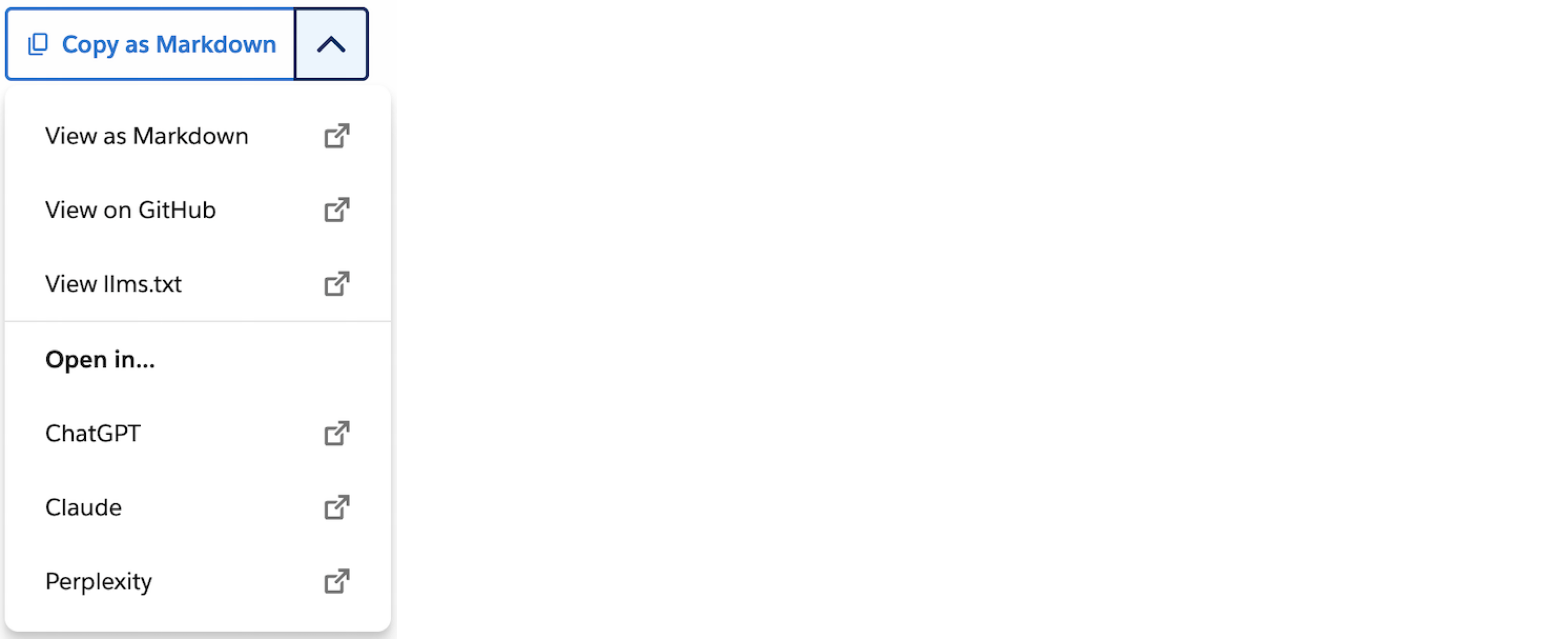
Use these options to quickly grab clean text or jump straight into your workflow:
-
Copy as Markdown: Copies the Markdown version of the page to your clipboard to streamline your prompt engineering.
-
View as Markdown: Opens the Markdown version of the page in a new tab for sharing or inspecting.
-
View on GitHub: Opens the page’s source on GitHub to review, suggest changes, or log issues.
-
View llms.txt: Opens the sitewide
llms.txtindex file. See llms.txt and llms-full.txt. -
Open in ChatGPT / Claude / Perplexity: Opens a conversation with the current page as context so the LLM can answer your questions instantly.
llms.txt and llms-full.txt
MuleSoft documentation publishes llms.txt and llms-full.txt index files, which are machine-readable Markdown catalogs that let AI tools and RAG pipelines cleanly discover, search, or bulk-ingest our documentation without crawling raw HTML.
For example, you can point an AI coding assistant to the sitewide or product llms.txt URL for real-time integration context, or import the llms-full.txt file into a vector database to ground AI agents.
Depending on your data scope, you can target three types of endpoints:
-
Sitewide
llms.txtSpans the entire MuleSoft documentation library and links to every product’s
llms.txt. -
Product
llms.txtNarrows to a single product and links to each of that product’s pages.
-
URL pattern:
docs.mulesoft.com/[product-name]/llms.txt
-
-
Product
llms-full.txtConsolidates a single product’s full documentation into one file.
-
URL pattern:
docs.mulesoft.com/[product-name]/llms-full.txt
-