
Oracle Siebel Connector 4.0
| Siebel Connector 4.0.8 and later now supports IP22. |
Anypoint Connector for Oracle Siebel (Siebel Connector) lets you access connections between Mule runtime engine (Mule) integration apps and the Oracle Siebel customer relationship manager (CRM).
Siebel Connector has only one option for connecting with Siebel apps, which are categorized by Siebel Objects and Services.
-
Oracle Siebel Business Objects: Create, update, upsert, query, and delete Siebel business components.
-
Oracle Siebel Integration Objects: Create, update, upsert, query, delete, query page, execute, and synchronize Siebel integration objects.
-
Oracle Siebel Business Services: Execute Siebel business services.
All options are available after installing the Siebel connector.
The Siebel connector is built using the Siebel Java Data Beans interface. Java Data Beans provides a native Java interface to access the Siebel Object Manager.
The Siebel Object Manager lets a connector use a generic interface that does not depend on a customized installation. To discover the metadata of Siebel objects in design time, use DataSense in Anypoint Studio. The Siebel connector takes advantage of the Siebel Repository to show a list of available objects as well as their structures in a Siebel custom installation.
The objects can be business components, business objects, integration objects, or business services.
Release Notes: Oracle Siebel Connector Release Notes
Exchange: Oracle Siebel Connector
Before You Begin
To use this information, you should be familiar with Oracle Siebel, Mule runtime engine (Mule), Anypoint Connectors, Anypoint Studio, Mule concepts, elements in a Mule flow, and Global Elements.
You need login credentials to test your connection to your target resource.
To use this connector with Maven, view the pom.xml dependency information in the Dependency Snippets in Anypoint Exchange.
Because of how closely the connector is coupled with Siebel CRM, you should have a working knowledge of Siebel Business Components, Business Objects, Business Services, and Integration Objects.
The Siebel connector requires the following two Siebel JAR files: Siebel.jar and SiebelJI_xxx.
Choose the SiebelJI_xxx.jar based on the locale of the Siebel installation. For instance, if the locale of Siebel installation is US_EN, use SiebelJI_enu.jar.
The Siebel.jar and SiebelJI_enu.jar are available in the <%SIEBEL_HOME%>\8.1.1.11\Tools_1\CLASSES folder on the Siebel server. %SIEBEL_HOME% is the installation directory of Siebel.
The connector now is a conglomerate of the previous 3 modules (Oracle Siebel Business Objects, Oracle Siebel Integration Objects, Oracle Siebel Business Services)
POM File Information
<dependency>
  <groupId>com.mulesoft.connectors</groupId>
  <artifactId>mule-oracle-siebel-jdb-connector</artifactId>
  <version>x.y.z</version>
  <classifier>mule-plugin</classifier>
</dependency>
Replace x.y.z with the version that corresponds to the connector you are using.
To obtain the most up-to-date pom.xml file information, access the connector in Anypoint Exchange and click Dependency Snippets.
Add the Connector to a Studio Project
Anypoint Studio provides two ways to add the connector to your Studio project: from the Exchange button in the Studio taskbar or from the Mule Palette view.
Add the Connector Using Exchange
-
In Studio, create a Mule project.
-
Click the Exchange icon (X) in the upper-left of the Studio task bar.
-
In Exchange, click Login and supply your Anypoint Platform username and password.
-
In Exchange, search for "siebel".
-
Select the connector and click Add to project.
-
Follow the prompts to install the connector.
Add the Connector in Studio
-
In Studio, create a Mule project.
-
In the Mule Palette view, click (X) Search in Exchange.
-
In Add Modules to Project, type "siebel" in the search field.
-
Click this connector’s name in Available modules.
-
Click Add.
-
Click Finish.
Configure in Studio
-
Drag the operation you want to execute to the Studio canvas.
-
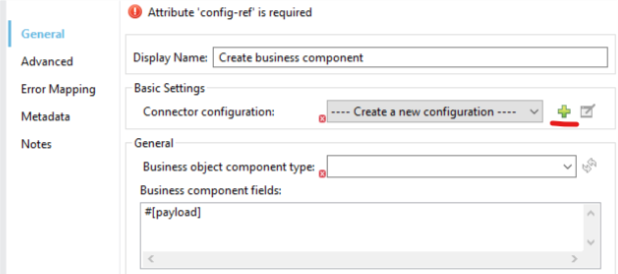
To create a new configuration for the Siebel connector, click the plus button in the Basic Settings area.
-
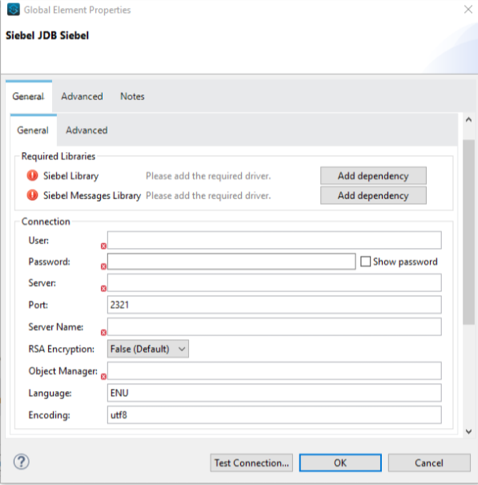
Fill in the data in the configuration form.
-
For the Required Libraries sections, you have to add the Siebel.jar and SiebelJI_xxx libraries that you previously downloaded.
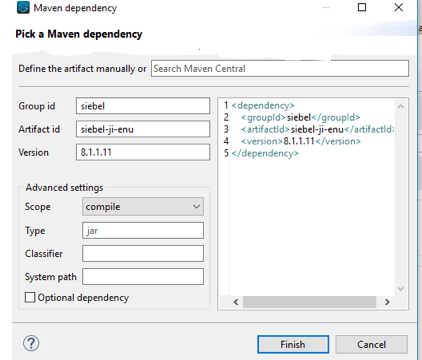
After you click Finish, the library is added as a dependency, but the Global Element Properties window does not change, just in case you want to add more dependencies throughout the Maven Dependency UI.
-
For the configuration section, the fields are:
-
Name - Enter a name for this Configuration to reference it later.
-
User - Enter the Siebel username to be used.
-
Password - Enter the corresponding Siebel password.
-
Server - Enter the server IP address of your Siebel instance.
-
Port - Enter the port number. Default value is 2321.
-
Server Name - Enter the Siebel Enterprise server name.
-
RSA Encryption - Choose if you want to use RSA encryption. Default value is false.
-
Object Manager - Enter the value of the Object Manager of your Siebel instance.
-
Language - Enter the language corresponding to the locale of the Siebel instance. Default value is ENU.
-
Encoding - Enter an encoding type supported by the Siebel server. Default value is utf8.
-
-
The General filters are composed of:
-
Default View Mode Bus Comp - Enter the default view for DataSense. The default value for this field is 3.
Supported values:
-
0 (SalesRepView):
-
-
Applies access control according to a single position or a sales team.
-
Displays records according to one of the following items: The user position or the sales team that includes a user’s position. The Visibility field or Visibility MVField of the business component determines the visibility.
-
1 (ManagerView):
Displays records that a user and others who report to the user can access. For example, it includes the records that Siebel CRM displays in the My Team’s Accounts visibility filter.
-
2 (PersonalView):
Displays records that a user can access, as determined by the Visibility Field property of the BusComp view mode object. For example, it includes the records that Siebel CRM displays in the My Accounts visibility filter.
-
3 (AllView):
Displays all records that includes a valid owner. For example, it includes the records that Siebel CRM displays in the All Accounts Across Organizations visibility filter.
-
-
Data Sense Filter Query Bus Objects - Use this field to write a query to filter the Business Objects metadata being downloaded into the application.
-
DataSense Filter Query Bus Comp - Use this field to write a query to filter the Business Components metadata being downloaded into the application.
-
DataSense Filter Query Int Objects - Use this field to write a query to filter the Integration Objects metadata being downloaded into the application.
-
Data Sense Filter Query - Use this field to write a query to filter the Business Services metadata being downloaded into the application.
-
Other - Use this field to define another query to filter the Business Objects, Services or Integration Objects metadata which is going to be downloaded into the application.
-
-
| Limit the number of objects to retrieve through DataSense to a few objects using search specifications, otherwise retrieving metadata slows down Studio. |
Log Requests and Responses
To log requests and responses when using the connector, configure a logger by adding this line to the Loggers element of the log4j2.xml configuration file for the Mule app:
<AsyncLogger name="org.mule.modules.siebel.internal.service"
   level="DEBUG"/>
The following example shows the Loggers element with the AsyncLogger line added:
<?xml version="1.0" encoding="UTF-8"?>
<Configuration status="WARN">
	<Appenders>
	    <Console name="Console" target="SYSTEM_OUT">
	    	<PatternLayout pattern="%d{HH:mm:ss.SSS} [%t] %-5level %logger{36} - %msg%n"/>
		</Console>
	</Appenders>
	<Loggers>
		<AsyncLogger name="org.mule.modules.siebel.internal.service" level="DEBUG" additivity="false">
			<appender-ref ref="Console" level="debug"/>
		</AsyncLogger>
	</Loggers>
</Configuration>
You can view the app log as follows:
-
If you’re running the app from the Anypoint Platform, the output is visible in the Anypoint Studio console window.
-
If you’re running the app using Mule from the command line, the app log is visible in your OS console.
Unless the log file path was customized in the app’s log file (log4j2.xml), you can also view the app log in this default location:
MULE_HOME/logs/<app-name>.log
For more information about the app log, see Configuring Logging.
Use Case: Studio
The Siebel Connector is an operation-based connector, which means that when you add the connector to your flow you must specify an operation to perform.
Example Use Cases
The following are common use cases for the Siebel v4.0.0 connector:
-
Create a Business Component (Action, Account, etc.)
-
Create a new Mule project in Anypoint Studio.
-
Add a suitable Mule Inbound endpoint, such as the HTTP listener, to begin the flow.
-
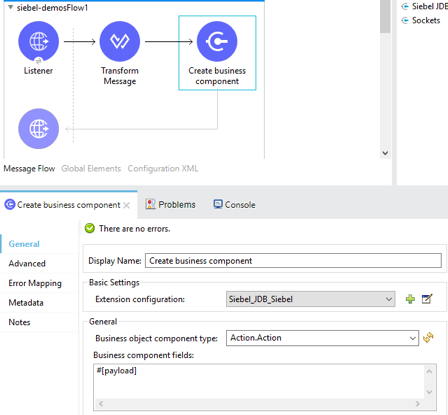
Drag the Create business component operation from the Siebel JDB palette onto the canvas, then select it to open the properties editor.
-
Configure the operation’s parameters:
-
Drag the Transform Message connector between the HTTP Listener and the Siebel connector on the flow.
-
Configure the input payload with the desired fields:

-
-
Execute a Business Service (Create Contact, Create Account etc.)
-
Create a new Mule project in Anypoint Studio.
-
Add a suitable Mule Inbound endpoint, such as the HTTP listener, to begin the flow.
-
Drag the Execute business service operation from the Siebel JDB palette onto the canvas, then select it to open the properties editor.
-
Configure the operation’s parameters:
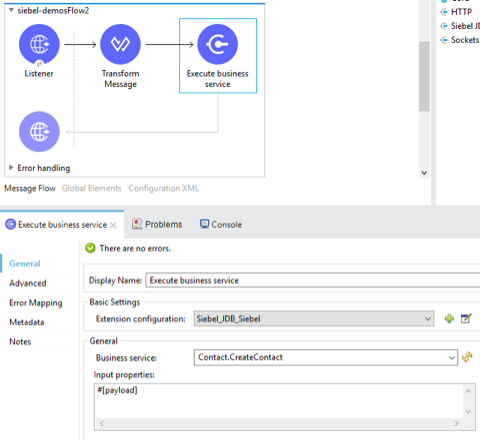
-
Drag the Transform Message connector between the HTTP Listener and the Siebel connector on the flow.
-
Configure the input payload with the desired fields:
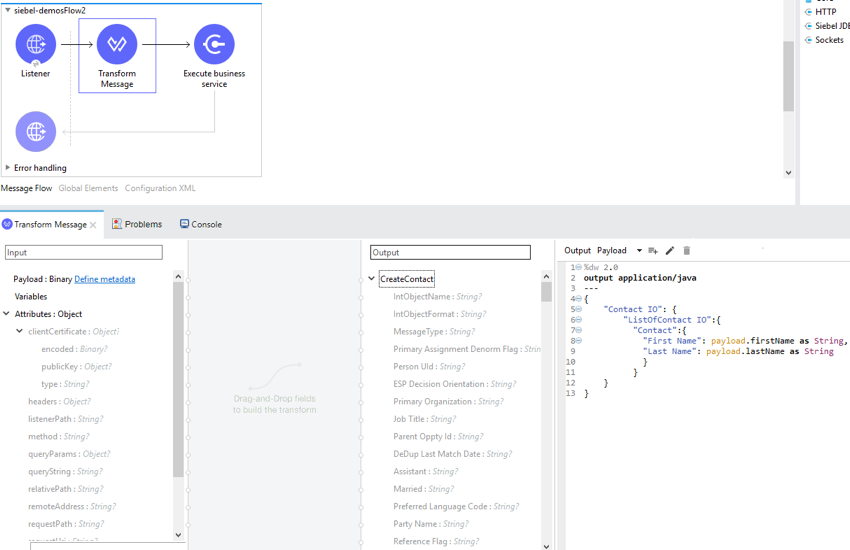
-
-
Execute Siebel Adapter (Creating an Integration Object)
-
Create a new Mule project in Anypoint Studio.
-
Add a suitable Mule Inbound endpoint, such as the HTTP listener, to begin the flow.
-
Drag the Execute siebel adapter operation from the Siebel JDB palette onto the canvas, then select it to open the properties editor.
-
Configure the operation’s parameters:
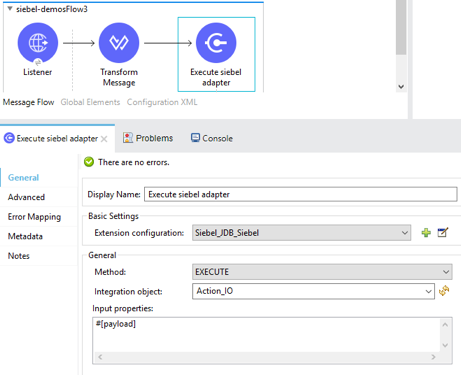
-
Drag the Transform Message connector between the HTTP Listener and the Siebel connector on the flow.
-
Configure the input payload with the desired fields:
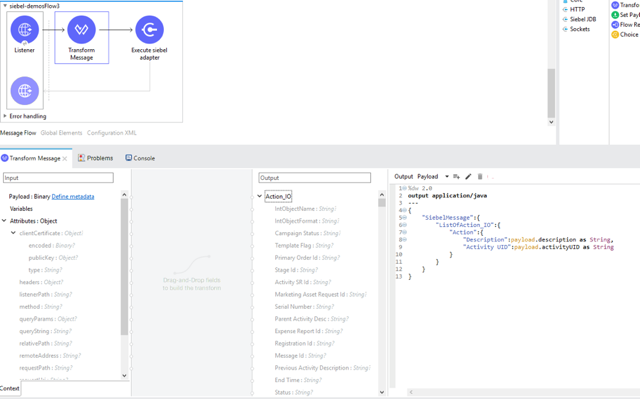
-
USE Case: XML
XML snippet from a project using the Siebel Connector:
<?xml version="1.0" encoding="UTF-8"?>

<mule xmlns:ee="http://www.mulesoft.org/schema/mule/ee/core"
    xmlns:siebel="http://www.mulesoft.org/schema/mule/siebel"
    xmlns:http="http://www.mulesoft.org/schema/mule/http"
    xmlns="http://www.mulesoft.org/schema/mule/core"
    xmlns:doc="http://www.mulesoft.org/schema/mule/documentation"
    xmlns:xsi="http://www.w3.org/2001/XMLSchema-instance"
    xsi:schemaLocation="http://www.mulesoft.org/schema/mule/core
    http://www.mulesoft.org/schema/mule/core/current/mule.xsd
    http://www.mulesoft.org/schema/mule/http
    http://www.mulesoft.org/schema/mule/http/current/mule-http.xsd
    http://www.mulesoft.org/schema/mule/siebel
    http://www.mulesoft.org/schema/mule/siebel/current/mule-siebel.xsd
    http://www.mulesoft.org/schema/mule/ee/core
    http://www.mulesoft.org/schema/mule/ee/core/current/mule-ee.xsd">

    <configuration-properties file="mule-app.properties"/>

    <siebel:siebel-config
        name="Siebel_JDB_Siebel"
        doc:name="Siebel JDB Siebel"
        dataSenseFilterQueryBusComp="[Name] = 'Action'">
        <siebel:basic-connection
            user="${siebel.user}"
            password="${siebel.password}"
            server="${siebel.server}"
            serverName="${siebel.servername}"
            objectManager="${siebel.objectManager}"/>
    </siebel:siebel-config>

    <http:listener-config name="HTTP_Listener_config" doc:name="HTTP Listener config">
        <http:listener-connection host="localhost" port="8081"/>
    </http:listener-config>

    <flow name="siebel-demosFlow1">
            <http:listener
                config-ref="HTTP_Listener_config"
                path="/create"
                doc:name="Listener"/>
            <ee:transform doc:name="Transform Message">
                <ee:message>
                    <ee:set-payload><![CDATA[%dw 2.0
                                        output application/java
                                        ---
                                        {
                                            "Type":payload.actionType as String,
                                            "Description": payload.description as String
                                        }]]>
                    </ee:set-payload>
                </ee:message>
            </ee:transform>
            <siebel:create-business-component
                config-ref="Siebel_JDB_Siebel"
                businessObjectComponentType="Action.Action"
                doc:name="Create business component"/>
            <ee:transform doc:name="Transform Message">
                <ee:message>
                    <ee:set-payload><![CDATA[%dw 2.0
                                        output application/json
                                        ---
                                        payload]]>
                    </ee:set-payload>
                </ee:message>
            </ee:transform>
        </flow>
</mule>