
Discovering and Cataloging External Services with Scanners
Use scanners to automatically discover, import, and catalog services from outside Anypoint Platform. Scanners connect to external provider platforms and pull in metadata for agents, APIs, and Model Context Protocol (MCP) servers your teams rely on. They give enterprise-grade governance and visibility through MuleSoft Agent Fabric by synchronizing that metadata with the Agent Fabric registry in Anypoint Exchange.
What each scan imports depends on the provider: some ecosystems expose agents; others also surface API definitions or MCP endpoints that Exchange can represent as catalog services. Scanners extract metadata, map it into Exchange-friendly forms (including the canonical Agent-to-Agent (A2A) representation for agentic services where applicable), and keep the catalog aligned with the source. The system detects updates and resolves conflicts to maintain a single source of truth.
Create a scanner to connect to a supported external platform and configure how often it runs. Schedule scans at specific intervals, set up the connection, and opt into email notifications. After a scan completes, review a summary of imported services and the scan history.
Imported services appear in the Exchange catalog in the views that match their type—for example Agents & Tools for agents, MCP servers, and related agentic services, and the usual API experiences for API specifications your provider exposes to the scanner. Scanners detect new and missing services and metadata changes. Later scans overwrite metadata from Exchange with values from the source and can restore services removed from Exchange while the scanner still sees them externally. To keep local edits, change the service in the provider’s source of truth.
After you add a scanner to a business group, you can’t move the scanner or its managed services to another group. Click Scanners in the sidebar to see all scanners for the group. The list shows the scanner status, name, provider, service type,last run status, next run, and counts of added or updated services.
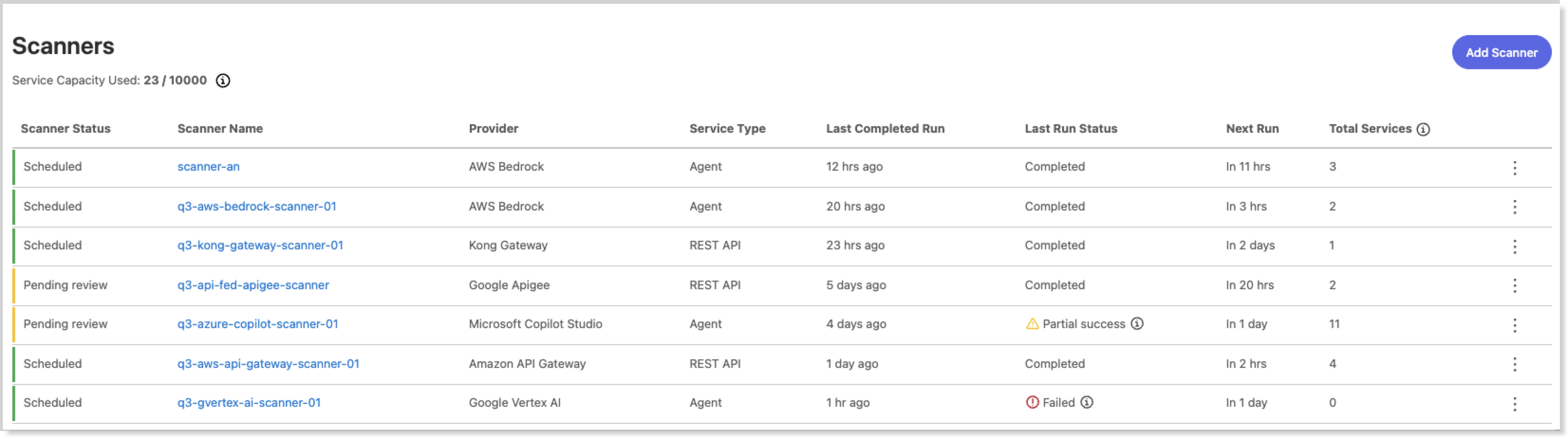
Exchange supports these scanner types:
-
Agents
-
APIs
-
MCP servers
Security and Data Retention
Sensitive information, such as API keys and tokens, is stored in Anypoint Security secrets manager. To maintain compliance, create credentials with least privilege.
The system retains scan logs and statuses for at least 90 days and never deletes the most recent successful run.
Scanners enforce these limits:
-
Frequency: Once daily
-
Retrieval: 1,200 services per runtime limit
-
Capacity: 10,000 services
-
Runtime: 6 hours
If a scan exceeds the runtime limit, the scanner saves the progress and continues the scan the next time it runs.