
Microsoft Outlook 365 1.3 Examples
The following examples show how to perform operations that interact with messages, events, and attachment resources in Microsoft Outlook 365 Connector:
| Some operations need prerequisite data, for example, to get a message or an event based on its ID, you must create a message or an event first. |
Create Message
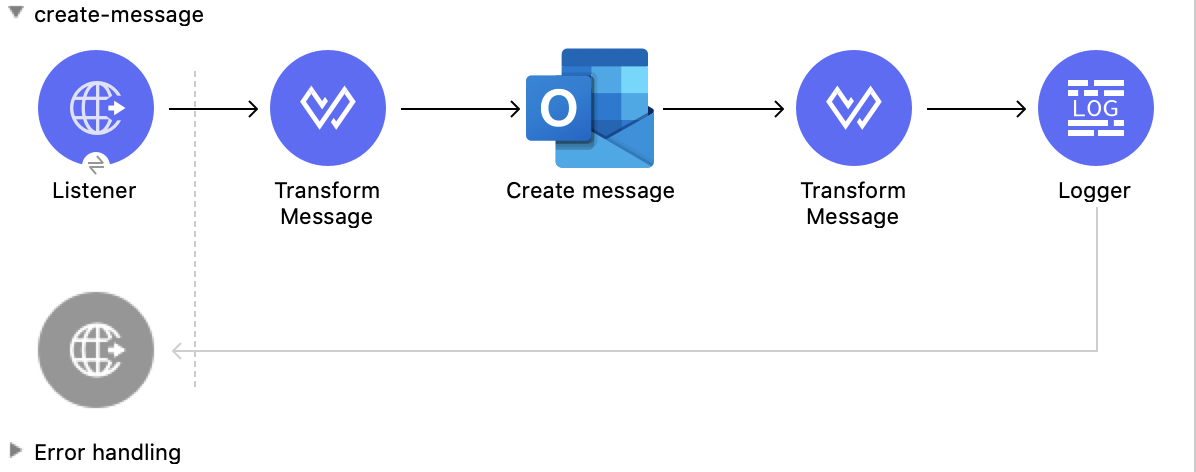
This Mule flow creates a message to send later. The message is saved in the Drafts folder.
This example uses the following operations:
-
HTTP Listener
Accepts data from HTTP requests -
Transform Message
Transforms the HTTP input used to create a message -
Create message
Creates a draft of the message -
Transform Message
Outputs the results of the Create message operation in JSON format -
Logger
Shows the HTTP response from the Create message operation
XML for This Example
Paste this code into the Studio XML editor to quickly load the flow for this example into your Mule app:
<?xml version="1.0" encoding="UTF-8"?>

<mule xmlns:tableau-specialist="http://www.mulesoft.org/schema/mule/tableau-specialist" xmlns:email="http://www.mulesoft.org/schema/mule/email"
	  xmlns:ee="http://www.mulesoft.org/schema/mule/ee/core"
	  xmlns:http="http://www.mulesoft.org/schema/mule/http" xmlns:outlook365="http://www.mulesoft.org/schema/mule/outlook365" xmlns:salesforce="http://www.mulesoft.org/schema/mule/salesforce" xmlns="http://www.mulesoft.org/schema/mule/core" xmlns:doc="http://www.mulesoft.org/schema/mule/documentation" xmlns:xsi="http://www.w3.org/2001/XMLSchema-instance" xsi:schemaLocation="http://www.mulesoft.org/schema/mule/core http://www.mulesoft.org/schema/mule/core/current/mule.xsd
http://www.mulesoft.org/schema/mule/outlook365 http://www.mulesoft.org/schema/mule/outlook365/current/mule-outlook365.xsd
http://www.mulesoft.org/schema/mule/http http://www.mulesoft.org/schema/mule/http/current/mule-http.xsd
http://www.mulesoft.org/schema/mule/ee/core http://www.mulesoft.org/schema/mule/ee/core/current/mule-ee.xsd
http://www.mulesoft.org/schema/mule/email http://www.mulesoft.org/schema/mule/email/current/mule-email.xsd
http://www.mulesoft.org/schema/mule/tableau-specialist http://www.mulesoft.org/schema/mule/tableau-specialist/current/mule-tableau-specialist.xsd">
	<http:listener-config name="HTTP_Listener_config" doc:name="HTTP Listener config" doc:id="7ca945b4-7657-4688-90bf-5b9b8aa9b78b" >
		<http:listener-connection host="0.0.0.0" port="8083" />
	</http:listener-config>

	<outlook365:outlook365-config name="outlook365_client_credentials" doc:name="Outlook365 Outlook365 Config" doc:id="1ae40dd0-f924-457e-b702-946d5e896ec2" >
		<outlook365:oauth-client-credentials-connection >
			<outlook365:oauth-client-credentials clientId="${oauth-client-credentials.clientId}" clientSecret="${oauth-client-credentials.clientSecret}" tokenUrl="${oauth-client-credentials.tokenUrl}" scopes="${oauth-client-credentials.scopes}" />
		</outlook365:oauth-client-credentials-connection>
	</outlook365:outlook365-config>

	<flow name="create-message" doc:id="e5a15ff1-0ded-45ae-9c20-bf71b3367edd" >
		<http:listener doc:name="Listener" doc:id="493d0ed4-3f5a-4777-ba2c-454e6e640461" path="/create-msg" config-ref="HTTP_Listener_config"/>
		<ee:transform doc:name="Transform Message" doc:id="47b52140-9bb6-4d15-9e4d-d480ebb3dcd8" >
			<ee:message >
				<ee:set-payload ><![CDATA[%dw 2.0
output application/json
---
{
 "subject":"Last night game - Test - Ignore please",
"importance":"Low",
"body":{
"contentType":"HTML",
"content":"They were <b>awesome</b>!"
},
"toRecipients":[
{
    "emailAddress":{
        "address":"muletest@mulesoft.com"
     }
},
{
    "emailAddress":{
        "address":"muletest@mulesoft.com"
     }
}
    ]
}]]></ee:set-payload>
			</ee:message>
		</ee:transform>
		<outlook365:create-message doc:name="Create message" doc:id="4723c105-b33b-40b7-a480-118e7b486f97" config-ref="outlook365_client_credentials" userId="88f176b2-84ca-4cfe-828c-954db0096efa">
		</outlook365:create-message>
		<ee:transform doc:name="Transform Message" doc:id="e23d752c-1c63-4c9b-b664-e94fa2f274fc" >
			<ee:message >
				<ee:set-payload ><![CDATA[%dw 2.0
output application/json
---
payload]]></ee:set-payload>
			</ee:message>
		</ee:transform>
		<logger level="INFO" doc:name="Logger" doc:id="88008b17-7027-4142-a8e4-a2a59f949756" message="#[payload]"/>
	</flow>
</mule>
Steps for Running This Example
-
Verify that your connector is configured.
-
Save the project.
-
From a web browser, test the application by entering
http://localhost:8083/create-msg.
Delete Message
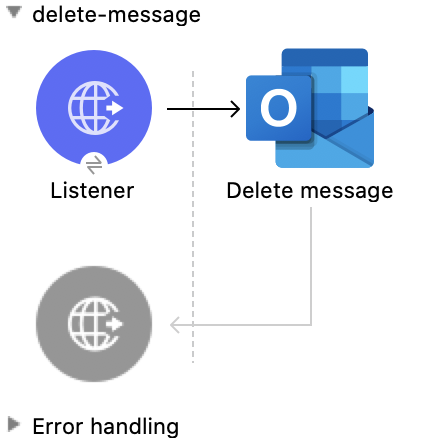
This Mule flow deletes an existing message.
This example uses the following operations:
-
HTTP Listener
Accepts data from HTTP requests -
Delete message
Deletes a message from the specified user’s mailbox
XML for This Example
Paste this code into the Studio XML editor to quickly load the flow for this example into your Mule app:
<?xml version="1.0" encoding="UTF-8"?>

<mule xmlns:tableau-specialist="http://www.mulesoft.org/schema/mule/tableau-specialist" xmlns:email="http://www.mulesoft.org/schema/mule/email"
	  xmlns:ee="http://www.mulesoft.org/schema/mule/ee/core"
	  xmlns:http="http://www.mulesoft.org/schema/mule/http" xmlns:outlook365="http://www.mulesoft.org/schema/mule/outlook365" xmlns:salesforce="http://www.mulesoft.org/schema/mule/salesforce" xmlns="http://www.mulesoft.org/schema/mule/core" xmlns:doc="http://www.mulesoft.org/schema/mule/documentation" xmlns:xsi="http://www.w3.org/2001/XMLSchema-instance" xsi:schemaLocation="http://www.mulesoft.org/schema/mule/core http://www.mulesoft.org/schema/mule/core/current/mule.xsd
http://www.mulesoft.org/schema/mule/outlook365 http://www.mulesoft.org/schema/mule/outlook365/current/mule-outlook365.xsd
http://www.mulesoft.org/schema/mule/http http://www.mulesoft.org/schema/mule/http/current/mule-http.xsd
http://www.mulesoft.org/schema/mule/ee/core http://www.mulesoft.org/schema/mule/ee/core/current/mule-ee.xsd
http://www.mulesoft.org/schema/mule/email http://www.mulesoft.org/schema/mule/email/current/mule-email.xsd
http://www.mulesoft.org/schema/mule/tableau-specialist http://www.mulesoft.org/schema/mule/tableau-specialist/current/mule-tableau-specialist.xsd">
	<http:listener-config name="HTTP_Listener_config" doc:name="HTTP Listener config" doc:id="7ca945b4-7657-4688-90bf-5b9b8aa9b78b" >
		<http:listener-connection host="0.0.0.0" port="8083" />
	</http:listener-config>

	<outlook365:outlook365-config name="outlook365_client_credentials" doc:name="Outlook365 Outlook365 Config" doc:id="1ae40dd0-f924-457e-b702-946d5e896ec2" >
		<outlook365:oauth-client-credentials-connection >
			<outlook365:oauth-client-credentials clientId="${oauth-client-credentials.clientId}" clientSecret="${oauth-client-credentials.clientSecret}" tokenUrl="${oauth-client-credentials.tokenUrl}" scopes="${oauth-client-credentials.scopes}" />
		</outlook365:oauth-client-credentials-connection>
	</outlook365:outlook365-config>

	<flow name="delete-message" doc:id="f5a345c9-3adb-4371-a420-d4f103f8b514" >
		<http:listener doc:name="Listener" doc:id="2d56056f-ebb3-4759-aabe-4c0e97d5a4d9" config-ref="HTTP_Listener_config" path="/delete-msg"/>
		<outlook365:delete-message doc:name="Delete message" doc:id="98511d16-2de9-4d3e-abc3-41239eeefe36" config-ref="outlook365_client_credentials" userId="88f176b2-84ca-4cfe-828c-954db0096efa" messageId="AAMkADg5NjIxODNkLWRkNzAtNGFkNC04YjUwLWFjOTEyMzg0YzA5NgBGAAAAAADzzlN7RptORYu7QgvFkvQJBwCthX8I2XTFT5_USx5R95fIAAAAAAEPAACthX8I2XTFT5_USx5R95fIAAFXpn4vAAA="/>
	</flow>
</mule>
Steps for Running This Example
-
Verify that your connector is configured.
-
Save the project.
-
From a web browser, test the application by entering
http://localhost:8083/delete-msg.
Get Message
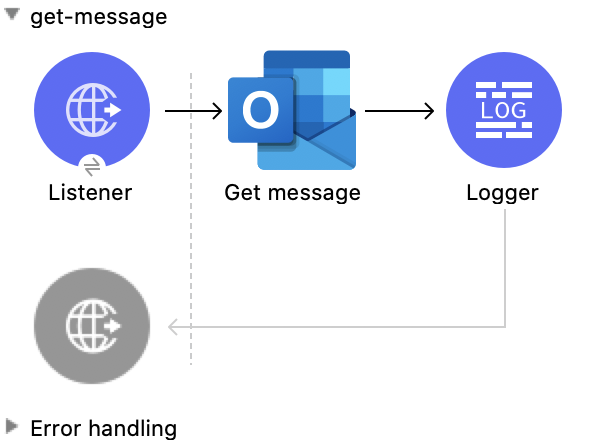
This Mule flow retrieves an existing message.
This example uses the following operations:
-
HTTP Listener
Accepts data from HTTP requests -
Get message
Retrieves the properties and relationships of a message object
XML for This Example
Paste this code into the Studio XML editor to quickly load the flow for this example into your Mule app:
<?xml version="1.0" encoding="UTF-8"?>

<mule xmlns:tableau-specialist="http://www.mulesoft.org/schema/mule/tableau-specialist" xmlns:email="http://www.mulesoft.org/schema/mule/email"
	  xmlns:ee="http://www.mulesoft.org/schema/mule/ee/core"
	  xmlns:http="http://www.mulesoft.org/schema/mule/http" xmlns:outlook365="http://www.mulesoft.org/schema/mule/outlook365" xmlns:salesforce="http://www.mulesoft.org/schema/mule/salesforce" xmlns="http://www.mulesoft.org/schema/mule/core" xmlns:doc="http://www.mulesoft.org/schema/mule/documentation" xmlns:xsi="http://www.w3.org/2001/XMLSchema-instance" xsi:schemaLocation="http://www.mulesoft.org/schema/mule/core http://www.mulesoft.org/schema/mule/core/current/mule.xsd
http://www.mulesoft.org/schema/mule/outlook365 http://www.mulesoft.org/schema/mule/outlook365/current/mule-outlook365.xsd
http://www.mulesoft.org/schema/mule/http http://www.mulesoft.org/schema/mule/http/current/mule-http.xsd
http://www.mulesoft.org/schema/mule/ee/core http://www.mulesoft.org/schema/mule/ee/core/current/mule-ee.xsd
http://www.mulesoft.org/schema/mule/email http://www.mulesoft.org/schema/mule/email/current/mule-email.xsd
http://www.mulesoft.org/schema/mule/tableau-specialist http://www.mulesoft.org/schema/mule/tableau-specialist/current/mule-tableau-specialist.xsd">
	<http:listener-config name="HTTP_Listener_config" doc:name="HTTP Listener config" doc:id="7b5e348d-2f1c-4a09-b73a-7b1f84d89060" >
		<http:listener-connection host="0.0.0.0" port="8083" />
	</http:listener-config>

	<outlook365:outlook365-config name="outlook365_client_credentials" doc:name="Outlook365 Outlook365 Config" doc:id="ab1353ac-79b8-4718-a96c-a2c9e9d1d996" >
		<outlook365:oauth-client-credentials-connection >
			<outlook365:oauth-client-credentials clientId="${oauth-client-credentials.clientId}" clientSecret="${oauth-client-credentials.clientSecret}" tokenUrl="${oauth-client-credentials.tokenUrl}" scopes="${oauth-client-credentials.scopes}" />
		</outlook365:oauth-client-credentials-connection>
	</outlook365:outlook365-config>

	<flow name="get-message" doc:id="f4d095f0-3841-4b6e-b8ab-73986a37339d" >
		<http:listener doc:name="Listener" doc:id="744e331c-a530-41b2-b6a1-a7b251248578" config-ref="HTTP_Listener_config" path="/get-msg"/>
		<outlook365:get-message doc:name="Get message" doc:id="67f75fea-3c1a-4dbc-a4fe-00503d68565b" config-ref="outlook365_client_credentials" userId="88f176b2-84ca-4cfe-828c-954db0096efa" messageId="AAMkADg5NjIxODNkLWRkNzAtNGFkNC04YjUwLWFjOTEyMzg0YzA5NgBGAAAAAADzzlN7RptORYu7QgvFkvQJBwCthX8I2XTFT5_USx5R95fIAAAAAAEPAACthX8I2XTFT5_USx5R95fIAAFXpn4vAAA=" getMIMEContent="true"/>
		<logger level="INFO" doc:name="Logger" doc:id="191b1e4b-1acf-452c-b1af-62c7d14fc06d" message="#[payload]"/>
	</flow>
</mule>
Steps for Running This Example
-
Verify that your connector is configured.
-
Save the project.
-
From a web browser, test the application by entering
http://localhost:8083/get-msg.
List Messages
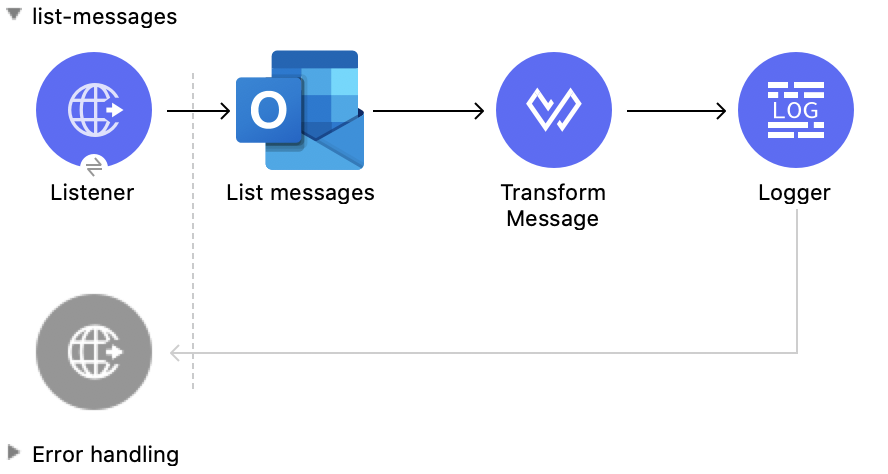
This Mule flow retrieves all of the messages from the signed-in user’s mailbox.
This example uses the following operations:
-
HTTP Listener
Accepts data from HTTP requests -
List messages
Retrieves messages from the signed-in user’s mailbox, including messages from the Deleted Items and Clutter folders
XML for This Example
Paste this code into the Studio XML editor to quickly load the flow for this example into your Mule app:
<?xml version="1.0" encoding="UTF-8"?>

<mule xmlns:tableau-specialist="http://www.mulesoft.org/schema/mule/tableau-specialist" xmlns:email="http://www.mulesoft.org/schema/mule/email"
	  xmlns:ee="http://www.mulesoft.org/schema/mule/ee/core"
	  xmlns:http="http://www.mulesoft.org/schema/mule/http" xmlns:outlook365="http://www.mulesoft.org/schema/mule/outlook365" xmlns:salesforce="http://www.mulesoft.org/schema/mule/salesforce" xmlns="http://www.mulesoft.org/schema/mule/core" xmlns:doc="http://www.mulesoft.org/schema/mule/documentation" xmlns:xsi="http://www.w3.org/2001/XMLSchema-instance" xsi:schemaLocation="http://www.mulesoft.org/schema/mule/core http://www.mulesoft.org/schema/mule/core/current/mule.xsd
http://www.mulesoft.org/schema/mule/outlook365 http://www.mulesoft.org/schema/mule/outlook365/current/mule-outlook365.xsd
http://www.mulesoft.org/schema/mule/http http://www.mulesoft.org/schema/mule/http/current/mule-http.xsd
http://www.mulesoft.org/schema/mule/ee/core http://www.mulesoft.org/schema/mule/ee/core/current/mule-ee.xsd
http://www.mulesoft.org/schema/mule/email http://www.mulesoft.org/schema/mule/email/current/mule-email.xsd
http://www.mulesoft.org/schema/mule/tableau-specialist http://www.mulesoft.org/schema/mule/tableau-specialist/current/mule-tableau-specialist.xsd">
	<http:listener-config name="HTTP_Listener_config" doc:name="HTTP Listener config" doc:id="7b5e348d-2f1c-4a09-b73a-7b1f84d89060" >
		<http:listener-connection host="0.0.0.0" port="8083" />
	</http:listener-config>

	<outlook365:outlook365-config name="outlook365_client_credentials" doc:name="Outlook365 Outlook365 Config" doc:id="ab1353ac-79b8-4718-a96c-a2c9e9d1d996" >
		<outlook365:oauth-client-credentials-connection >
			<outlook365:oauth-client-credentials clientId="${oauth-client-credentials.clientId}" clientSecret="${oauth-client-credentials.clientSecret}" tokenUrl="${oauth-client-credentials.tokenUrl}" scopes="${oauth-client-credentials.scopes}" />
		</outlook365:oauth-client-credentials-connection>
	</outlook365:outlook365-config>

	<flow name="list-messages" doc:id="bd553217-a020-415a-a313-edb2cb42e551" >
		<http:listener doc:name="Listener" doc:id="b3414782-db80-40e0-895b-e7fd33109238" config-ref="HTTP_Listener_config" path="/list-messages"/>
		<outlook365:list-messages doc:name="List messages" doc:id="ebc105a3-438d-4b72-9e07-10799b760abd" config-ref="outlook365_client_credentials" userId="88f176b2-84ca-4cfe-828c-954db0096efa">
			<outlook365:o-data-query-params orderBy="createdDateTime desc" />
		</outlook365:list-messages>
		<ee:transform doc:name="Transform Message" doc:id="6cddacd2-044e-45fa-b2a0-8e0388cc4d1c" >
			<ee:message >
				<ee:set-payload ><![CDATA[%dw 2.0
output application/json
---
payload]]></ee:set-payload>
			</ee:message>
		</ee:transform>
		<logger level="INFO" doc:name="Logger" doc:id="3a8707e4-a258-42d1-96db-3dd47f7bbf8a" message="#[payload]"/>
	</flow>
</mule>
Steps for Running This Example
-
Verify that your connector is configured.
-
Save the project.
-
From a web browser, test the application by entering
http://localhost:8083/list-messages.
Delete Event
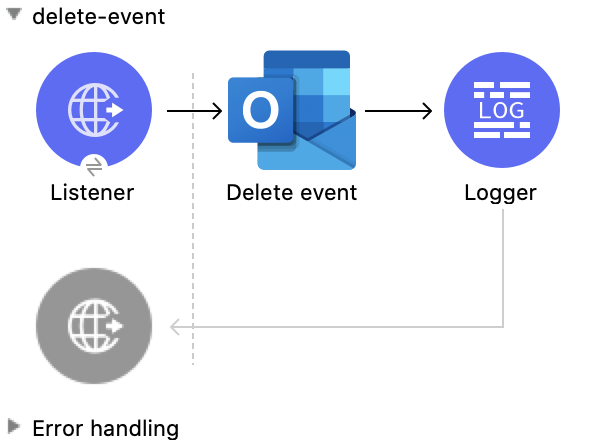
This Mule flow deletes an existing event.
This example uses the following operations:
-
HTTP Listener
Accepts data from HTTP requests -
Delete event
Removes the specified event from the calendar -
Logger
Shows the HTTP response from the Delete event operation
XML for This Example
Paste this code into the Studio XML editor to quickly load the flow for this example into your Mule app:
<?xml version="1.0" encoding="UTF-8"?>

<mule xmlns:tableau-specialist="http://www.mulesoft.org/schema/mule/tableau-specialist" xmlns:email="http://www.mulesoft.org/schema/mule/email"
	  xmlns:ee="http://www.mulesoft.org/schema/mule/ee/core"
	  xmlns:http="http://www.mulesoft.org/schema/mule/http" xmlns:outlook365="http://www.mulesoft.org/schema/mule/outlook365" xmlns:salesforce="http://www.mulesoft.org/schema/mule/salesforce" xmlns="http://www.mulesoft.org/schema/mule/core" xmlns:doc="http://www.mulesoft.org/schema/mule/documentation" xmlns:xsi="http://www.w3.org/2001/XMLSchema-instance" xsi:schemaLocation="http://www.mulesoft.org/schema/mule/core http://www.mulesoft.org/schema/mule/core/current/mule.xsd
http://www.mulesoft.org/schema/mule/outlook365 http://www.mulesoft.org/schema/mule/outlook365/current/mule-outlook365.xsd
http://www.mulesoft.org/schema/mule/http http://www.mulesoft.org/schema/mule/http/current/mule-http.xsd
http://www.mulesoft.org/schema/mule/ee/core http://www.mulesoft.org/schema/mule/ee/core/current/mule-ee.xsd
http://www.mulesoft.org/schema/mule/email http://www.mulesoft.org/schema/mule/email/current/mule-email.xsd
http://www.mulesoft.org/schema/mule/tableau-specialist http://www.mulesoft.org/schema/mule/tableau-specialist/current/mule-tableau-specialist.xsd">
	<http:listener-config name="HTTP_Listener_config" doc:name="HTTP Listener config" doc:id="7b5e348d-2f1c-4a09-b73a-7b1f84d89060" >
		<http:listener-connection host="0.0.0.0" port="8083" />
	</http:listener-config>

	<outlook365:outlook365-config name="outlook365_client_credentials" doc:name="Outlook365 Outlook365 Config" doc:id="ab1353ac-79b8-4718-a96c-a2c9e9d1d996" >
		<outlook365:oauth-client-credentials-connection >
			<outlook365:oauth-client-credentials clientId="${oauth-client-credentials.clientId}" clientSecret="${oauth-client-credentials.clientSecret}" tokenUrl="${oauth-client-credentials.tokenUrl}" scopes="${oauth-client-credentials.scopes}" />
		</outlook365:oauth-client-credentials-connection>
	</outlook365:outlook365-config>

	<flow name="delete-event" doc:id="52cb41b0-d1b7-4ea6-9794-325ce76330a2" >
		<http:listener doc:name="Listener" doc:id="105e968f-dd1e-438b-ae7a-4931b143f4ec" config-ref="HTTP_Listener_config" path="/delete-event"/>
		<outlook365:delete-event doc:name="Delete event" doc:id="dbd4e75f-9380-4e83-9218-604ee5d696ec" config-ref="outlook365_client_credentials" eventId="AAMkADg5NjIxODNkLWRkNzAtNGFkNC04YjUwLWFjOTEyMzg0YzA5NgBGAAAAAADzzlN7RptORYu7QgvFkvQJBwCthX8I2XTFT5_USx5R95fIAAAAAAENAACthX8I2XTFT5_USx5R95fIAAFXpoYNAAA=" userId="88f176b2-84ca-4cfe-828c-954db0096efa"/>
		<logger level="INFO" doc:name="Logger" doc:id="81bea8fa-22ec-42e3-ac58-156fa59e8ebb" message="#[payload]"/>
	</flow>
</mule>
Steps for Running This Example
-
Verify that your connector is configured.
-
Save the project.
-
From a web browser, test the application by entering
http://localhost:8083/delete-event.
Create Event
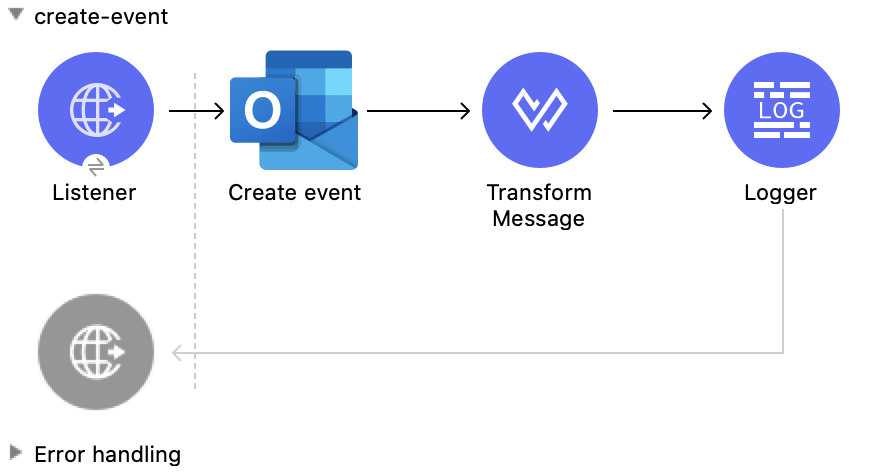
This Mule flow creates an event in a default user’s calendar or in a specified calendar.
This example uses the following operations:
-
HTTP Listener
Accepts data from HTTP requests -
Create event
Creates an event in a default user’s calendar or in a specified calendar -
Transform Message
Outputs the results of the Create event operation in JSON format -
Logger
Shows the HTTP response from the Create event operation
XML for This Example
Paste this code into the Studio XML editor to quickly load the flow for this example into your Mule app:
<?xml version="1.0" encoding="UTF-8"?>

<mule xmlns:tableau-specialist="http://www.mulesoft.org/schema/mule/tableau-specialist" xmlns:email="http://www.mulesoft.org/schema/mule/email"
	  xmlns:ee="http://www.mulesoft.org/schema/mule/ee/core"
	  xmlns:http="http://www.mulesoft.org/schema/mule/http" xmlns:outlook365="http://www.mulesoft.org/schema/mule/outlook365" xmlns:salesforce="http://www.mulesoft.org/schema/mule/salesforce" xmlns="http://www.mulesoft.org/schema/mule/core" xmlns:doc="http://www.mulesoft.org/schema/mule/documentation" xmlns:xsi="http://www.w3.org/2001/XMLSchema-instance" xsi:schemaLocation="http://www.mulesoft.org/schema/mule/core http://www.mulesoft.org/schema/mule/core/current/mule.xsd
http://www.mulesoft.org/schema/mule/outlook365 http://www.mulesoft.org/schema/mule/outlook365/current/mule-outlook365.xsd
http://www.mulesoft.org/schema/mule/http http://www.mulesoft.org/schema/mule/http/current/mule-http.xsd
http://www.mulesoft.org/schema/mule/ee/core http://www.mulesoft.org/schema/mule/ee/core/current/mule-ee.xsd
http://www.mulesoft.org/schema/mule/email http://www.mulesoft.org/schema/mule/email/current/mule-email.xsd
http://www.mulesoft.org/schema/mule/tableau-specialist http://www.mulesoft.org/schema/mule/tableau-specialist/current/mule-tableau-specialist.xsd">
	<http:listener-config name="HTTP_Listener_config" doc:name="HTTP Listener config" doc:id="7b5e348d-2f1c-4a09-b73a-7b1f84d89060" >
		<http:listener-connection host="0.0.0.0" port="8083" />
	</http:listener-config>

	<outlook365:outlook365-config name="outlook365_client_credentials" doc:name="Outlook365 Outlook365 Config" doc:id="ab1353ac-79b8-4718-a96c-a2c9e9d1d996" >
		<outlook365:oauth-client-credentials-connection >
			<outlook365:oauth-client-credentials clientId="${oauth-client-credentials.clientId}" clientSecret="${oauth-client-credentials.clientSecret}" tokenUrl="${oauth-client-credentials.tokenUrl}" scopes="${oauth-client-credentials.scopes}" />
		</outlook365:oauth-client-credentials-connection>
	</outlook365:outlook365-config>

	<flow name="create-event" doc:id="53b324a6-02e7-45ab-8ba6-29861daf34c9" >
		<http:listener doc:name="Listener" doc:id="e5ad9b28-c411-4ae7-8b12-ee95a0a4f145" config-ref="HTTP_Listener_config" path="/create-event"/>
		<outlook365:create-event doc:name="Create event" doc:id="def0e304-1e18-4f92-806f-f9654b064b1e" config-ref="outlook365_client_credentials" userId="88f176b2-84ca-4cfe-828c-954db0096efa" calendarId="AQMkADg5NjIxODNkLWRkADcwLTRhZDQtOGI1MC1hYzkxMjM4NGMwOTYARgAAA-POU3tGm05Fi7tCC8WS9AkHAK2FfwjZdMVPn5RLHlH3l8gAAAIBBgAAAK2FfwjZdMVPn5RLHlH3l8gAAAKEKAAAAA==">
			<outlook365:event ><![CDATA[#[{
  "subject": "Let's go for lunch again in July",
  "body": {
    "contentType": "HTML",
    "content": "Does noon work for you?"
  },
  "start": {
      "dateTime": "2018-04-15T12:00:00",
      "timeZone": "Pacific Standard Time"
  },
  "end": {
      "dateTime": "2018-04-15T14:00:00",
      "timeZone": "Pacific Standard Time"
  },
  "location":{
      "displayName":"Harry's Bar"
  },
  "attendees": [
    {
      "emailAddress": {
        "address":"muletest@mulesoft.com",
        "name": "Mule Test"
      },
      "type": "required"
    }
  ],
  "allowNewTimeProposals": true
}]]]></outlook365:event>
		</outlook365:create-event>
		<ee:transform doc:name="Transform Message" doc:id="24c6fb20-0288-421c-994d-30de24eaef35" >
			<ee:message >
				<ee:set-payload ><![CDATA[%dw 2.0
output application/json
---
payload]]></ee:set-payload>
			</ee:message>
		</ee:transform>
		<logger level="INFO" doc:name="Logger" doc:id="2c57de93-d25b-46a9-8874-83570527d694" message="#[payload]"/>
	</flow>
</mule>
Steps for Running This Example
-
Verify that your connector is configured.
-
Save the project.
-
From a web browser, test the application by entering
http://localhost:8083/create-event.
Update Event
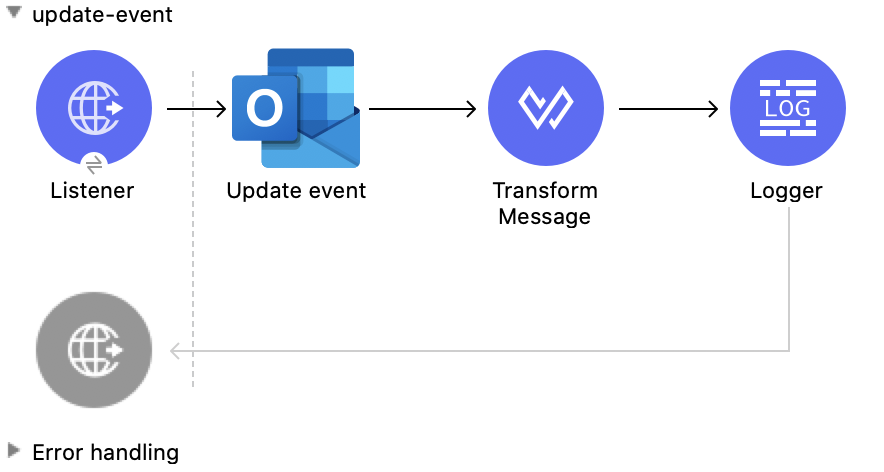
This Mule flow updates an existing event.
This example uses the following operations:
-
HTTP Listener
Accepts data from HTTP requests -
Update event
Updates the properties of the event object -
Transform Message
Outputs the results of the Update event operation in JSON format -
Logger
Shows the HTTP response from the Update event operation
XML for This Example
Paste this code into the Studio XML editor to quickly load the flow for this example into your Mule app:
<?xml version="1.0" encoding="UTF-8"?>

<mule xmlns:tableau-specialist="http://www.mulesoft.org/schema/mule/tableau-specialist" xmlns:email="http://www.mulesoft.org/schema/mule/email"
	  xmlns:ee="http://www.mulesoft.org/schema/mule/ee/core"
	  xmlns:http="http://www.mulesoft.org/schema/mule/http" xmlns:outlook365="http://www.mulesoft.org/schema/mule/outlook365" xmlns:salesforce="http://www.mulesoft.org/schema/mule/salesforce" xmlns="http://www.mulesoft.org/schema/mule/core" xmlns:doc="http://www.mulesoft.org/schema/mule/documentation" xmlns:xsi="http://www.w3.org/2001/XMLSchema-instance" xsi:schemaLocation="http://www.mulesoft.org/schema/mule/core http://www.mulesoft.org/schema/mule/core/current/mule.xsd
http://www.mulesoft.org/schema/mule/outlook365 http://www.mulesoft.org/schema/mule/outlook365/current/mule-outlook365.xsd
http://www.mulesoft.org/schema/mule/http http://www.mulesoft.org/schema/mule/http/current/mule-http.xsd
http://www.mulesoft.org/schema/mule/ee/core http://www.mulesoft.org/schema/mule/ee/core/current/mule-ee.xsd
http://www.mulesoft.org/schema/mule/email http://www.mulesoft.org/schema/mule/email/current/mule-email.xsd
http://www.mulesoft.org/schema/mule/tableau-specialist http://www.mulesoft.org/schema/mule/tableau-specialist/current/mule-tableau-specialist.xsd">
	<http:listener-config name="HTTP_Listener_config" doc:name="HTTP Listener config" doc:id="7b5e348d-2f1c-4a09-b73a-7b1f84d89060" >
		<http:listener-connection host="0.0.0.0" port="8083" />
	</http:listener-config>

	<outlook365:outlook365-config name="outlook365_client_credentials" doc:name="Outlook365 Outlook365 Config" doc:id="ab1353ac-79b8-4718-a96c-a2c9e9d1d996" >
		<outlook365:oauth-client-credentials-connection >
			<outlook365:oauth-client-credentials clientId="${oauth-client-credentials.clientId}" clientSecret="${oauth-client-credentials.clientSecret}" tokenUrl="${oauth-client-credentials.tokenUrl}" scopes="${oauth-client-credentials.scopes}" />
		</outlook365:oauth-client-credentials-connection>
	</outlook365:outlook365-config>

	<flow name="update-event" doc:id="36e43afe-dc2b-4895-b03e-eb4ba43233dd" >
		<http:listener doc:name="Listener" doc:id="3cabeba4-5be7-43dc-b768-ca09b6f88a69" config-ref="HTTP_Listener_config" path="/update-event"/>
		<outlook365:update-event doc:name="Update event" doc:id="bbaf5f53-e697-4b18-8df8-f4ce844f8656" config-ref="outlook365_client_credentials" eventId="AAMkADg5NjIxODNkLWRkNzAtNGFkNC04YjUwLWFjOTEyMzg0YzA5NgBGAAAAAADzzlN7RptORYu7QgvFkvQJBwCthX8I2XTFT5_USx5R95fIAAAAAAENAACthX8I2XTFT5_USx5R95fIAAFXpoYNAAA=" userId="88f176b2-84ca-4cfe-828c-954db0096efa">
			<outlook365:event-fields-to-be-updated ><![CDATA[#[{
	"categories": ["Red category", "Vlad category"]
}]]]></outlook365:event-fields-to-be-updated>
		</outlook365:update-event>
		<ee:transform doc:name="Transform Message" doc:id="f1220217-7036-4128-afaf-43cec2f9fa0f" >
			<ee:message >
				<ee:set-payload ><![CDATA[%dw 2.0
output application/json
---
payload]]></ee:set-payload>
			</ee:message>
		</ee:transform>
		<logger level="INFO" doc:name="Logger" doc:id="33205271-6e16-4162-83a2-c88897c4b030" message="#[payload]"/>
	</flow>
</mule>
Steps for Running This Example
-
Verify that your connector is configured.
-
Save the project.
-
From a web browser, test the application by entering
http://localhost:8083/update-event.
List Events
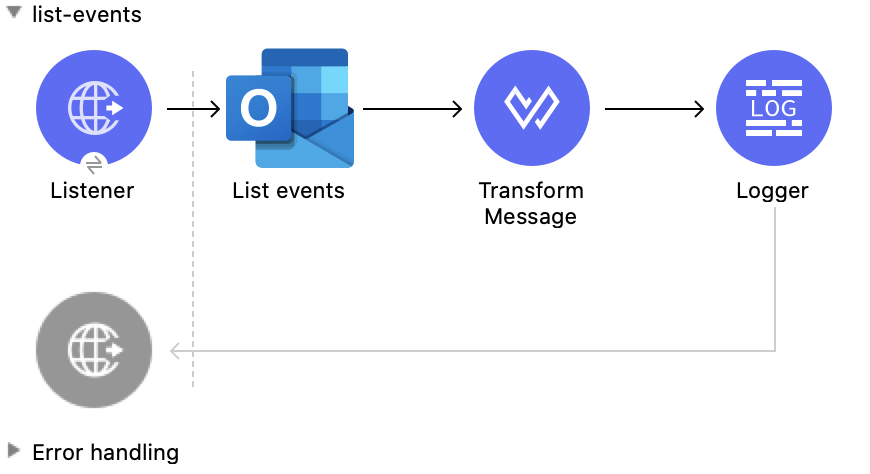
This Mule flow lists all events.
This example uses the following operations:
-
HTTP Listener
Accepts data from HTTP requests -
List events
Retrieves a list of event objects from the user’s mailbox -
Transform Message
Outputs the results of the List events operation in JSON format -
Logger
Shows the HTTP response from the List events operation
XML for This Example
Paste this code into the Studio XML editor to quickly load the flow for this example into your Mule app:
<?xml version="1.0" encoding="UTF-8"?>

<mule xmlns:tableau-specialist="http://www.mulesoft.org/schema/mule/tableau-specialist" xmlns:email="http://www.mulesoft.org/schema/mule/email"
	  xmlns:ee="http://www.mulesoft.org/schema/mule/ee/core"
	  xmlns:http="http://www.mulesoft.org/schema/mule/http" xmlns:outlook365="http://www.mulesoft.org/schema/mule/outlook365" xmlns:salesforce="http://www.mulesoft.org/schema/mule/salesforce" xmlns="http://www.mulesoft.org/schema/mule/core" xmlns:doc="http://www.mulesoft.org/schema/mule/documentation" xmlns:xsi="http://www.w3.org/2001/XMLSchema-instance" xsi:schemaLocation="http://www.mulesoft.org/schema/mule/core http://www.mulesoft.org/schema/mule/core/current/mule.xsd
http://www.mulesoft.org/schema/mule/outlook365 http://www.mulesoft.org/schema/mule/outlook365/current/mule-outlook365.xsd
http://www.mulesoft.org/schema/mule/http http://www.mulesoft.org/schema/mule/http/current/mule-http.xsd
http://www.mulesoft.org/schema/mule/ee/core http://www.mulesoft.org/schema/mule/ee/core/current/mule-ee.xsd
http://www.mulesoft.org/schema/mule/email http://www.mulesoft.org/schema/mule/email/current/mule-email.xsd
http://www.mulesoft.org/schema/mule/tableau-specialist http://www.mulesoft.org/schema/mule/tableau-specialist/current/mule-tableau-specialist.xsd">
	<http:listener-config name="HTTP_Listener_config" doc:name="HTTP Listener config" doc:id="7b5e348d-2f1c-4a09-b73a-7b1f84d89060" >
		<http:listener-connection host="0.0.0.0" port="8083" />
	</http:listener-config>

	<outlook365:outlook365-config name="outlook365_client_credentials" doc:name="Outlook365 Outlook365 Config" doc:id="ab1353ac-79b8-4718-a96c-a2c9e9d1d996" >
		<outlook365:oauth-client-credentials-connection >
			<outlook365:oauth-client-credentials clientId="${oauth-client-credentials.clientId}" clientSecret="${oauth-client-credentials.clientSecret}" tokenUrl="${oauth-client-credentials.tokenUrl}" scopes="${oauth-client-credentials.scopes}" />
		</outlook365:oauth-client-credentials-connection>
	</outlook365:outlook365-config>

	<flow name="list-events" doc:id="7eb6a6e3-9ec5-41be-8d66-87d645edc07d" >
		<http:listener doc:name="Listener" doc:id="416b9729-d390-439d-93a6-d3a024af7fc0" config-ref="HTTP_Listener_config" path="/list-events"/>
		<outlook365:list-events doc:name="List events" doc:id="a72dc766-a4f1-4038-a2d1-0c7a9e225dce" config-ref="outlook365_client_credentials" userId="sharepoint-teams@muleconnector.onmicrosoft.com" calendarId="AQMkADg5NjIxODNkLWRkADcwLTRhZDQtOGI1MC1hYzkxMjM4NGMwOTYARgAAA-POU3tGm05Fi7tCC8WS9AkHAK2FfwjZdMVPn5RLHlH3l8gAAAIBBgAAAK2FfwjZdMVPn5RLHlH3l8gAAAKEKAAAAA==">
		</outlook365:list-events>
		<ee:transform doc:name="Transform Message" doc:id="df5c6914-b3c0-4539-a84a-9abaa6c9e6d3" >
			<ee:message >
				<ee:set-payload ><![CDATA[%dw 2.0
output application/json
---
payload]]></ee:set-payload>
			</ee:message>
		</ee:transform>
		<logger level="INFO" doc:name="Logger" doc:id="21d29450-0e7f-4f7f-b063-37b7af31f1aa" message="#[payload]"/>
	</flow>
</mule>
Steps for Running This Example
-
Verify that your connector is configured.
-
Save the project.
-
From a web browser, test the application by entering
http://localhost:8083/list-events.
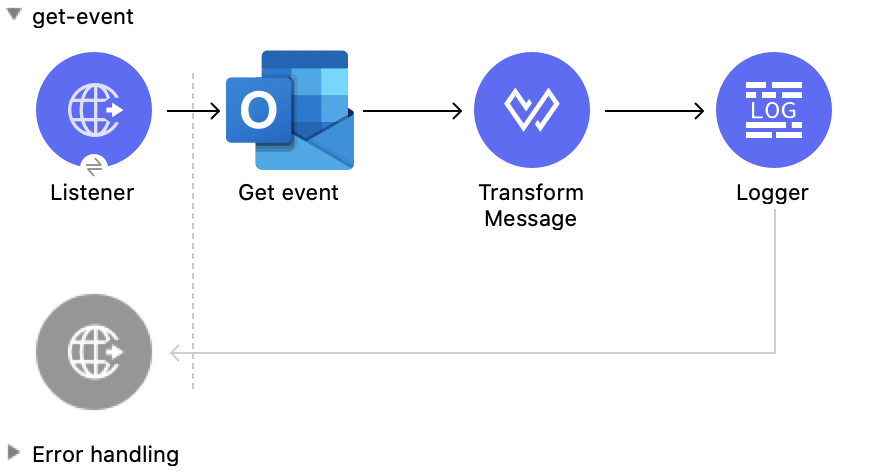
Get Event
This Mule flow retrieves an existing event.
This example uses the following operations:
-
HTTP Listener
Accepts data from HTTP requests -
Get event
Gets the properties and relationships of the specified event object -
Transform Message
Outputs the results of the Get event operation in JSON format -
Logger
Shows the HTTP response from the Get event operation
XML for This Example
Paste this code into the Studio XML editor to quickly load the flow for this example into your Mule app:
<?xml version="1.0" encoding="UTF-8"?>

<mule xmlns:tableau-specialist="http://www.mulesoft.org/schema/mule/tableau-specialist" xmlns:email="http://www.mulesoft.org/schema/mule/email"
	  xmlns:ee="http://www.mulesoft.org/schema/mule/ee/core"
	  xmlns:http="http://www.mulesoft.org/schema/mule/http" xmlns:outlook365="http://www.mulesoft.org/schema/mule/outlook365" xmlns:salesforce="http://www.mulesoft.org/schema/mule/salesforce" xmlns="http://www.mulesoft.org/schema/mule/core" xmlns:doc="http://www.mulesoft.org/schema/mule/documentation" xmlns:xsi="http://www.w3.org/2001/XMLSchema-instance" xsi:schemaLocation="http://www.mulesoft.org/schema/mule/core http://www.mulesoft.org/schema/mule/core/current/mule.xsd
http://www.mulesoft.org/schema/mule/outlook365 http://www.mulesoft.org/schema/mule/outlook365/current/mule-outlook365.xsd
http://www.mulesoft.org/schema/mule/http http://www.mulesoft.org/schema/mule/http/current/mule-http.xsd
http://www.mulesoft.org/schema/mule/ee/core http://www.mulesoft.org/schema/mule/ee/core/current/mule-ee.xsd
http://www.mulesoft.org/schema/mule/email http://www.mulesoft.org/schema/mule/email/current/mule-email.xsd
http://www.mulesoft.org/schema/mule/tableau-specialist http://www.mulesoft.org/schema/mule/tableau-specialist/current/mule-tableau-specialist.xsd">
	<http:listener-config name="HTTP_Listener_config" doc:name="HTTP Listener config" doc:id="7b5e348d-2f1c-4a09-b73a-7b1f84d89060" >
		<http:listener-connection host="0.0.0.0" port="8083" />
	</http:listener-config>

	<outlook365:outlook365-config name="outlook365_client_credentials" doc:name="Outlook365 Outlook365 Config" doc:id="ab1353ac-79b8-4718-a96c-a2c9e9d1d996" >
		<outlook365:oauth-client-credentials-connection >
			<outlook365:oauth-client-credentials clientId="${oauth-client-credentials.clientId}" clientSecret="${oauth-client-credentials.clientSecret}" tokenUrl="${oauth-client-credentials.tokenUrl}" scopes="${oauth-client-credentials.scopes}" />
		</outlook365:oauth-client-credentials-connection>
	</outlook365:outlook365-config>

	<flow name="get-event" doc:id="0aa74710-8f47-426f-bd5d-2feefb06040d" >
		<http:listener doc:name="Listener" doc:id="84e0a134-a20d-470f-ab41-d941f092d90c" config-ref="HTTP_Listener_config" path="/get-event"/>
		<outlook365:get-event doc:name="Get event" doc:id="2f6f1dc9-3a8a-4ed4-8348-3d25f807967e" config-ref="outlook365_client_credentials" eventId="AAMkADg5NjIxODNkLWRkNzAtNGFkNC04YjUwLWFjOTEyMzg0YzA5NgBGAAAAAADzzlN7RptORYu7QgvFkvQJBwCthX8I2XTFT5_USx5R95fIAAAAAAENAACthX8I2XTFT5_USx5R95fIAAFXpoYMAAA=" userId="88f176b2-84ca-4cfe-828c-954db0096efa" calendarId="AAMkADg5NjIxODNkLWRkNzAtNGFkNC04YjUwLWFjOTEyMzg0YzA5NgBGAAAAAADzzlN7RptORYu7QgvFkvQJBwCthX8I2XTFT5_USx5R95fIAAAAAAEGAACthX8I2XTFT5_USx5R95fIAADmNDgwAAA=" outlookTimeZone="Fiji Standard Time"/>
		<ee:transform doc:name="Transform Message" doc:id="2e206f7f-492f-4a42-ad58-1819cdbfb602" >
			<ee:message >
				<ee:set-payload ><![CDATA[%dw 2.0
output application/json
---
payload]]></ee:set-payload>
			</ee:message>
		</ee:transform>
		<logger level="INFO" doc:name="Logger" doc:id="d21f3b2c-5837-4329-b8eb-a84433cea076" message="#[payload]"/>
	</flow>
</mule>
Steps for Running This Example
-
Verify that your connector is configured.
-
Save the project.
-
From a web browser, test the application by entering
http://localhost:8083/get-event.
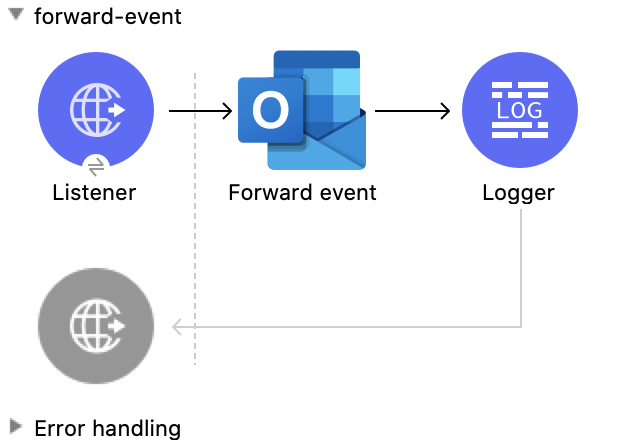
Forward Event
This Mule flow forwards an existing event.
This example uses the following operations:
-
HTTP Listener
Accepts data from HTTP requests -
Forward event
Forwards the meeting request to a new recipient -
Logger
Shows the HTTP response from the Forward event operation
XML for This Example
Paste this code into the Studio XML editor to quickly load the flow for this example into your Mule app:
<?xml version="1.0" encoding="UTF-8"?>

<mule xmlns:tableau-specialist="http://www.mulesoft.org/schema/mule/tableau-specialist" xmlns:email="http://www.mulesoft.org/schema/mule/email"
	  xmlns:ee="http://www.mulesoft.org/schema/mule/ee/core"
	  xmlns:http="http://www.mulesoft.org/schema/mule/http" xmlns:outlook365="http://www.mulesoft.org/schema/mule/outlook365" xmlns:salesforce="http://www.mulesoft.org/schema/mule/salesforce" xmlns="http://www.mulesoft.org/schema/mule/core" xmlns:doc="http://www.mulesoft.org/schema/mule/documentation" xmlns:xsi="http://www.w3.org/2001/XMLSchema-instance" xsi:schemaLocation="http://www.mulesoft.org/schema/mule/core http://www.mulesoft.org/schema/mule/core/current/mule.xsd
http://www.mulesoft.org/schema/mule/outlook365 http://www.mulesoft.org/schema/mule/outlook365/current/mule-outlook365.xsd
http://www.mulesoft.org/schema/mule/http http://www.mulesoft.org/schema/mule/http/current/mule-http.xsd
http://www.mulesoft.org/schema/mule/ee/core http://www.mulesoft.org/schema/mule/ee/core/current/mule-ee.xsd
http://www.mulesoft.org/schema/mule/email http://www.mulesoft.org/schema/mule/email/current/mule-email.xsd
http://www.mulesoft.org/schema/mule/tableau-specialist http://www.mulesoft.org/schema/mule/tableau-specialist/current/mule-tableau-specialist.xsd">
	<http:listener-config name="HTTP_Listener_config" doc:name="HTTP Listener config" doc:id="7b5e348d-2f1c-4a09-b73a-7b1f84d89060" >
		<http:listener-connection host="0.0.0.0" port="8083" />
	</http:listener-config>

	<outlook365:outlook365-config name="outlook365_client_credentials" doc:name="Outlook365 Outlook365 Config" doc:id="ab1353ac-79b8-4718-a96c-a2c9e9d1d996" >
		<outlook365:oauth-client-credentials-connection >
			<outlook365:oauth-client-credentials clientId="${oauth-client-credentials.clientId}" clientSecret="${oauth-client-credentials.clientSecret}" tokenUrl="${oauth-client-credentials.tokenUrl}" scopes="${oauth-client-credentials.scopes}" />
		</outlook365:oauth-client-credentials-connection>
	</outlook365:outlook365-config>

	<flow name="forward-event" doc:id="e283a9a8-75f8-4c82-a598-4858a99ee9c2" >
		<http:listener doc:name="Listener" doc:id="248bbf13-316d-43d0-bb05-04be5bc0c25a" config-ref="HTTP_Listener_config" path="/forward-event"/>
		<outlook365:forward-event doc:name="Forward event" doc:id="bc49959a-69f2-4603-a5d1-b8f3420feae6" config-ref="outlook365_client_credentials" eventId="AAMkADg5NjIxODNkLWRkNzAtNGFkNC04YjUwLWFjOTEyMzg0YzA5NgBGAAAAAADzzlN7RptORYu7QgvFkvQJBwCthX8I2XTFT5_USx5R95fIAAAAAAENAACthX8I2XTFT5_USx5R95fIAAFXpoYMAAA=" userId="88f176b2-84ca-4cfe-828c-954db0096efa">
			<outlook365:forward-event-properties ><![CDATA[#[{
  "ToRecipients":[
      {
        "emailAddress": {
          "address":"muletest@mulesoft.com",
          "name":"Mule Test"
        }
      }
     ],
  "Comment": "Dana, hope you can make this meeting."
}]]]></outlook365:forward-event-properties>
		</outlook365:forward-event>
		<logger level="INFO" doc:name="Logger" doc:id="26c1b6ea-6431-4046-9f66-a4787e80942a" />
	</flow>
</mule>
Steps for Running This Example
-
Verify that your connector is configured.
-
Save the project.
-
From a web browser, test the application by entering
http://localhost:8083/forward-event.
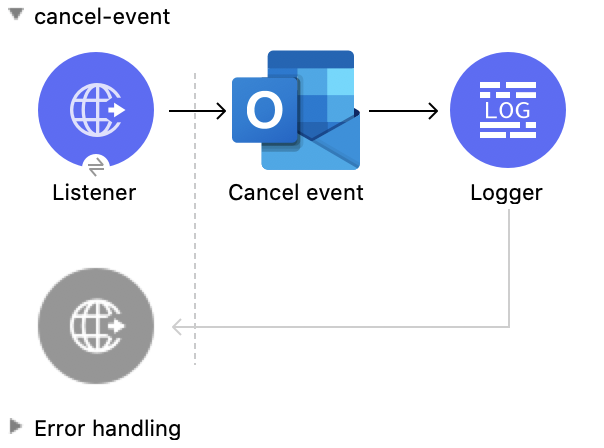
Cancel Event
This Mule flow cancels an existing event.
This example uses the following operations:
-
HTTP Listener
Accepts data from HTTP requests -
Cancel event
Cancels the specified event from a user’s calendar -
Logger
Shows the HTTP response from the Cancel event operation
XML for This Example
Paste this code into the Studio XML editor to quickly load the flow for this example into your Mule app:
<?xml version="1.0" encoding="UTF-8"?>

<mule xmlns:tableau-specialist="http://www.mulesoft.org/schema/mule/tableau-specialist" xmlns:email="http://www.mulesoft.org/schema/mule/email"
	  xmlns:ee="http://www.mulesoft.org/schema/mule/ee/core"
	  xmlns:http="http://www.mulesoft.org/schema/mule/http" xmlns:outlook365="http://www.mulesoft.org/schema/mule/outlook365" xmlns:salesforce="http://www.mulesoft.org/schema/mule/salesforce" xmlns="http://www.mulesoft.org/schema/mule/core" xmlns:doc="http://www.mulesoft.org/schema/mule/documentation" xmlns:xsi="http://www.w3.org/2001/XMLSchema-instance" xsi:schemaLocation="http://www.mulesoft.org/schema/mule/core http://www.mulesoft.org/schema/mule/core/current/mule.xsd
http://www.mulesoft.org/schema/mule/outlook365 http://www.mulesoft.org/schema/mule/outlook365/current/mule-outlook365.xsd
http://www.mulesoft.org/schema/mule/http http://www.mulesoft.org/schema/mule/http/current/mule-http.xsd
http://www.mulesoft.org/schema/mule/ee/core http://www.mulesoft.org/schema/mule/ee/core/current/mule-ee.xsd
http://www.mulesoft.org/schema/mule/email http://www.mulesoft.org/schema/mule/email/current/mule-email.xsd
http://www.mulesoft.org/schema/mule/tableau-specialist http://www.mulesoft.org/schema/mule/tableau-specialist/current/mule-tableau-specialist.xsd">
	<http:listener-config name="HTTP_Listener_config" doc:name="HTTP Listener config" doc:id="7b5e348d-2f1c-4a09-b73a-7b1f84d89060" >
		<http:listener-connection host="0.0.0.0" port="8083" />
	</http:listener-config>

	<outlook365:outlook365-config name="outlook365_client_credentials" doc:name="Outlook365 Outlook365 Config" doc:id="ab1353ac-79b8-4718-a96c-a2c9e9d1d996" >
		<outlook365:oauth-client-credentials-connection >
			<outlook365:oauth-client-credentials clientId="${oauth-client-credentials.clientId}" clientSecret="${oauth-client-credentials.clientSecret}" tokenUrl="${oauth-client-credentials.tokenUrl}" scopes="${oauth-client-credentials.scopes}" />
		</outlook365:oauth-client-credentials-connection>
	</outlook365:outlook365-config>

	<flow name="cancel-event" doc:id="96f49b9f-fd57-4f54-a946-fbf3545f8091" >
		<http:listener doc:name="Listener" doc:id="08256991-d387-4d45-ac28-b9efc56ff9ae" config-ref="HTTP_Listener_config" path="/cancel-event"/>
		<outlook365:cancel-event doc:name="Cancel event" doc:id="3f19035c-040b-4cf9-854b-23d54748900d" config-ref="outlook365_client_credentials" eventId="AAMkADg5NjIxODNkLWRkNzAtNGFkNC04YjUwLWFjOTEyMzg0YzA5NgBGAAAAAADzzlN7RptORYu7QgvFkvQJBwCthX8I2XTFT5_USx5R95fIAAAAAAENAACthX8I2XTFT5_USx5R95fIAAFXpoYMAAA=" userId="88f176b2-84ca-4cfe-828c-954db0096efa"/>
		<logger level="INFO" doc:name="Logger" doc:id="c90dab5c-b0e4-438c-8ea0-e3802759921e" message="#[payload]"/>
	</flow>
</mule>
Steps for Running This Example
-
Verify that your connector is configured.
-
Save the project.
-
From a web browser, test the application by entering
http://localhost:8083/cancel-event.
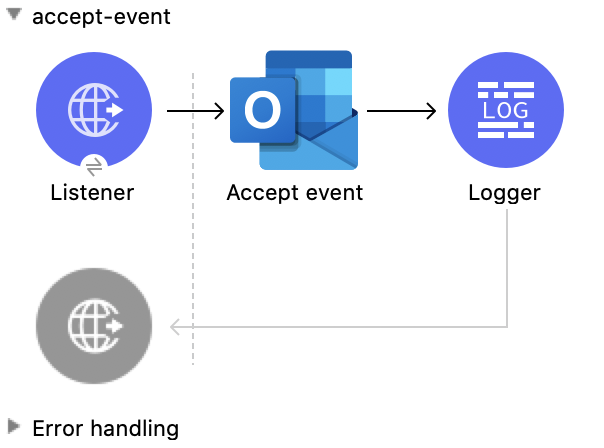
Accept Event
This Mule flow accepts an existing event.
This example uses the following operations:
-
HTTP Listener
Accepts data from HTTP requests -
Accept event
Accepts the specified event from a user’s calendar -
Logger
Shows the HTTP response from the Accept event operation
XML for This Example
Paste this code into the Studio XML editor to quickly load the flow for this example into your Mule app:
<?xml version="1.0" encoding="UTF-8"?>

<mule xmlns:tableau-specialist="http://www.mulesoft.org/schema/mule/tableau-specialist" xmlns:email="http://www.mulesoft.org/schema/mule/email"
	  xmlns:ee="http://www.mulesoft.org/schema/mule/ee/core"
	  xmlns:http="http://www.mulesoft.org/schema/mule/http" xmlns:outlook365="http://www.mulesoft.org/schema/mule/outlook365" xmlns:salesforce="http://www.mulesoft.org/schema/mule/salesforce" xmlns="http://www.mulesoft.org/schema/mule/core" xmlns:doc="http://www.mulesoft.org/schema/mule/documentation" xmlns:xsi="http://www.w3.org/2001/XMLSchema-instance" xsi:schemaLocation="http://www.mulesoft.org/schema/mule/core http://www.mulesoft.org/schema/mule/core/current/mule.xsd
http://www.mulesoft.org/schema/mule/outlook365 http://www.mulesoft.org/schema/mule/outlook365/current/mule-outlook365.xsd
http://www.mulesoft.org/schema/mule/http http://www.mulesoft.org/schema/mule/http/current/mule-http.xsd
http://www.mulesoft.org/schema/mule/ee/core http://www.mulesoft.org/schema/mule/ee/core/current/mule-ee.xsd
http://www.mulesoft.org/schema/mule/email http://www.mulesoft.org/schema/mule/email/current/mule-email.xsd
http://www.mulesoft.org/schema/mule/tableau-specialist http://www.mulesoft.org/schema/mule/tableau-specialist/current/mule-tableau-specialist.xsd">
	<http:listener-config name="HTTP_Listener_config" doc:name="HTTP Listener config" doc:id="7b5e348d-2f1c-4a09-b73a-7b1f84d89060" >
		<http:listener-connection host="0.0.0.0" port="8083" />
	</http:listener-config>

	<outlook365:outlook365-config name="outlook365_client_credentials" doc:name="Outlook365 Outlook365 Config" doc:id="ab1353ac-79b8-4718-a96c-a2c9e9d1d996" >
		<outlook365:oauth-client-credentials-connection >
			<outlook365:oauth-client-credentials clientId="${oauth-client-credentials.clientId}" clientSecret="${oauth-client-credentials.clientSecret}" tokenUrl="${oauth-client-credentials.tokenUrl}" scopes="${oauth-client-credentials.scopes}" />
		</outlook365:oauth-client-credentials-connection>
	</outlook365:outlook365-config>

	<flow name="accept-event" doc:id="1078eca8-fa88-4072-98b4-107427b1ac83" >
		<http:listener doc:name="Listener" doc:id="49aa293c-9ec0-43d2-b45e-78e8e4fc5091" config-ref="HTTP_Listener_config" path="/accept-event"/>
		<outlook365:accept-event doc:name="Accept event" doc:id="2a0aba0e-b970-420c-8df2-cf64d13a1079" config-ref="outlook365_client_credentials" eventId="AAMkADg5NjIxODNkLWRkNzAtNGFkNC04YjUwLWFjOTEyMzg0YzA5NgBGAAAAAADzzlN7RptORYu7QgvFkvQJBwCthX8I2XTFT5_USx5R95fIAAAAAAENAACthX8I2XTFT5_USx5R95fIAAFXpoYKAAA=" userId="88f176b2-84ca-4cfe-828c-954db0096efa" calendarId="AAMkADg5NjIxODNkLWRkNzAtNGFkNC04YjUwLWFjOTEyMzg0YzA5NgBGAAAAAADzzlN7RptORYu7QgvFkvQJBwCthX8I2XTFT5_USx5R95fIAAAAAAEGAACthX8I2XTFT5_USx5R95fIAADmNDgwAAA=">
		</outlook365:accept-event>
		<logger level="INFO" doc:name="Logger" doc:id="af2bf8e8-b43d-45c4-9459-a29d0230308d" message="#[payload]"/>
	</flow>
</mule>
Steps for Running This Example
-
Verify that your connector is configured.
-
Save the project.
-
From a web browser, test the application by entering
http://localhost:8083/accept-event.
Decline Event
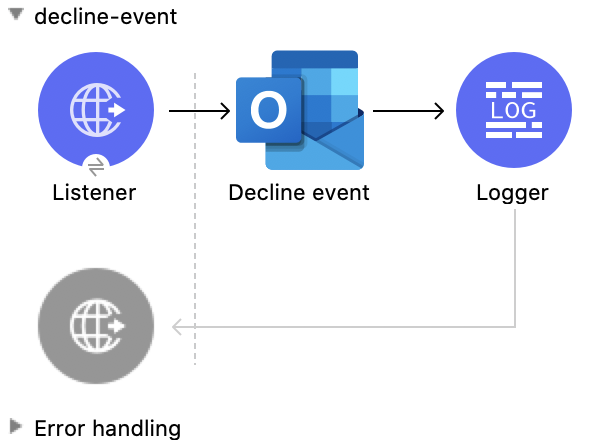
This Mule flow declines an existing event.
This example uses the following operations:
-
HTTP Listener
Accepts data from HTTP requests -
Decline event
Declines the specified event from a user’s calendar -
Logger
Shows the HTTP response from the Decline event operation
XML for This Example
Paste this code into the Studio XML editor to quickly load the flow for this example into your Mule app:
<?xml version="1.0" encoding="UTF-8"?>

<mule xmlns:tableau-specialist="http://www.mulesoft.org/schema/mule/tableau-specialist" xmlns:email="http://www.mulesoft.org/schema/mule/email"
	  xmlns:ee="http://www.mulesoft.org/schema/mule/ee/core"
	  xmlns:http="http://www.mulesoft.org/schema/mule/http" xmlns:outlook365="http://www.mulesoft.org/schema/mule/outlook365" xmlns:salesforce="http://www.mulesoft.org/schema/mule/salesforce" xmlns="http://www.mulesoft.org/schema/mule/core" xmlns:doc="http://www.mulesoft.org/schema/mule/documentation" xmlns:xsi="http://www.w3.org/2001/XMLSchema-instance" xsi:schemaLocation="http://www.mulesoft.org/schema/mule/core http://www.mulesoft.org/schema/mule/core/current/mule.xsd
http://www.mulesoft.org/schema/mule/outlook365 http://www.mulesoft.org/schema/mule/outlook365/current/mule-outlook365.xsd
http://www.mulesoft.org/schema/mule/http http://www.mulesoft.org/schema/mule/http/current/mule-http.xsd
http://www.mulesoft.org/schema/mule/ee/core http://www.mulesoft.org/schema/mule/ee/core/current/mule-ee.xsd
http://www.mulesoft.org/schema/mule/email http://www.mulesoft.org/schema/mule/email/current/mule-email.xsd
http://www.mulesoft.org/schema/mule/tableau-specialist http://www.mulesoft.org/schema/mule/tableau-specialist/current/mule-tableau-specialist.xsd">
	<http:listener-config name="HTTP_Listener_config" doc:name="HTTP Listener config" doc:id="7b5e348d-2f1c-4a09-b73a-7b1f84d89060" >
		<http:listener-connection host="0.0.0.0" port="8083" />
	</http:listener-config>

	<outlook365:outlook365-config name="outlook365_client_credentials" doc:name="Outlook365 Outlook365 Config" doc:id="ab1353ac-79b8-4718-a96c-a2c9e9d1d996" >
		<outlook365:oauth-client-credentials-connection >
			<outlook365:oauth-client-credentials clientId="${oauth-client-credentials.clientId}" clientSecret="${oauth-client-credentials.clientSecret}" tokenUrl="${oauth-client-credentials.tokenUrl}" scopes="${oauth-client-credentials.scopes}" />
		</outlook365:oauth-client-credentials-connection>
	</outlook365:outlook365-config>

	<flow name="decline-event" doc:id="5f8072e7-f703-4309-a22c-fdcbd307c51d" >
		<http:listener doc:name="Listener" doc:id="73b3f688-8159-42b5-857b-e8f19186ecfd" config-ref="HTTP_Listener_config" path="/decline-event"/>
		<outlook365:decline-event doc:name="Decline event" doc:id="752343c1-b0c2-41b2-b1c2-dbbbe563b419" config-ref="outlook365_client_credentials" eventId="AAMkADg5NjIxODNkLWRkNzAtNGFkNC04YjUwLWFjOTEyMzg0YzA5NgBGAAAAAADzzlN7RptORYu7QgvFkvQJBwCthX8I2XTFT5_USx5R95fIAAAAAAENAACthX8I2XTFT5_USx5R95fIAAElkjSCAAA=" userId="88f176b2-84ca-4cfe-828c-954db0096efa"/>
		<logger level="INFO" doc:name="Logger" doc:id="2f3e9117-760a-4003-a03f-b34026b233c7" message="#[payload]"/>
	</flow>
</mule>
Steps for Running This Example
-
Verify that your connector is configured.
-
Save the project.
-
From a web browser, test the application by entering
http://localhost:8083/decline-event.
List Event Attachments
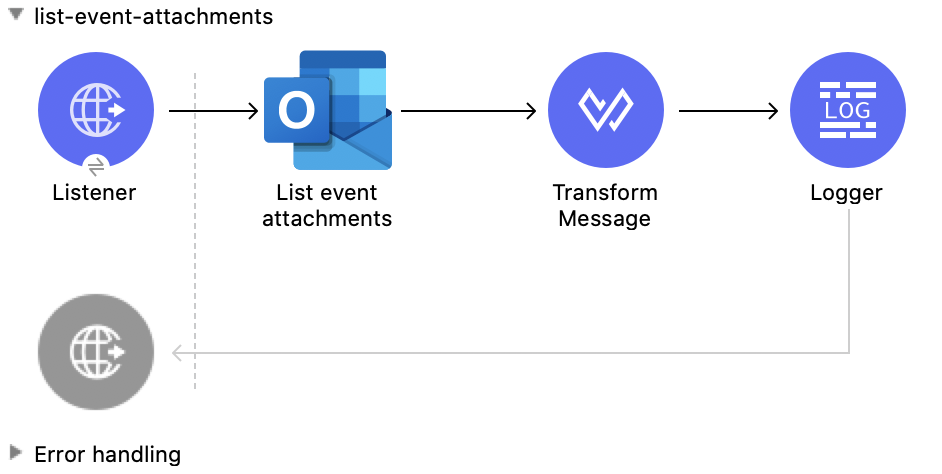
This Mule flow lists the attachments of an existing event.
This example uses the following operations:
-
HTTP Listener
Accepts data from HTTP requests -
List event attachments
Retrieves a list of attachment objects attached to an event -
Transform Message
Outputs the results of the List event attachments operation in JSON format -
Logger
Shows the HTTP response from the List event attachments operation
XML for This Example
Paste this code into the Studio XML editor to quickly load the flow for this example into your Mule app:
<?xml version="1.0" encoding="UTF-8"?>

<mule xmlns:tableau-specialist="http://www.mulesoft.org/schema/mule/tableau-specialist" xmlns:email="http://www.mulesoft.org/schema/mule/email"
	  xmlns:ee="http://www.mulesoft.org/schema/mule/ee/core"
	  xmlns:http="http://www.mulesoft.org/schema/mule/http" xmlns:outlook365="http://www.mulesoft.org/schema/mule/outlook365" xmlns:salesforce="http://www.mulesoft.org/schema/mule/salesforce" xmlns="http://www.mulesoft.org/schema/mule/core" xmlns:doc="http://www.mulesoft.org/schema/mule/documentation" xmlns:xsi="http://www.w3.org/2001/XMLSchema-instance" xsi:schemaLocation="http://www.mulesoft.org/schema/mule/core http://www.mulesoft.org/schema/mule/core/current/mule.xsd
http://www.mulesoft.org/schema/mule/outlook365 http://www.mulesoft.org/schema/mule/outlook365/current/mule-outlook365.xsd
http://www.mulesoft.org/schema/mule/http http://www.mulesoft.org/schema/mule/http/current/mule-http.xsd
http://www.mulesoft.org/schema/mule/ee/core http://www.mulesoft.org/schema/mule/ee/core/current/mule-ee.xsd
http://www.mulesoft.org/schema/mule/email http://www.mulesoft.org/schema/mule/email/current/mule-email.xsd
http://www.mulesoft.org/schema/mule/tableau-specialist http://www.mulesoft.org/schema/mule/tableau-specialist/current/mule-tableau-specialist.xsd">
	<http:listener-config name="HTTP_Listener_config" doc:name="HTTP Listener config" doc:id="7b5e348d-2f1c-4a09-b73a-7b1f84d89060" >
		<http:listener-connection host="0.0.0.0" port="8083" />
	</http:listener-config>

	<outlook365:outlook365-config name="outlook365_client_credentials" doc:name="Outlook365 Outlook365 Config" doc:id="ab1353ac-79b8-4718-a96c-a2c9e9d1d996" >
		<outlook365:oauth-client-credentials-connection >
			<outlook365:oauth-client-credentials clientId="${oauth-client-credentials.clientId}" clientSecret="${oauth-client-credentials.clientSecret}" tokenUrl="${oauth-client-credentials.tokenUrl}" scopes="${oauth-client-credentials.scopes}" />
		</outlook365:oauth-client-credentials-connection>
	</outlook365:outlook365-config>

	<flow name="list-event-attachments" doc:id="d6e2c77e-1e14-48d9-a555-4ad0e8384850" >
		<http:listener doc:name="Listener" doc:id="3f1db425-2751-474c-ab5f-8ea77aa4c2f6" config-ref="HTTP_Listener_config" path="/list-event-attachments"/>
		<outlook365:list-event-attachments doc:name="List event attachments" doc:id="bb3b3e63-0443-4de9-ad46-39ec836146d2" config-ref="outlook365_client_credentials" eventId="AAMkADg5NjIxODNkLWRkNzAtNGFkNC04YjUwLWFjOTEyMzg0YzA5NgBGAAAAAADzzlN7RptORYu7QgvFkvQJBwCthX8I2XTFT5_USx5R95fIAAAAAAENAACthX8I2XTFT5_USx5R95fIAAE8i1INAAA=" userId="88f176b2-84ca-4cfe-828c-954db0096efa"/>
		<ee:transform doc:name="Transform Message" doc:id="b4c1aee0-f17b-4a15-817e-5070d5f15491" >
			<ee:message >
				<ee:set-payload ><![CDATA[%dw 2.0
output application/json
---
payload]]></ee:set-payload>
			</ee:message>
		</ee:transform>
		<logger level="INFO" doc:name="Logger" doc:id="ae6157a3-7c41-44a8-bf9d-4b666a5b10b6" message="#[payload]"/>
	</flow>
</mule>
Steps for Running This Example
-
Verify that your connector is configured.
-
Save the project.
-
From a web browser, test the application by entering
http://localhost:8083/list-event-attachments.
Add Event Attachment
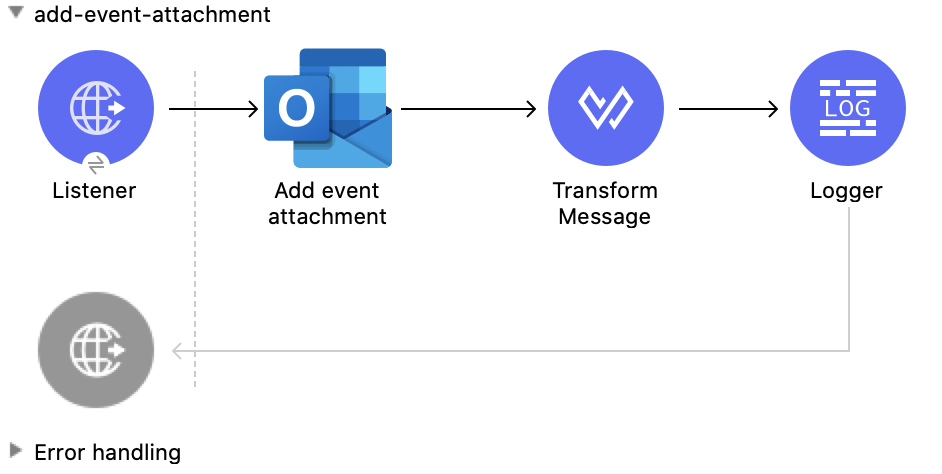
This Mule flow adds an attachment to an existing event.
This example uses the following operations:
-
HTTP Listener
Accepts data from HTTP requests -
Add event attachment
Adds an attachment to an event -
Transform Message
Outputs the results of the Add event attachment operation in JSON format -
Logger
Shows the HTTP response from the Add event attachment operation
XML for This Example
Paste this code into the Studio XML editor to quickly load the flow for this example into your Mule app:
<?xml version="1.0" encoding="UTF-8"?>

<mule xmlns:tableau-specialist="http://www.mulesoft.org/schema/mule/tableau-specialist" xmlns:email="http://www.mulesoft.org/schema/mule/email"
	  xmlns:ee="http://www.mulesoft.org/schema/mule/ee/core"
	  xmlns:http="http://www.mulesoft.org/schema/mule/http" xmlns:outlook365="http://www.mulesoft.org/schema/mule/outlook365" xmlns:salesforce="http://www.mulesoft.org/schema/mule/salesforce" xmlns="http://www.mulesoft.org/schema/mule/core" xmlns:doc="http://www.mulesoft.org/schema/mule/documentation" xmlns:xsi="http://www.w3.org/2001/XMLSchema-instance" xsi:schemaLocation="http://www.mulesoft.org/schema/mule/core http://www.mulesoft.org/schema/mule/core/current/mule.xsd
http://www.mulesoft.org/schema/mule/outlook365 http://www.mulesoft.org/schema/mule/outlook365/current/mule-outlook365.xsd
http://www.mulesoft.org/schema/mule/http http://www.mulesoft.org/schema/mule/http/current/mule-http.xsd
http://www.mulesoft.org/schema/mule/ee/core http://www.mulesoft.org/schema/mule/ee/core/current/mule-ee.xsd
http://www.mulesoft.org/schema/mule/email http://www.mulesoft.org/schema/mule/email/current/mule-email.xsd
http://www.mulesoft.org/schema/mule/tableau-specialist http://www.mulesoft.org/schema/mule/tableau-specialist/current/mule-tableau-specialist.xsd">
	<http:listener-config name="HTTP_Listener_config" doc:name="HTTP Listener config" doc:id="7b5e348d-2f1c-4a09-b73a-7b1f84d89060" >
		<http:listener-connection host="0.0.0.0" port="8083" />
	</http:listener-config>

	<outlook365:outlook365-config name="outlook365_client_credentials" doc:name="Outlook365 Outlook365 Config" doc:id="ab1353ac-79b8-4718-a96c-a2c9e9d1d996" >
		<outlook365:oauth-client-credentials-connection >
			<outlook365:oauth-client-credentials clientId="${oauth-client-credentials.clientId}" clientSecret="${oauth-client-credentials.clientSecret}" tokenUrl="${oauth-client-credentials.tokenUrl}" scopes="${oauth-client-credentials.scopes}" />
		</outlook365:oauth-client-credentials-connection>
	</outlook365:outlook365-config>

	<flow name="add-event-attachment" doc:id="da5d88b0-08ac-4ea9-a267-03f4ef1978dd" >
		<http:listener doc:name="Listener" doc:id="2c78cdb1-1f8c-410b-9f25-f1810c9cf8ac" config-ref="HTTP_Listener_config" path="/add-event-attachment"/>
		<outlook365:add-event-attachment doc:name="Add event attachment" doc:id="df2f4976-bd7a-46df-9594-4c7b3c6ffbd5" userId="88f176b2-84ca-4cfe-828c-954db0096efa" config-ref="outlook365_client_credentials" eventId="AAMkADg5NjIxODNkLWRkNzAtNGFkNC04YjUwLWFjOTEyMzg0YzA5NgBGAAAAAADzzlN7RptORYu7QgvFkvQJBwCthX8I2XTFT5_USx5R95fIAAAAAAENAACthX8I2XTFT5_USx5R95fIAAE8i1INAAA=" calendarId="AAMkADg5NjIxODNkLWRkNzAtNGFkNC04YjUwLWFjOTEyMzg0YzA5NgBGAAAAAADzzlN7RptORYu7QgvFkvQJBwCthX8I2XTFT5_USx5R95fIAAAAAAEGAACthX8I2XTFT5_USx5R95fIAADk2CUpAAA=">
			<outlook365:attachment-for-event ><![CDATA[#[%dw 2.0
output application/json
---
{
  "@odata.type": "#microsoft.graph.fileAttachment",
  "name": "smile",
  "contentBytes": "VGhlIHF1aWNrIGJyb3duIGZveCBqdW1wcyBvdmVyIDEzIGxhenkgZG9ncy4="
}]]]></outlook365:attachment-for-event>
		</outlook365:add-event-attachment>
		<ee:transform doc:name="Transform Message" doc:id="f81537d5-01dd-4373-be50-d5de61d5c81f" >
			<ee:message >
				<ee:set-payload ><![CDATA[%dw 2.0
output application/json
---
payload]]></ee:set-payload>
			</ee:message>
		</ee:transform>
		<logger level="INFO" doc:name="Logger" doc:id="ccaa4716-6441-4291-985a-8cef8cf7e186" message="#[payload]"/>
	</flow>
</mule>
Steps for Running This Example
-
Verify that your connector is configured.
-
Save the project.
-
From a web browser, test the application by entering
http://localhost:8083/add-event-attachment.
Add Message Attachment
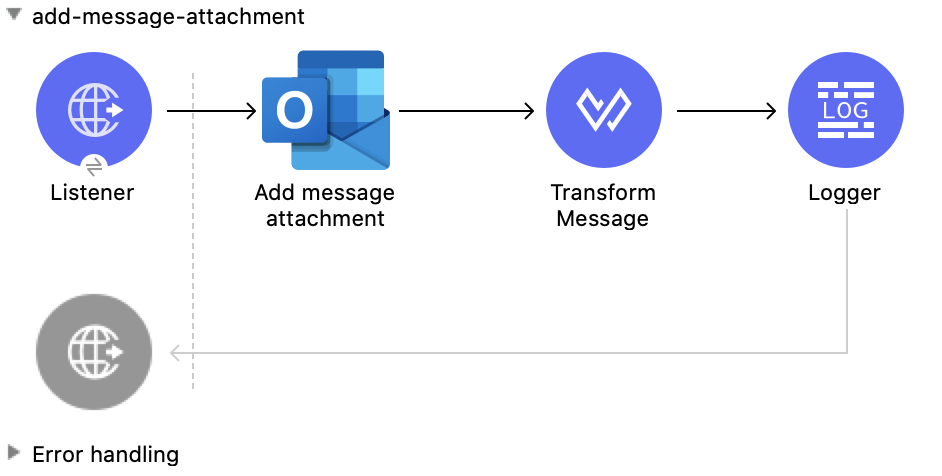
This Mule flow adds an attachment to an existing message.
This example uses the following operations:
-
HTTP Listener
Accepts data from HTTP requests -
Add message attachment
Adds an attachment to a message -
Transform Message
Outputs the results of the Add message attachment operation in JSON format -
Logger
Shows the HTTP response from the Add message attachment operation
XML for This Example
Paste this code into the Studio XML editor to quickly load the flow for this example into your Mule app:
<?xml version="1.0" encoding="UTF-8"?>

<mule xmlns:tableau-specialist="http://www.mulesoft.org/schema/mule/tableau-specialist" xmlns:email="http://www.mulesoft.org/schema/mule/email"
	  xmlns:ee="http://www.mulesoft.org/schema/mule/ee/core"
	  xmlns:http="http://www.mulesoft.org/schema/mule/http" xmlns:outlook365="http://www.mulesoft.org/schema/mule/outlook365" xmlns:salesforce="http://www.mulesoft.org/schema/mule/salesforce" xmlns="http://www.mulesoft.org/schema/mule/core" xmlns:doc="http://www.mulesoft.org/schema/mule/documentation" xmlns:xsi="http://www.w3.org/2001/XMLSchema-instance" xsi:schemaLocation="http://www.mulesoft.org/schema/mule/core http://www.mulesoft.org/schema/mule/core/current/mule.xsd
http://www.mulesoft.org/schema/mule/outlook365 http://www.mulesoft.org/schema/mule/outlook365/current/mule-outlook365.xsd
http://www.mulesoft.org/schema/mule/http http://www.mulesoft.org/schema/mule/http/current/mule-http.xsd
http://www.mulesoft.org/schema/mule/ee/core http://www.mulesoft.org/schema/mule/ee/core/current/mule-ee.xsd
http://www.mulesoft.org/schema/mule/email http://www.mulesoft.org/schema/mule/email/current/mule-email.xsd
http://www.mulesoft.org/schema/mule/tableau-specialist http://www.mulesoft.org/schema/mule/tableau-specialist/current/mule-tableau-specialist.xsd">
	<http:listener-config name="HTTP_Listener_config" doc:name="HTTP Listener config" doc:id="7b5e348d-2f1c-4a09-b73a-7b1f84d89060" >
		<http:listener-connection host="0.0.0.0" port="8083" />
	</http:listener-config>

	<outlook365:outlook365-config name="outlook365_client_credentials" doc:name="Outlook365 Outlook365 Config" doc:id="ab1353ac-79b8-4718-a96c-a2c9e9d1d996" >
		<outlook365:oauth-client-credentials-connection >
			<outlook365:oauth-client-credentials clientId="${oauth-client-credentials.clientId}" clientSecret="${oauth-client-credentials.clientSecret}" tokenUrl="${oauth-client-credentials.tokenUrl}" scopes="${oauth-client-credentials.scopes}" />
		</outlook365:oauth-client-credentials-connection>
	</outlook365:outlook365-config>

	<flow name="add-message-attachment" doc:id="0a662a35-6cb1-43f6-8585-00c9496b0d6b" >
		<http:listener doc:name="Listener" doc:id="1377bbf5-0db5-42e5-a61a-48c8ecebd0f7" config-ref="HTTP_Listener_config" path="/add-msg-attachment"/>
		<outlook365:add-message-attachment doc:name="Add message attachment" doc:id="1024c88f-110b-40fe-8079-90c35e0a2b7e" config-ref="outlook365_client_credentials" userId="88f176b2-84ca-4cfe-828c-954db0096efa" messageId="AAMkADg5NjIxODNkLWRkNzAtNGFkNC04YjUwLWFjOTEyMzg0YzA5NgBGAAAAAADzzlN7RptORYu7QgvFkvQJBwCthX8I2XTFT5_USx5R95fIAAAAAAEMAACthX8I2XTFT5_USx5R95fIAAEwN5RlAAA=">
			<outlook365:attachment-for-message ><![CDATA[#[%dw 2.0
output application/json
---
{
  "@odata.type": "#microsoft.graph.fileAttachment",
  "name": "smile",
  "contentBytes": "VGhlIHF1aWNrIGJyb3duIGZveCBqdW1wcyBvdmVyIDEzIGxhenkgZG9ncy4="
}]]]></outlook365:attachment-for-message>
		</outlook365:add-message-attachment>
		<ee:transform doc:name="Transform Message" doc:id="8fc0abfd-7193-429c-bf94-b6287de873f1" >
			<ee:message >
				<ee:set-payload ><![CDATA[%dw 2.0
output application/json
---
payload]]></ee:set-payload>
			</ee:message>
		</ee:transform>
		<logger level="INFO" doc:name="Logger" doc:id="ddd2f6c8-bc4d-4716-9bc3-1285b95bd7e6" message="#[payload]"/>
	</flow>
</mule>
Steps for Running This Example
-
Verify that your connector is configured.
-
Save the project.
-
From a web browser, test the application by entering
http://localhost:8083/add-message-attachment.
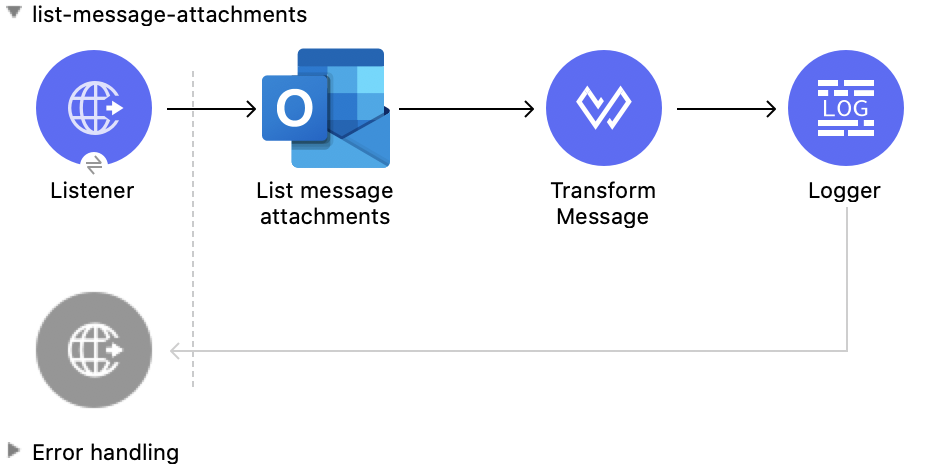
List Message Attachments
This Mule flow lists all of the attachments of an existing message.
This example uses the following operations:
-
HTTP Listener
Accepts data from HTTP requests -
List message attachments
Retrieves a list of attachment objects attached to a message -
Transform Message
Outputs the results of the List message attachments operation in JSON format -
Logger
Shows the HTTP response from the List message attachments operation
XML for This Example
Paste this code into the Studio XML editor to quickly load the flow for this example into your Mule app:
<?xml version="1.0" encoding="UTF-8"?>

<mule xmlns:tableau-specialist="http://www.mulesoft.org/schema/mule/tableau-specialist" xmlns:email="http://www.mulesoft.org/schema/mule/email"
	  xmlns:ee="http://www.mulesoft.org/schema/mule/ee/core"
	  xmlns:http="http://www.mulesoft.org/schema/mule/http" xmlns:outlook365="http://www.mulesoft.org/schema/mule/outlook365" xmlns:salesforce="http://www.mulesoft.org/schema/mule/salesforce" xmlns="http://www.mulesoft.org/schema/mule/core" xmlns:doc="http://www.mulesoft.org/schema/mule/documentation" xmlns:xsi="http://www.w3.org/2001/XMLSchema-instance" xsi:schemaLocation="http://www.mulesoft.org/schema/mule/core http://www.mulesoft.org/schema/mule/core/current/mule.xsd
http://www.mulesoft.org/schema/mule/outlook365 http://www.mulesoft.org/schema/mule/outlook365/current/mule-outlook365.xsd
http://www.mulesoft.org/schema/mule/http http://www.mulesoft.org/schema/mule/http/current/mule-http.xsd
http://www.mulesoft.org/schema/mule/ee/core http://www.mulesoft.org/schema/mule/ee/core/current/mule-ee.xsd
http://www.mulesoft.org/schema/mule/email http://www.mulesoft.org/schema/mule/email/current/mule-email.xsd
http://www.mulesoft.org/schema/mule/tableau-specialist http://www.mulesoft.org/schema/mule/tableau-specialist/current/mule-tableau-specialist.xsd">
	<http:listener-config name="HTTP_Listener_config" doc:name="HTTP Listener config" doc:id="7b5e348d-2f1c-4a09-b73a-7b1f84d89060" >
		<http:listener-connection host="0.0.0.0" port="8083" />
	</http:listener-config>

	<outlook365:outlook365-config name="outlook365_client_credentials" doc:name="Outlook365 Outlook365 Config" doc:id="ab1353ac-79b8-4718-a96c-a2c9e9d1d996" >
		<outlook365:oauth-client-credentials-connection >
			<outlook365:oauth-client-credentials clientId="${oauth-client-credentials.clientId}" clientSecret="${oauth-client-credentials.clientSecret}" tokenUrl="${oauth-client-credentials.tokenUrl}" scopes="${oauth-client-credentials.scopes}" />
		</outlook365:oauth-client-credentials-connection>
	</outlook365:outlook365-config>

	<flow name="list-message-attachments" doc:id="f5669f25-f382-46f5-bdc6-455206f0e4a4" >
		<http:listener doc:name="Listener" doc:id="1c38582a-eed8-40ab-8398-e502beeeba99" config-ref="HTTP_Listener_config" path="/list-attachments-for-msgs"/>
		<outlook365:list-message-attachments doc:name="List message attachments" doc:id="b1db9405-7c4f-436d-9e4a-e07be85cc95f" config-ref="outlook365_client_credentials" userId="88f176b2-84ca-4cfe-828c-954db0096efa" messageId="AAMkADg5NjIxODNkLWRkNzAtNGFkNC04YjUwLWFjOTEyMzg0YzA5NgBGAAAAAADzzlN7RptORYu7QgvFkvQJBwCthX8I2XTFT5_USx5R95fIAAAAAAEMAACthX8I2XTFT5_USx5R95fIAAEwN5RlAAA="/>
		<ee:transform doc:name="Transform Message" doc:id="96fa5ba5-e3df-4964-88d2-251355b42d94" >
			<ee:message >
				<ee:set-payload ><![CDATA[%dw 2.0
output application/json
---
payload]]></ee:set-payload>
			</ee:message>
		</ee:transform>
		<logger level="INFO" doc:name="Logger" doc:id="aa5314be-67e6-4785-b8fc-8b5a11aad79a" message="#[payload]"/>
	</flow>
</mule>
Steps for Running This Example
-
Verify that your connector is configured.
-
Save the project.
-
From a web browser, test the application by entering
http://localhost:8083/list-message-attachments.
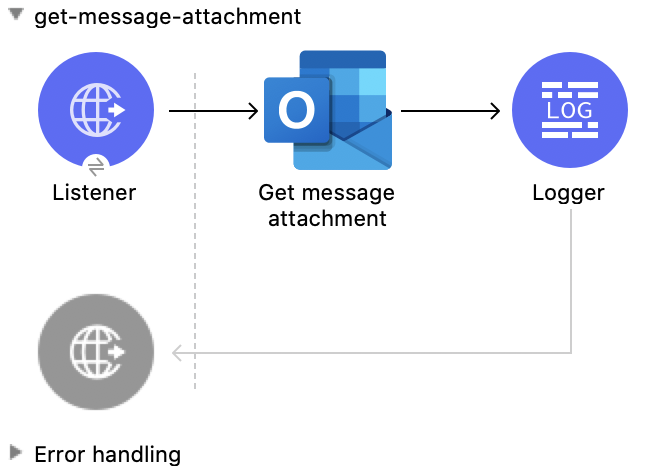
Get Message Attachment
This Mule flow retrieves an attachment from an existing message.
This example uses the following operations:
-
HTTP Listener
Accepts data from HTTP requests -
Get message attachment
Reads the properties and relationships of an attachment that is attached to a user message -
Logger
Shows the HTTP response from the Get message attachment operation
XML for This Example
Paste this code into the Studio XML editor to quickly load the flow for this example into your Mule app:
<?xml version="1.0" encoding="UTF-8"?>

<mule xmlns:tableau-specialist="http://www.mulesoft.org/schema/mule/tableau-specialist" xmlns:email="http://www.mulesoft.org/schema/mule/email"
	  xmlns:ee="http://www.mulesoft.org/schema/mule/ee/core"
	  xmlns:http="http://www.mulesoft.org/schema/mule/http" xmlns:outlook365="http://www.mulesoft.org/schema/mule/outlook365" xmlns:salesforce="http://www.mulesoft.org/schema/mule/salesforce" xmlns="http://www.mulesoft.org/schema/mule/core" xmlns:doc="http://www.mulesoft.org/schema/mule/documentation" xmlns:xsi="http://www.w3.org/2001/XMLSchema-instance" xsi:schemaLocation="http://www.mulesoft.org/schema/mule/core http://www.mulesoft.org/schema/mule/core/current/mule.xsd
http://www.mulesoft.org/schema/mule/outlook365 http://www.mulesoft.org/schema/mule/outlook365/current/mule-outlook365.xsd
http://www.mulesoft.org/schema/mule/http http://www.mulesoft.org/schema/mule/http/current/mule-http.xsd
http://www.mulesoft.org/schema/mule/ee/core http://www.mulesoft.org/schema/mule/ee/core/current/mule-ee.xsd
http://www.mulesoft.org/schema/mule/email http://www.mulesoft.org/schema/mule/email/current/mule-email.xsd
http://www.mulesoft.org/schema/mule/tableau-specialist http://www.mulesoft.org/schema/mule/tableau-specialist/current/mule-tableau-specialist.xsd">
	<http:listener-config name="HTTP_Listener_config" doc:name="HTTP Listener config" doc:id="7b5e348d-2f1c-4a09-b73a-7b1f84d89060" >
		<http:listener-connection host="0.0.0.0" port="8083" />
	</http:listener-config>

	<outlook365:outlook365-config name="outlook365_client_credentials" doc:name="Outlook365 Outlook365 Config" doc:id="ab1353ac-79b8-4718-a96c-a2c9e9d1d996" >
		<outlook365:oauth-client-credentials-connection >
			<outlook365:oauth-client-credentials clientId="${oauth-client-credentials.clientId}" clientSecret="${oauth-client-credentials.clientSecret}" tokenUrl="${oauth-client-credentials.tokenUrl}" scopes="${oauth-client-credentials.scopes}" />
		</outlook365:oauth-client-credentials-connection>
	</outlook365:outlook365-config>

	<flow name="get-message-attachment" doc:id="41bd505f-6a0d-4079-bb81-8b79083fc336" >
		<http:listener doc:name="Listener" doc:id="858ac6db-7fbb-496c-b630-bb86c2958b63" config-ref="HTTP_Listener_config" path="/get-msg-attachment"/>
		<outlook365:get-message-attachment doc:name="Get message attachment" doc:id="519415c5-0205-487a-bbfc-802207b90b1e" config-ref="outlook365_client_credentials" userId="88f176b2-84ca-4cfe-828c-954db0096efa" messageId="AAMkADg5NjIxODNkLWRkNzAtNGFkNC04YjUwLWFjOTEyMzg0YzA5NgBGAAAAAADzzlN7RptORYu7QgvFkvQJBwCthX8I2XTFT5_USx5R95fIAAAAAAEMAACthX8I2XTFT5_USx5R95fIAAEwN5RlAAA=" attachmentId="AAMkADg5NjIxODNkLWRkNzAtNGFkNC04YjUwLWFjOTEyMzg0YzA5NgBGAAAAAADzzlN7RptORYu7QgvFkvQJBwCthX8I2XTFT5_USx5R95fIAAAAAAEMAACthX8I2XTFT5_USx5R95fIAAEwN5RlAAABEgAQAD9EH3Atqb9MpCb3Zov2FdQ="/>
		<logger level="INFO" doc:name="Logger" doc:id="52de1ce6-db8c-40ba-be19-3fb5358b2928" message="#[payload]"/>
	</flow>
</mule>
Steps for Running This Example
-
Verify that your connector is configured.
-
Save the project.
-
From a web browser, test the application by entering
http://localhost:8083/get-message-attachment.
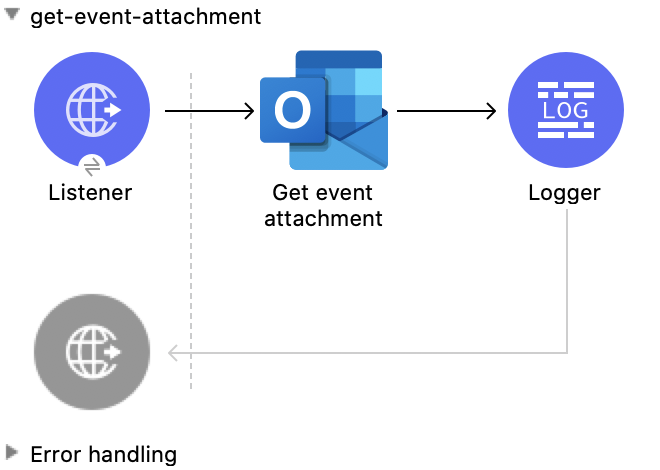
Get Event Attachment
This Mule flow retrieves an attachment from an existing event.
This example uses the following operations:
-
HTTP Listener
Accepts data from HTTP requests -
Get event attachment
Reads the properties and relationships of an attachment that is attached to an event -
Logger
Shows the HTTP response from the Get event attachment operation
XML for This Example
Paste this code into the Studio XML editor to quickly load the flow for this example into your Mule app:
<?xml version="1.0" encoding="UTF-8"?>

<mule xmlns:tableau-specialist="http://www.mulesoft.org/schema/mule/tableau-specialist" xmlns:email="http://www.mulesoft.org/schema/mule/email"
	  xmlns:ee="http://www.mulesoft.org/schema/mule/ee/core"
	  xmlns:http="http://www.mulesoft.org/schema/mule/http" xmlns:outlook365="http://www.mulesoft.org/schema/mule/outlook365" xmlns:salesforce="http://www.mulesoft.org/schema/mule/salesforce" xmlns="http://www.mulesoft.org/schema/mule/core" xmlns:doc="http://www.mulesoft.org/schema/mule/documentation" xmlns:xsi="http://www.w3.org/2001/XMLSchema-instance" xsi:schemaLocation="http://www.mulesoft.org/schema/mule/core http://www.mulesoft.org/schema/mule/core/current/mule.xsd
http://www.mulesoft.org/schema/mule/outlook365 http://www.mulesoft.org/schema/mule/outlook365/current/mule-outlook365.xsd
http://www.mulesoft.org/schema/mule/http http://www.mulesoft.org/schema/mule/http/current/mule-http.xsd
http://www.mulesoft.org/schema/mule/ee/core http://www.mulesoft.org/schema/mule/ee/core/current/mule-ee.xsd
http://www.mulesoft.org/schema/mule/email http://www.mulesoft.org/schema/mule/email/current/mule-email.xsd
http://www.mulesoft.org/schema/mule/tableau-specialist http://www.mulesoft.org/schema/mule/tableau-specialist/current/mule-tableau-specialist.xsd">
	<http:listener-config name="HTTP_Listener_config" doc:name="HTTP Listener config" doc:id="7b5e348d-2f1c-4a09-b73a-7b1f84d89060" >
		<http:listener-connection host="0.0.0.0" port="8083" />
	</http:listener-config>

	<outlook365:outlook365-config name="outlook365_client_credentials" doc:name="Outlook365 Outlook365 Config" doc:id="ab1353ac-79b8-4718-a96c-a2c9e9d1d996" >
		<outlook365:oauth-client-credentials-connection >
			<outlook365:oauth-client-credentials clientId="${oauth-client-credentials.clientId}" clientSecret="${oauth-client-credentials.clientSecret}" tokenUrl="${oauth-client-credentials.tokenUrl}" scopes="${oauth-client-credentials.scopes}" />
		</outlook365:oauth-client-credentials-connection>
	</outlook365:outlook365-config>

	<flow name="get-event-attachment" doc:id="eabf42a3-5a13-4e62-8ac0-f42fe3af7b46" >
		<http:listener doc:name="Listener" doc:id="5a126e2a-4707-48da-a451-33d2102b9e14" config-ref="HTTP_Listener_config" path="/get-event-attachment"/>
		<outlook365:get-event-attachment doc:name="Get event attachment" doc:id="92b1c180-41e5-4306-8a9b-0d69dbf6f57e" userId="88f176b2-84ca-4cfe-828c-954db0096efa" eventId="AAMkADg5NjIxODNkLWRkNzAtNGFkNC04YjUwLWFjOTEyMzg0YzA5NgBGAAAAAADzzlN7RptORYu7QgvFkvQJBwCthX8I2XTFT5_USx5R95fIAAAAAAENAACthX8I2XTFT5_USx5R95fIAAE8i1INAAA=" attachmentId="AAMkADg5NjIxODNkLWRkNzAtNGFkNC04YjUwLWFjOTEyMzg0YzA5NgBGAAAAAADzzlN7RptORYu7QgvFkvQJBwCthX8I2XTFT5_USx5R95fIAAAAAAENAACthX8I2XTFT5_USx5R95fIAAE8i1INAAABEgAQACmxgKifl79Lvzb1cpzml1o=" config-ref="outlook365_client_credentials" getRawContent="true"/>
		<logger level="INFO" doc:name="Logger" doc:id="88a52a69-b04e-4b34-b976-8f80f291bbbb" message="#[payload]"/>
	</flow>
</mule>
Steps for Running This Example
-
Verify that your connector is configured.
-
Save the project.
-
From a web browser, test the application by entering
http://localhost:8083/get-event-attachment.
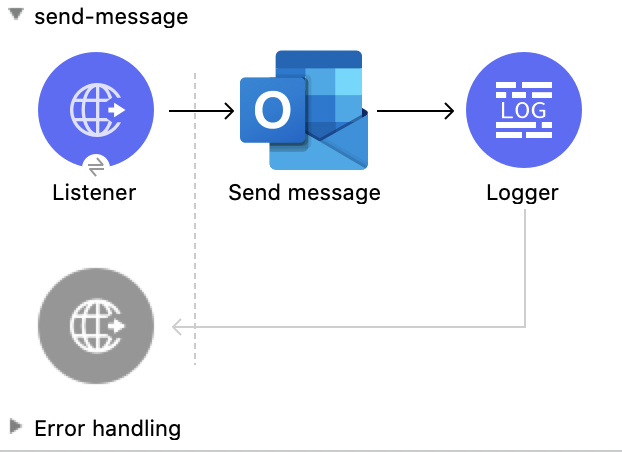
Send Message
This Mule flow sends a message from the Drafts folder, which the Create message operation created previously.
This example uses the following operations:
-
HTTP Listener
Accepts data from HTTP requests -
Send message
Sends a message from the Drafts folder -
Logger
Shows the HTTP response from the Send message operation
XML for This Example
Paste this code into the Studio XML editor to quickly load the flow for this example into your Mule app:
<?xml version="1.0" encoding="UTF-8"?>

<mule xmlns:tableau-specialist="http://www.mulesoft.org/schema/mule/tableau-specialist" xmlns:email="http://www.mulesoft.org/schema/mule/email"
	  xmlns:ee="http://www.mulesoft.org/schema/mule/ee/core"
	  xmlns:http="http://www.mulesoft.org/schema/mule/http" xmlns:outlook365="http://www.mulesoft.org/schema/mule/outlook365" xmlns:salesforce="http://www.mulesoft.org/schema/mule/salesforce" xmlns="http://www.mulesoft.org/schema/mule/core" xmlns:doc="http://www.mulesoft.org/schema/mule/documentation" xmlns:xsi="http://www.w3.org/2001/XMLSchema-instance" xsi:schemaLocation="http://www.mulesoft.org/schema/mule/core http://www.mulesoft.org/schema/mule/core/current/mule.xsd
http://www.mulesoft.org/schema/mule/outlook365 http://www.mulesoft.org/schema/mule/outlook365/current/mule-outlook365.xsd
http://www.mulesoft.org/schema/mule/http http://www.mulesoft.org/schema/mule/http/current/mule-http.xsd
http://www.mulesoft.org/schema/mule/ee/core http://www.mulesoft.org/schema/mule/ee/core/current/mule-ee.xsd
http://www.mulesoft.org/schema/mule/email http://www.mulesoft.org/schema/mule/email/current/mule-email.xsd
http://www.mulesoft.org/schema/mule/tableau-specialist http://www.mulesoft.org/schema/mule/tableau-specialist/current/mule-tableau-specialist.xsd">
	<http:listener-config name="HTTP_Listener_config" doc:name="HTTP Listener config" doc:id="7b5e348d-2f1c-4a09-b73a-7b1f84d89060" >
		<http:listener-connection host="0.0.0.0" port="8083" />
	</http:listener-config>

	<outlook365:outlook365-config name="outlook365_client_credentials" doc:name="Outlook365 Outlook365 Config" doc:id="ab1353ac-79b8-4718-a96c-a2c9e9d1d996" >
		<outlook365:oauth-client-credentials-connection >
			<outlook365:oauth-client-credentials clientId="${oauth-client-credentials.clientId}" clientSecret="${oauth-client-credentials.clientSecret}" tokenUrl="${oauth-client-credentials.tokenUrl}" scopes="${oauth-client-credentials.scopes}" />
		</outlook365:oauth-client-credentials-connection>
	</outlook365:outlook365-config>

	<flow name="send-message" doc:id="c664597a-6d88-4816-b502-f786a959d1f9" >
		<http:listener doc:name="Listener" doc:id="6fb79b3f-395a-4b9f-a702-ea7a127573f7" config-ref="HTTP_Listener_config" path="/send-msg"/>
		<outlook365:send-message doc:name="Send message" doc:id="71da69e5-6ec3-4fe1-beec-7ef4ce625527" config-ref="outlook365_client_credentials" userId="88f176b2-84ca-4cfe-828c-954db0096efa" messageId="AAMkADg5NjIxODNkLWRkNzAtNGFkNC04YjUwLWFjOTEyMzg0YzA5NgBGAAAAAADzzlN7RptORYu7QgvFkvQJBwCthX8I2XTFT5_USx5R95fIAAAAAAEPAACthX8I2XTFT5_USx5R95fIAAFXpn5uAAA="/>
		<logger level="INFO" doc:name="Logger" doc:id="f6f311e4-92e6-4eff-93b9-e3f0bd1d346c" message="#[payload]"/>
	</flow>
</mule>
Steps for Running This Example
-
Verify that your connector is configured.
-
Save the project.
-
From a web browser, test the application by entering
http://localhost:8083/send-message.
Send Mail
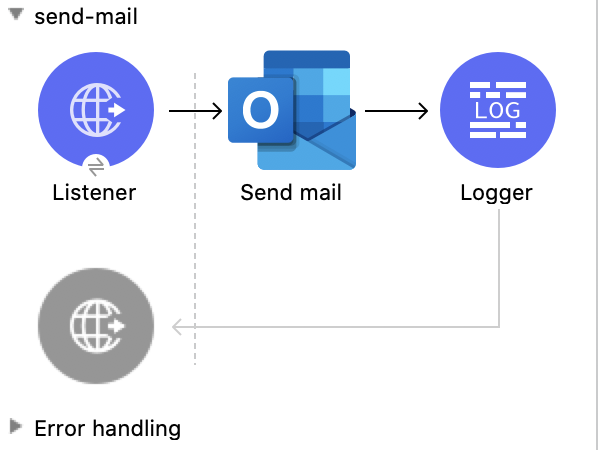
This Mule flow sends a message without creating a draft message first.
This example uses the following operations:
-
HTTP Listener
Accepts data from HTTP requests -
Send mail
Sends the message specified in the request body -
Logger
Shows the HTTP response from the Send mail operation
XML for This Example
Paste this code into the Studio XML editor to quickly load the flow for this example into your Mule app:
<?xml version="1.0" encoding="UTF-8"?>

<mule xmlns:tableau-specialist="http://www.mulesoft.org/schema/mule/tableau-specialist" xmlns:email="http://www.mulesoft.org/schema/mule/email"
	  xmlns:ee="http://www.mulesoft.org/schema/mule/ee/core"
	  xmlns:http="http://www.mulesoft.org/schema/mule/http" xmlns:outlook365="http://www.mulesoft.org/schema/mule/outlook365" xmlns:salesforce="http://www.mulesoft.org/schema/mule/salesforce" xmlns="http://www.mulesoft.org/schema/mule/core" xmlns:doc="http://www.mulesoft.org/schema/mule/documentation" xmlns:xsi="http://www.w3.org/2001/XMLSchema-instance" xsi:schemaLocation="http://www.mulesoft.org/schema/mule/core http://www.mulesoft.org/schema/mule/core/current/mule.xsd
http://www.mulesoft.org/schema/mule/outlook365 http://www.mulesoft.org/schema/mule/outlook365/current/mule-outlook365.xsd
http://www.mulesoft.org/schema/mule/http http://www.mulesoft.org/schema/mule/http/current/mule-http.xsd
http://www.mulesoft.org/schema/mule/ee/core http://www.mulesoft.org/schema/mule/ee/core/current/mule-ee.xsd
http://www.mulesoft.org/schema/mule/email http://www.mulesoft.org/schema/mule/email/current/mule-email.xsd
http://www.mulesoft.org/schema/mule/tableau-specialist http://www.mulesoft.org/schema/mule/tableau-specialist/current/mule-tableau-specialist.xsd">
	<http:listener-config name="HTTP_Listener_config" doc:name="HTTP Listener config" doc:id="7b5e348d-2f1c-4a09-b73a-7b1f84d89060" >
		<http:listener-connection host="0.0.0.0" port="8083" />
	</http:listener-config>

	<outlook365:outlook365-config name="outlook365_client_credentials" doc:name="Outlook365 Outlook365 Config" doc:id="ab1353ac-79b8-4718-a96c-a2c9e9d1d996" >
		<outlook365:oauth-client-credentials-connection >
			<outlook365:oauth-client-credentials clientId="${oauth-client-credentials.clientId}" clientSecret="${oauth-client-credentials.clientSecret}" tokenUrl="${oauth-client-credentials.tokenUrl}" scopes="${oauth-client-credentials.scopes}" />
		</outlook365:oauth-client-credentials-connection>
	</outlook365:outlook365-config>

	<flow name="send-mail" doc:id="8c2eb7ec-b811-4598-bd84-8cdc5453563c" >
		<http:listener doc:name="Listener" doc:id="290e3637-9b48-421b-bfb1-2b6fd717bbf5" config-ref="HTTP_Listener_config" path="/send-mail"/>
		<outlook365:send-mail doc:name="Send mail" doc:id="1179a8b1-faca-42a1-8728-4398236f884e" config-ref="outlook365_client_credentials" userId="88f176b2-84ca-4cfe-828c-954db0096efa" requestBodyContentFormat="MIME">
			<outlook365:message ><![CDATA[RnJvbTogU2hhcmVwb2ludCBUZWFtcyA8c2hhcmVwb2ludC10ZWFtc0BtdWxlY29ubmVjdG9yLm9ubWljcm9zb2Z0LmNvbT4KVG86IE11bGUgVGVzdCA8bXVsZXRlc3RAbXVsZXNvZnQuY29tPgpTdWJqZWN0OiBUZXN0IE91dGxvb2szNjUgY29ubmVjdG9yIC0gcGxlYXNlIGlnbm9yZQpEYXRlOiBTdW4sIDI4IEZlYiAyMDIxIDA3OjE1OjAwICswMDAw]]></outlook365:message>
		</outlook365:send-mail>
		<logger level="INFO" doc:name="Logger" doc:id="ca16b61a-efda-45b6-aae9-f9cf0fc237eb" message="#[payload]"/>
	</flow>
</mule>
Steps for Running This Example
-
Verify that your connector is configured.
-
Save the project.
-
From a web browser, test the application by entering
http://localhost:8083/send-mail.
Create Reply All to Message
This Mule flow creates a reply-all message that is saved in the Drafts folder. The message can then be sent using the Send message operation.
This example uses the following operations:
-
HTTP Listener
Accepts data from HTTP requests -
Create reply all to message
Creates a draft to reply to the sender and all the recipients of the specified message -
Transform Message
Outputs the results of the Create reply all to message operation in JSON format -
Logger
Shows the HTTP response from the Create reply all to message operation
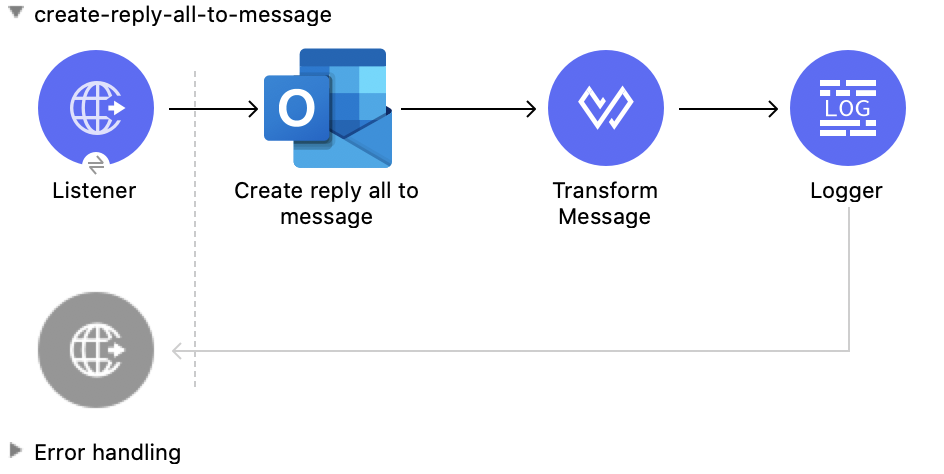
XML for This Example
Paste this code into the Studio XML editor to quickly load the flow for this example into your Mule app:
<?xml version="1.0" encoding="UTF-8"?>

<mule xmlns:tableau-specialist="http://www.mulesoft.org/schema/mule/tableau-specialist" xmlns:email="http://www.mulesoft.org/schema/mule/email"
	  xmlns:ee="http://www.mulesoft.org/schema/mule/ee/core"
	  xmlns:http="http://www.mulesoft.org/schema/mule/http" xmlns:outlook365="http://www.mulesoft.org/schema/mule/outlook365" xmlns:salesforce="http://www.mulesoft.org/schema/mule/salesforce" xmlns="http://www.mulesoft.org/schema/mule/core" xmlns:doc="http://www.mulesoft.org/schema/mule/documentation" xmlns:xsi="http://www.w3.org/2001/XMLSchema-instance" xsi:schemaLocation="http://www.mulesoft.org/schema/mule/core http://www.mulesoft.org/schema/mule/core/current/mule.xsd
http://www.mulesoft.org/schema/mule/outlook365 http://www.mulesoft.org/schema/mule/outlook365/current/mule-outlook365.xsd
http://www.mulesoft.org/schema/mule/http http://www.mulesoft.org/schema/mule/http/current/mule-http.xsd
http://www.mulesoft.org/schema/mule/ee/core http://www.mulesoft.org/schema/mule/ee/core/current/mule-ee.xsd
http://www.mulesoft.org/schema/mule/email http://www.mulesoft.org/schema/mule/email/current/mule-email.xsd
http://www.mulesoft.org/schema/mule/tableau-specialist http://www.mulesoft.org/schema/mule/tableau-specialist/current/mule-tableau-specialist.xsd">
	<http:listener-config name="HTTP_Listener_config" doc:name="HTTP Listener config" doc:id="98f35d79-9083-46d1-b1a5-27f954c8b437" >
		<http:listener-connection host="0.0.0.0" port="8083" />
	</http:listener-config>

	<outlook365:outlook365-config name="outlook365_client_credentials" doc:name="Outlook365 Outlook365 Config" doc:id="a5a23cc1-c8ec-400c-b2be-9590ebcf49ac" >
		<outlook365:oauth-client-credentials-connection >
			<outlook365:oauth-client-credentials clientId="${oauth-client-credentials.clientId}" clientSecret="${oauth-client-credentials.clientSecret}" tokenUrl="${oauth-client-credentials.tokenUrl}" scopes="${oauth-client-credentials.scopes}" />
		</outlook365:oauth-client-credentials-connection>
	</outlook365:outlook365-config>

	<flow name="create-reply-all-to-message" doc:id="2584d71b-c2fb-4a8d-8c79-957ca4900e06" >
		<http:listener doc:name="Listener" doc:id="02424960-2abd-4c16-8caa-5d9c233189d3" config-ref="HTTP_Listener_config" path="/create-reply-all"/>
		<outlook365:create-reply-all-to-message doc:name="Create reply all to message" doc:id="2cd08725-03a6-4945-98c0-3cfa559a16c8" config-ref="outlook365_client_credentials" userId="88f176b2-84ca-4cfe-828c-954db0096efa" messageId="AAMkADg5NjIxODNkLWRkNzAtNGFkNC04YjUwLWFjOTEyMzg0YzA5NgBGAAAAAADzzlN7RptORYu7QgvFkvQJBwCthX8I2XTFT5_USx5R95fIAAAAAAEJAACthX8I2XTFT5_USx5R95fIAAFD3jMsAAA=">
			<outlook365:reply ><![CDATA[#[%dw 2.0
output application/json
---
{
  "blabla": "sssscomment-value"
}]]]></outlook365:reply>
		</outlook365:create-reply-all-to-message>
		<ee:transform doc:name="Transform Message" doc:id="43f037d7-2d48-42e1-b504-9ffda49b3175" >
			<ee:message >
				<ee:set-payload ><![CDATA[%dw 2.0
output application/json
---
payload]]></ee:set-payload>
			</ee:message>
		</ee:transform>
		<logger level="INFO" doc:name="Logger" doc:id="3bdce785-d6d3-496b-8f8c-b2c7460293a0" message="#[payload]"/>
	</flow>
</mule>
Steps for Running This Example
-
Verify that your connector is configured.
-
Save the project.
-
From a web browser, test the application by entering
http://localhost:8083/create-reply-all-to-message.
Reply All to Message
This Mule flow creates a reply-all message, which is sent without creating it first in the Drafts folder using the Create message operation.
This example uses the following operations:
-
HTTP Listener
Accepts data from HTTP requests -
Reply all to message
Replies to all recipients of a message -
Logger
Shows the HTTP response from the Reply all to message operation
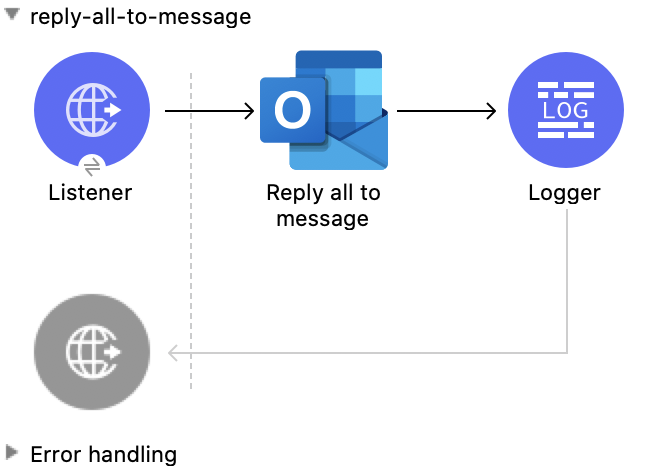
XML for This Example
Paste this code into the Studio XML editor to quickly load the flow for this example into your Mule app:
<?xml version="1.0" encoding="UTF-8"?>

<mule xmlns:tableau-specialist="http://www.mulesoft.org/schema/mule/tableau-specialist" xmlns:email="http://www.mulesoft.org/schema/mule/email"
	  xmlns:ee="http://www.mulesoft.org/schema/mule/ee/core"
	  xmlns:http="http://www.mulesoft.org/schema/mule/http" xmlns:outlook365="http://www.mulesoft.org/schema/mule/outlook365" xmlns:salesforce="http://www.mulesoft.org/schema/mule/salesforce" xmlns="http://www.mulesoft.org/schema/mule/core" xmlns:doc="http://www.mulesoft.org/schema/mule/documentation" xmlns:xsi="http://www.w3.org/2001/XMLSchema-instance" xsi:schemaLocation="http://www.mulesoft.org/schema/mule/core http://www.mulesoft.org/schema/mule/core/current/mule.xsd
http://www.mulesoft.org/schema/mule/outlook365 http://www.mulesoft.org/schema/mule/outlook365/current/mule-outlook365.xsd
http://www.mulesoft.org/schema/mule/http http://www.mulesoft.org/schema/mule/http/current/mule-http.xsd
http://www.mulesoft.org/schema/mule/ee/core http://www.mulesoft.org/schema/mule/ee/core/current/mule-ee.xsd
http://www.mulesoft.org/schema/mule/email http://www.mulesoft.org/schema/mule/email/current/mule-email.xsd
http://www.mulesoft.org/schema/mule/tableau-specialist http://www.mulesoft.org/schema/mule/tableau-specialist/current/mule-tableau-specialist.xsd">
	<http:listener-config name="HTTP_Listener_config" doc:name="HTTP Listener config" doc:id="98f35d79-9083-46d1-b1a5-27f954c8b437" >
		<http:listener-connection host="0.0.0.0" port="8083" />
	</http:listener-config>

	<outlook365:outlook365-config name="outlook365_client_credentials" doc:name="Outlook365 Outlook365 Config" doc:id="a5a23cc1-c8ec-400c-b2be-9590ebcf49ac" >
		<outlook365:oauth-client-credentials-connection >
			<outlook365:oauth-client-credentials clientId="${oauth-client-credentials.clientId}" clientSecret="${oauth-client-credentials.clientSecret}" tokenUrl="${oauth-client-credentials.tokenUrl}" scopes="${oauth-client-credentials.scopes}" />
		</outlook365:oauth-client-credentials-connection>
	</outlook365:outlook365-config>

	<flow name="reply-all-to-message" doc:id="74d00afa-c238-4a4a-90d8-c7639dd1bb2b" >
		<http:listener doc:name="Listener" doc:id="545d0bae-9e20-48f6-9dd5-4a36ecade538" config-ref="HTTP_Listener_config" path="/reply-all"/>
		<outlook365:reply-all-to-message doc:name="Reply all to message" doc:id="44693b84-7bba-4f61-a5f2-481c05d8a3d8" config-ref="outlook365_client_credentials" userId="88f176b2-84ca-4cfe-828c-954db0096efa" messageId="AAMkADg5NjIxODNkLWRkNzAtNGFkNC04YjUwLWFjOTEyMzg0YzA5NgBGAAAAAADzzlN7RptORYu7QgvFkvQJBwCthX8I2XTFT5_USx5R95fIAAAAAAEJAACthX8I2XTFT5_USx5R95fIAAFD3jMsAAA="/>
		<logger level="INFO" doc:name="Logger" doc:id="e2e303d6-d17d-4940-910d-e9a95a2728b0" message="#[payload]"/>
	</flow>
</mule>
Steps for Running This Example
-
Verify that your connector is configured.
-
Save the project.
-
From a web browser, test the application by entering
http://localhost:8083/reply-all-to-message.