Replacing Mule License Keys
When your Mule license expires, you must replace your Mule license key. Also use this procedure if you entered an incorrect license key during installation.
Perform the following steps on the controller node used to start the installation. For Azure and AWS installations,
this node is named rtf-controller-1 by default.
Install rtfctl
The rtfctl utility is required to replace your Mule license key on Runtime Fabric. Follow the steps in Install rtfctl before continuing.
Confirm that the rtfctl binary is present in the current working directory and in the user $PATH.
Run rtfctl commands as a privileged user.
Procedure
-
Base64 encode the new Mule
.liclicense file provided by MuleSoft:-
On MacOS, run the following command in the terminal:
BASE64_ENCODED_LICENSE=$(base64 -b0 -i license.lic) -
On Unix, run the following command:
BASE64_ENCODED_LICENSE=$(base64 -w0 license.lic) -
On Windows, choose one of the following:
-
Use a WSL or Cygwin shell that includes the base64 tool and use the above Unix command.
-
Use the
base64.exeprogram included with Windows git (C:\Program Files\Git\usr\bin). -
Use the following Powershell command:
$BASE64_ENCODED_LICENSE=[convert]::ToBase64String((Get-Content -path "license.lic" -Encoding byte))
-
-
-
Use the
rtfctlutility to apply the Base64 value of your license key. For more information on thertfctlcommand, refer to rtfctl commands.rtfctl apply mule-license $BASE64_ENCODED_LICENSE -
To verify the Mule license key has applied correctly, retrieve the contents using the
rtfctlutility:rtfctl get mule-license
| You need to restart your Runtime Fabric Mule apps to take the latest changed license. |
Get License Expiry Date
The GET fabric API (/organizations/{organizationId}/fabrics/{id}) response includes an optional licenseExpiryDate field:
{
    "id": "fabric_id",
    "name": "anna-qa-gke-rtf-1",
    "region": "us-east-1",
    "vendor": "gke",
    "vendorMetadata": {},
    "organizationId": "organization_id",
    "version": "2.2.9",
    "status": "Active",
    "desiredVersion": "2.2.9",
    "availableUpgradeVersion": "2.2.29",
    "createdAt": 1679684859167,
    "secondsSinceHeartbeat": 192,
    "kubernetesVersion": "v1.24.11-gke.1000",
    "licenseExpiryDate": 1653523200000,
    "isManaged": false,
    "isHelmManaged": true,
    "clusterConfigurationLevel": "production",
    "features": {
        "enhancedSecurity": true,
        "persistentStore": false
    },
    "ingress": {
        "domains": []
    }
}
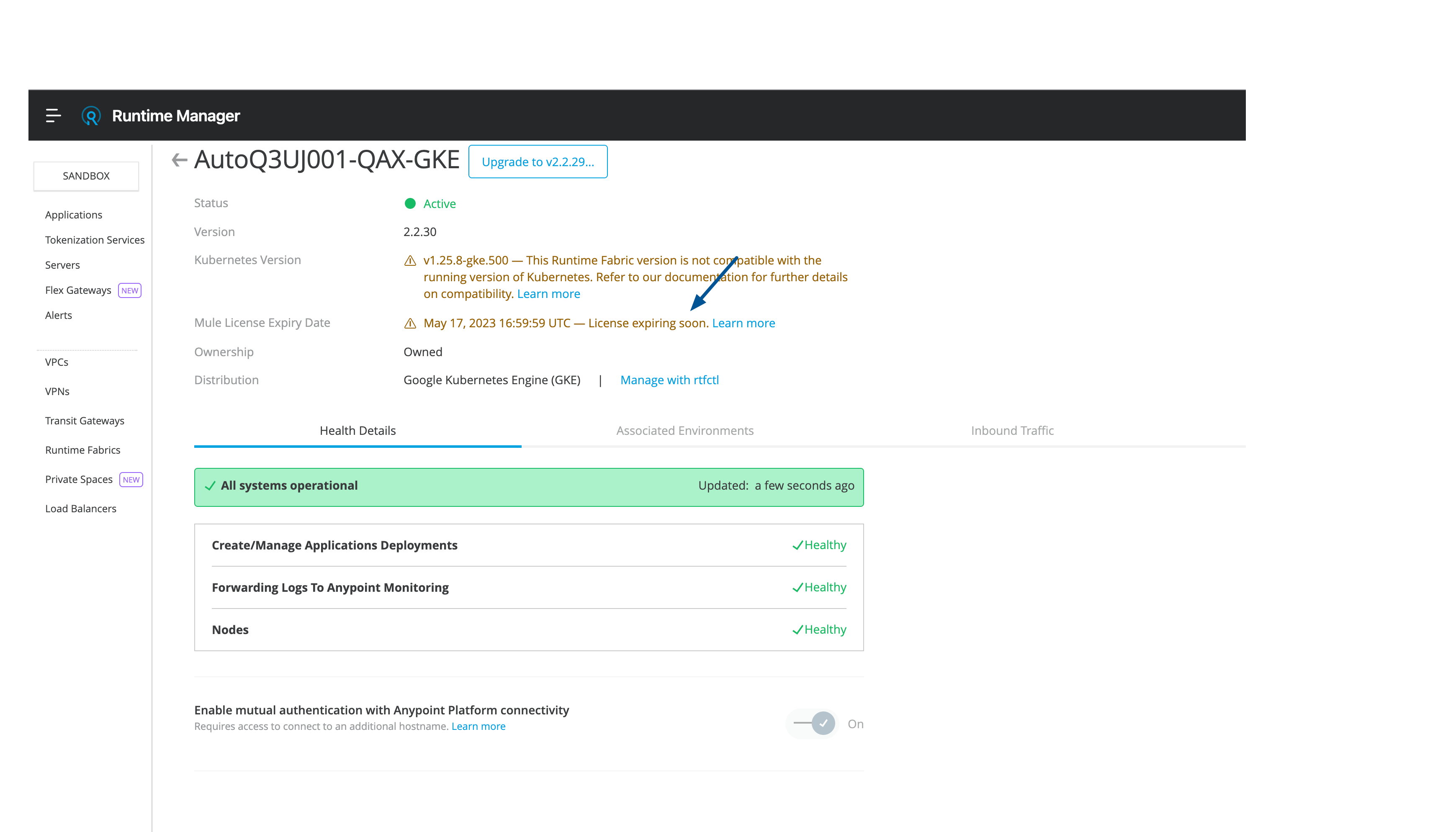
The Runtime Fabric Mule License Expiry Date is also exposed in the Runtime Manager UI, with a warning notification of License is expiring soon: