
X12 EDI Connector 2.17 Control Numbers
Using the Write operation in the Anypoint Connector for X12 EDI Connector (X12 EDI Connector), you can generate control numbers on the generated X12 payload by:
-
Managing global control numbers through control number keys
-
Managing identifier combination control numbers
-
Using your own control number
Manage Global Control Numbers Through Control Number Keys
If your organization or your trading partner have must maintain unique interchange, group, or transaction set control numbers across different identifier combinations and document types:
-
Set the configuration
Use supplied valuestofalse. -
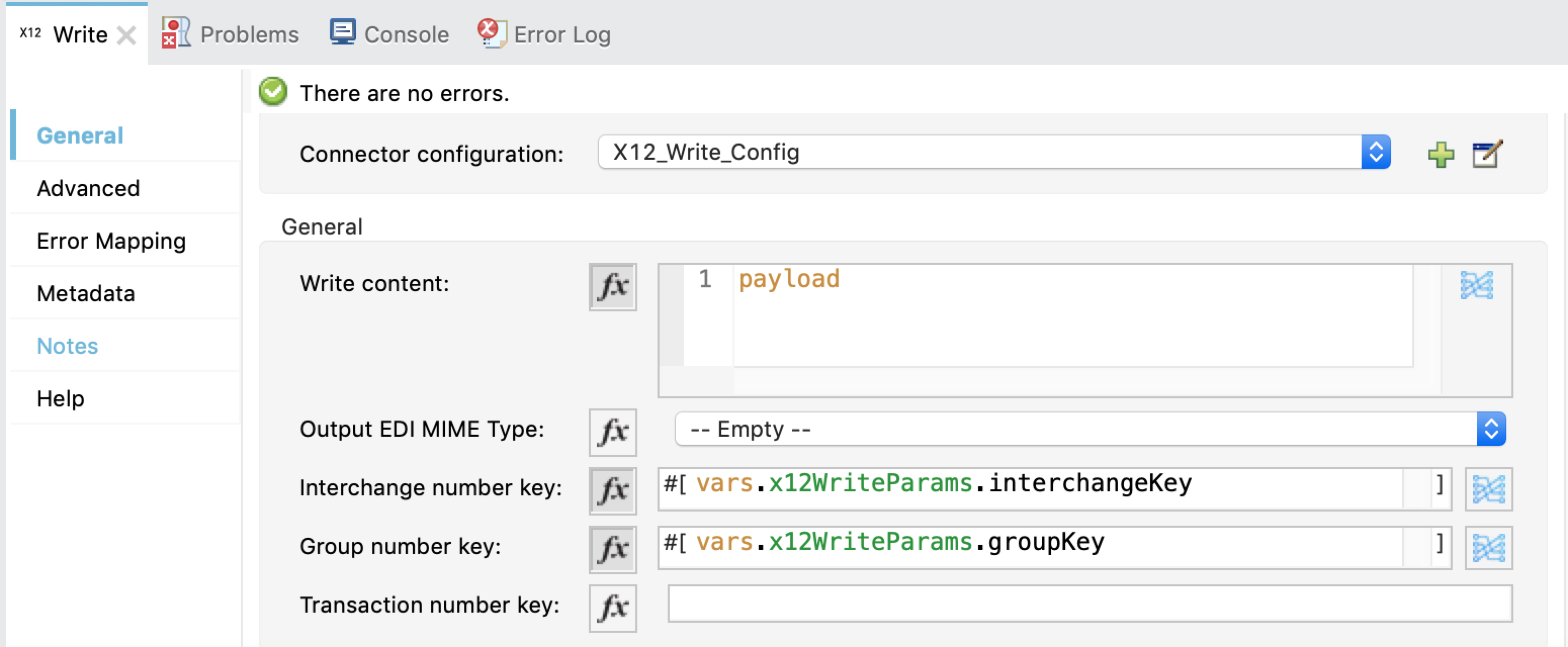
Leverage the control number key configurations (at the configuration level or operation level) to set a key unique to the partner.
By default, the control number key configurations pass dynamically at the operation level. You can then use this group control number key across different identifiers and transaction types for the same partner.
Manage Identifier Combination Control Numbers
If you want the connector to automatically maintain control number sequencing based on the sender/receiver identifiers and you do not require global control numbers at a partner level, then set the Write configuration Use supplied values to false. When no value passes into the optional interchange, group, or transaction number key configurations, the sender/receiver identifier combination is the default.