
Apache Kafka 4.3 の例
トピックのパブリッシュとコンシューム
次の例は、Apache Kafka 用 Anypoint Connector (Apache Kafka Connector) の 2 つの操作 (Publish と Consume) を使用して、メッセージを Apache Kafka にパブリッシュしてから取得する方法を示しています。
プロデューサーフローを作成する
プロデューサーフローは、メッセージを Apache Kafka にパブリッシュします。次のスクリーンショットは、Anypoint Studio のプロデューサーフローを示しています。
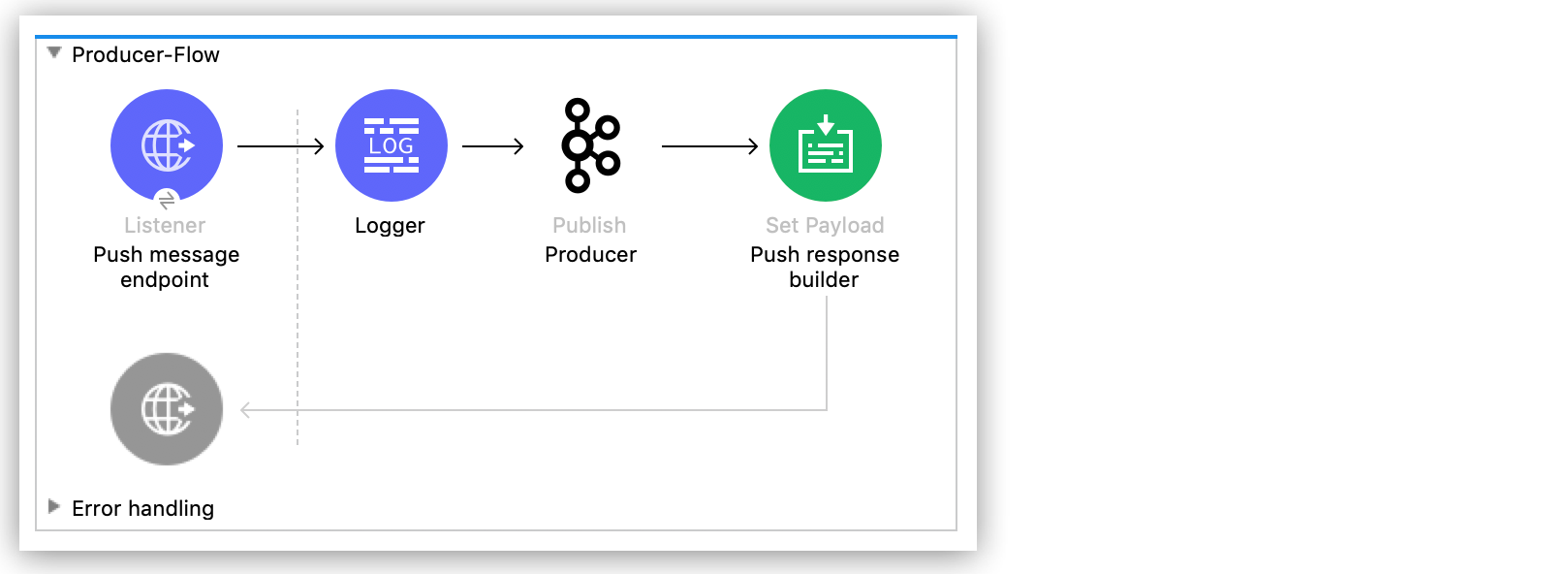
プロデューサーフローを作成する手順は、次のとおりです。
-
HTTP リスナーをキャンバスにドラッグします。
-
フロー名を
Producer-Flow に変更します。 -
リスナーの [Display Name (表示名)] を
Push message endpoint、[Path (パス)] を /pushMessage に設定します。 -
Logger コンポーネントを Studio キャンバスの Push message endpoint の右側にドラッグし、メッセージを次のように設定します。
#["Message: '" ++ payload.message ++ "' is going to be published to topic: '" ++ payload.topic ++ "'."] -
Kafka Publish 操作を Studio キャンバスの Logger の右側にドラッグします。
-
[Display Name (表示名)] 項目を
Producer、[Topic (トピック)] 項目を #[payload.topic]、[Key (キー)] 項目を #[now()] に設定します。 -
[Connector configuration (コネクタ設定)] 項目の右側にある緑色のプラスアイコンをクリックし、グローバル要素設定項目にアクセスします。
-
[Bootstrap server URLs (ブートストラップサーバー URL)] 項目で、[Edit inline (インライン編集)] を選択し、緑色のプラス記号をクリックします。
-
値
${config.basic.bootstrapServers} を入力して [Finish (完了)] をクリックします。
-
-
対応する YAML ファイル (
src/main/resources/properties/kafka-producer.yaml など) で以前に説明した変数を宣言して完了し、そのプロパティファイルをグローバル要素として読み込みます。プロパティファイルの使用についての詳細は、「Configuring Property Placeholders (プロパティプレースホルダーの設定)」を参照してください。
-
Set Payload コンポーネントを Studio キャンバスの Producer の右側にドラッグします。
-
[Display Name (表示名)] 項目を
Push response builder に変更します。 -
[Value (値)] を
Message successfully sent to Kafka topic. に設定します。
コンシューマーフローを作成する
コンシューマーフローは、Apache Kafka からのメッセージをコンシュームします。次のスクリーンショットは、Studio のコンシューマーフローを示しています。
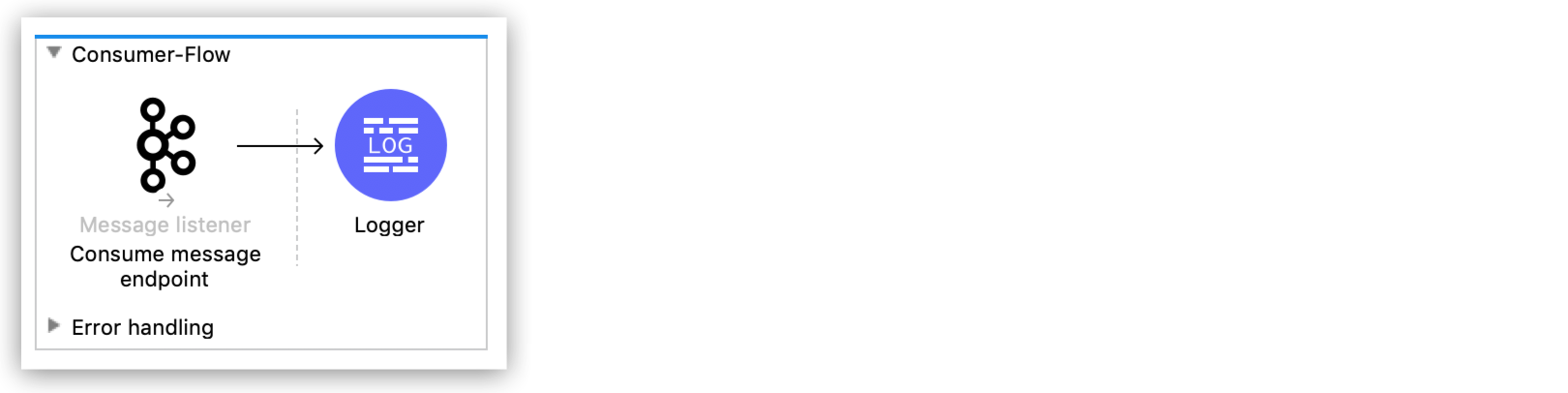
コンシューマーフローを作成する手順は、次のとおりです。
-
Kafka Consume Message 入力元を Anypoint Studio キャンバスにドラッグします。
-
フロー名を
Consumer-Flow に変更します。 -
メッセージリスナーの [Display Name (表示名)] 項目を
Consume message endpoint に設定します。 -
[Connector configuration (コネクタ設定)] 項目の右側にある緑色のプラスアイコンをクリックし、グローバル要素設定項目にアクセスします。
-
次の項目に入力します。
-
[Bootstrap server URLs (ブートストラップサーバー URL)] 項目で、[Edit inline (インライン編集)] を選択し、緑色のプラス記号をクリックします。
-
値
${config.basic.bootstrapServers} を入力して [Finish (完了)] をクリックします。 -
[Group ID (グループ ID)] 項目に
${consumer.groupId} と入力します。 -
[Topic Subscription Patterns (トピックサブスクリプションパターン)] 項目で、[Edit inline (インライン編集)] を選択し、緑色のプラス記号をクリックします。
-
値
${config.topics} を入力して [Finish (完了)] をクリックします。
-
-
対応する YAML ファイル (
src/main/resources/properties/Kafka-consumer.yaml など) で以前に説明した変数を宣言して完了し、そのプロパティファイルをグローバル要素として読み込みます。プロパティファイルの使用についての詳細は、「Configuring Property Placeholders (プロパティプレースホルダーの設定)」を参照してください。
-
Logger コンポーネントを Studio キャンバスの Consume message endpoint の右側にドラッグし、メッセージを次のように設定します。
"New message arrived: " ++ payload ++ ", key:" ++ attributes.key ++ ", partition:" ++ attributes.partition ++ ", offset:" ++ attributes.offset
トピックをコンシュームおよびパブリッシュするための XML
<?xml version="1.0" encoding="UTF-8"?>
<mule xmlns:ee="http://www.mulesoft.org/schema/mule/ee/core"
xmlns:Kafka="http://www.mulesoft.org/schema/mule/Kafka"
xmlns:http="http://www.mulesoft.org/schema/mule/http"
xmlns="http://www.mulesoft.org/schema/mule/core"
xmlns:doc="http://www.mulesoft.org/schema/mule/documentation"
xmlns:spring="http://www.springframework.org/schema/beans"
xmlns:xsi="http://www.w3.org/2001/XMLSchema-instance"
xsi:schemaLocation="
http://www.mulesoft.org/schema/mule/http http://www.mulesoft.org/schema/mule/http/current/mule-http.xsd
http://www.mulesoft.org/schema/mule/http
http://www.mulesoft.org/schema/mule/http/current/mule-http.xsd
http://www.springframework.org/schema/beans
http://www.springframework.org/schema/beans/spring-beans-current.xsd
http://www.mulesoft.org/schema/mule/core
http://www.mulesoft.org/schema/mule/core/current/mule.xsd
http://www.mulesoft.org/schema/mule/http
http://www.mulesoft.org/schema/mule/http/current/mule-http.xsd
http://www.mulesoft.org/schema/mule/ee/core
http://www.mulesoft.org/schema/mule/ee/core/current/mule-ee.xsd
http://www.mulesoft.org/schema/mule/kafka
http://www.mulesoft.org/schema/mule/kafka/current/mule-kafka.xsd">
<configuration-properties file="mule-app.properties">
</configuration-properties>
<http:listener-config name="HTTP_Listener_config"
doc:name="HTTP Listener config" >
<http:listener-connection host="0.0.0.0" port="8081" />
</http:listener-config>
<kafka:consumer-config name="Apache_Kafka_Consumer_configuration"
doc:name="Apache Kafka Consumer configuration" >
<kafka:consumer-plaintext-connection groupId="${consumer.groupId}" >
<kafka:bootstrap-servers >
<kafka:bootstrap-server value="${config.basic.bootstrapServers}" />
</kafka:bootstrap-servers>
<kafka:topic-patterns >
<kafka:topic-pattern value='${topic1}
<kafka:topic-pattern value="topic-1" />
<kafka:topic-pattern value="topic-2" />
</kafka:topic-patterns>]' />
</kafka:topic-patterns>
</kafka:consumer-plaintext-connection>
</kafka:consumer-config>
<kafka:producer-config name="Apache_Kafka_Producer_configuration"
doc:name="Apache Kafka Producer configuration" >
<kafka:producer-plaintext-connection >
<kafka:bootstrap-servers >
<kafka:bootstrap-server value="${config.basic.bootstrapServers}" />
</kafka:bootstrap-servers>
</kafka:producer-plaintext-connection>
</kafka:producer-config>
<kafka:consumer-config name="Apache_Kafka_Consumer_configuration1" doc:name="Apache Kafka Consumer configuration" >
<kafka:consumer-plaintext-connection groupId="${consumer.groupId}" >
<kafka:bootstrap-servers >
<kafka:bootstrap-server value="${config.basic.bootstrapServers}" />
</kafka:bootstrap-servers>
<kafka:topic-patterns >
<kafka:topic-pattern value="${config.topics}" />
</kafka:topic-patterns>
</kafka:consumer-plaintext-connection>
</kafka:consumer-config>
<flow name="Producer-Flow" >
<http:listener doc:name="Push message endpoint" config-ref="HTTP_Listener_config" path="/pushMessage" />
<logger level="INFO" doc:name="Logger" message="&quot;Message: '&quot; ++ payload.message ++ &quot;' is going to be published to topic: '&quot; ++ payload.topic ++ &quot;'.&quot;" />
<kafka:publish doc:name="Producer" topic="#[payload.topic]" key="#[now()]" config-ref="Apache_Kafka_Producer_configuration" />
<set-payload value="Message successfully sent to Apache Kafka topic." doc:name="Push response builder" />
</flow>
<flow name="Consumer-Flow" >
<kafka:message-listener doc:name="Consume message endpoint" config-ref="Apache_Kafka_Consumer_configuration"/>
<logger level="INFO" doc:name="Logger" message="'New message arrived: ' ++ payload ++ &quot;, key:&quot; ++ attributes.key ++ &quot;, partition:&quot; ++ attributes.partition ++ &quot;, offset:&quot; ++ attributes.offset"/>
</flow>
</mule>