
XML SDK
XML SDK は、より高度な Java ベースの Mule SDK に代わるものです。XML SDK を使用して、Mule アプリケーションを作成する方法と同様にカスタムモジュールを作成します。 実際にモジュール内で既存の Mule コンポーネントを使用できます。このフレームワークでは、モジュールの主要部分 (<module>、<operation>、<parameter> 要素など) を囲む XML 要素としていくつかの構文的なイディオムを追加するだけです。たとえば、次のスニペットでは Hello XML SDK 内で 1 つの操作を定義します。
<?xml version="1.0" encoding="UTF-8"?>
<module name="Hello XML SDK"  ...>
  <operation name="say-hello" doc:description="Greets you!">
    <body>
      <mule:set-payload value="Hello World!"/>
    </body>
    <output type="string"/>
  </operation>
</module>
他のコンポーネントの使用方法と同じ方法で、Mule SDK コンポーネントを Mule フローで使用します。この例では、操作 <hello-smart-connector:say-hello> で定義されているとおりに、フロー "random-flow" の実行によりペイロードが "Hello World!" に設定されます。
<flow name="random-flow">
  <hello-smart-connector:say-hello>
</flow>
XML SDK は強く型付けされているため、すべての操作の定義済みパラメーターのデータ型は、入力および出力の両方で静的に設定されます。
必須ソフトウェアのインストール
ローカル環境に以下のツールをインストールして、正しく動作することを確認します。
-
Java コードをコンパイルして構築するための Java Development Kit 8 (JDK 8)。
サポートされる XML SDK の最上位バージョンは JDK 11 ですが、JDK 11 はアプリケーションの実行にのみ使用できます。XML SDK でのコンパイルは JDK 8 で行う必要があります。 -
プロジェクトの構築を管理するための Apache Maven 3.3.9 以降。
XML SDK の基礎
XML SDK コンポーネントは、その動作と、Runtime がコンポーネントとやり取りする方法を示す主要な要素で構成されます。
-
操作
-
プロパティ
-
囲んでいるモジュール
操作
<operation> 要素は一連の入力パラメーターと 1 つの出力を定義します。関数と同様に、入力パラメーターがあり、(本文に記述されている) アクションを実行し、1 つの出力があります。関数と異なり、操作に値が保存されている場合や、操作で外部ソースを参照する場合、操作の動作は変わる可能性があります。
-
入力パラメーター (
<parameter>): 操作をコールするときに入力する型を宣言します。このパラメーターは、
<body> スコープ内のメッセージプロセッサーがアクセスできる唯一のデータです。 -
本文 (
<body>): 実行するコンポーネントのチェーンを定義します。フローに似ています。 -
出力 (
<output>): XML SDK Module の出力データ型を宣言します。これは、<body> で処理された後のペイロードの型です。 -
エラー:
<body> 内で XML SDK が発生させる (またはマップする) ことができるエラー種別を宣言します。
次の XML SDK Module では、2 つの数値をパラメーターとして取得し、それらを合計する 1 つの操作を実行します。
<module name="Math XML SDK"...>
  ...
  <operation name="sum" doc:description="Takes two numbers and returns the sum of them">
    <parameters>
      <parameter name="numberA" type="number"/>
      <parameter name="numberB" type="number"/>
    </parameters>
    <body>
      <mule:set-payload value="#[vars.numberA + vars.numberB]"/>
    </body>
    <output type="number"/>
  </operation>
</module>
XML SDK Module を Mule アプリケーションで使用するには、XML SDK Module を Mule フローに追加するだけです。次に例を示します。
<flow name="mule-flow">
  <math-smart-connector:sum numberA="10" numberB="5"/>
  <!-- payload here is 15 -->
</flow>| 名前 | 使用 | デフォルト値 | 説明 |
|---|---|---|---|
|
必須 |
なし |
|
|
省略可能 |
なし |
別の値を提供しない場合、 |
|
必須 |
|
可能な値:
|
|
必須 |
なし |
|
|
省略可能 |
|
UI 内では |
|
必須 |
|
現在の
ロールについての詳細を参照してください。 |
|
省略可能 |
なし |
簡単なツールチップを |
|
省略可能 |
なし |
このパラメーターのデータ型の短い例を追加します。 |
|
省略可能 |
なし |
UI 表示ラベルを提供します。 |
|
省略可能 |
なし |
各要素を UI に表示する順序を定義します。 |
|
省略可能 |
なし |
UI 内で |
|
省略可能 |
|
バージョン 1.2 以降で使用可能 次のように、操作の表示を |
|
省略可能 |
なし |
|
| 名前 | 使用 | デフォルト値 | 説明 |
|---|---|---|---|
|
省略可能 |
出力ペイロードのデータ型。要素を削除して、これを |
<output-attributes> 要素を使用する場合、属性型の定義は <operation> 要素によってサポートされます。
| 名前 | 使用 | デフォルト値 | 説明 |
|---|---|---|---|
|
省略可能 |
出力属性のデータ型。要素を削除して、これを |
両方の出力 (<output> と <output-attributes>) は、制御が呼び出し元に戻った時に作成される MuleMessage の一部になります。
| 名前 | 使用 | デフォルト値 | 説明 |
|---|---|---|---|
|
必須 |
|
プロパティ
<property> は、XML SDK コンポーネントのエンドユーザーにより定義された項目を対象とします。これは、これを使用する Mule プロジェクト全体のグローバル設定として機能します。
プロパティは、操作により公開されるパラメーターに似ていますが、特定の操作ではなく、プロジェクト内の XML SDK コンポーネントのすべてのインスタンスに影響するレベルで機能します。操作のパラメーターと同様に、プロパティは、通常は、デフォルト値を持つ単純型です。
| XML SDK Module のエンドユーザーが混乱しないように、エンドユーザーが編集する必要があると思われるプロパティのみを公開します。たとえば、エンドユーザーが変更できないまたは変更してはならない内部値は公開しないでください。 |
次の XML SDK Module は要求を GitHub API V3 に送信し、認証済みユーザーを取得します。
<module name="Github"  ...>
  <property name="username" type="string" doc:description="Username credential."/>
  <property name="password" type="string" password="true" doc:description="Password credential"/>

  <http:request-config name="github-httpreq-config" basePath="/">
    <http:request-connection host="api.github.com" protocol="HTTPS" port="443">
      <http:authentication>
        <http:basic-authentication username="#[vars.username]" password="#[vars.password]"/>
      </http:authentication>
    </http:request-connection>
  </http:request-config>

  <operation name="get-user" doc:description="Lists public and private profile information when authenticated.">
    <body>
      <http:request config-ref="github-httpreq-config" path="#['user/' ++ vars.username]" method="GET"/>
    </body>
    <output type="string" doc:description="User information if logged properly."/>
  </operation>
</module>
この例では、次のようにモジュール内で定義されている <property> を参照します。
-
グローバル要素内で
request-config の値として。 -
操作内で
http-request 内の config-ref 属性に対する値として。
次の Mule アプリケーションは XML SDK Module を使用します。github プレフィックス (github:get-user など) はモジュールの name から派生します。
<mule ...>
  <github:config name="lautaro-github-config" username="fernandezlautaro" password="****"/>
  <flow name="test-github-flow">
    <github:get-user config-ref="lautaro-github-config"/>
  </flow>
</mule>
"test-github-flow" の実行のたびに、認証済みユーザーの GitHub 情報が返されます。
{
  "login": "fernandezlautaro",
  "id": 4719511,
  "avatar_url": "https://avatars1.githubusercontent.com/u/4719511?v=3",
  "gravatar_id": "",
  "url": "https://api.github.com/users/fernandezlautaro",
  ...
}
ログイン情報が正しくない場合、GitHub から次のエラー応答が返されます。
{
  "message": "Requires authentication",
  "documentation_url": "https://developer.github.com/v3"
}| 名前 | 使用 | デフォルト値 | 説明 |
|---|---|---|---|
|
必須 |
なし |
|
|
省略可能 |
なし |
別の値を提供しない場合、 |
|
必須 |
|
可能な値:
|
|
必須 |
なし |
|
|
省略可能 |
|
入力時に UI 内のプロパティの値が非表示になります ( |
|
省略可能 |
なし |
簡単なツールチップを |
|
|
なし |
このプロパティのデータ型の短い例を追加します。 |
|
省略可能 |
なし |
UI 表示ラベルを提供します。 |
|
省略可能 |
なし |
各要素を UI に表示する順序を定義します。 |
|
省略可能 |
なし |
UI 内で |
|
省略可能 |
なし |
|
| XML SDK を使用して行われた拡張では、暗黙的な設定はサポートされません。つまり、拡張で定義されたすべてのプロパティが省略可能であっても、すべての操作には設定が必要です。そのパラメーターの値を指定せずに設定を作成できるため、デフォルト値を使用できます。 |
Module (モジュール)
<module> 要素は XML SDK Module のルートです。これには、モジュールに属するすべてのプロパティと操作が含まれます。
| 名前 | 使用 | デフォルト値 | 説明 |
|---|---|---|---|
|
必須 |
なし |
|
|
省略可能 |
|
XML SDK Module のベンダー。 |
|
省略可能 |
なし |
スキーマを生成するときに使用するモジュールのプレフィックス。空の場合、モジュールでは |
|
省略可能 |
なし |
スキーマの生成時にモジュールで使用する名前空間。それ以外の場合、デフォルトは |
|
省略可能 |
なし |
|
XML SDK スキーマを Mule アプリケーションにインポートするには、namespace 属性を使用します。XML スキーマは動的に生成されます。namespace、prefix、および name 属性がどのように連携するかを次の表で示します。
| 提供された値 | 生成された値 |
|---|---|
|
|
|
|
|
|
生成されたスキーマの場所:
http://www.mulesoft.org/schema/a/different/path/mule/hello/current/mule-hello-prefix.xsd
| 提供された値 | 生成された値 |
|---|---|
|
|
|
|
なし |
|
生成されたスキーマの場所: http://www.mulesoft.org/schema/mule/hello-prefix/current/mule-hello-prefix.xsd
| 提供された値 | 生成された値 |
|---|---|
|
|
なし |
|
なし |
|
生成されたスキーマの場所は http://www.mulesoft.org/schema/mule/hello-with-spaces/current/mule-hello-with-spaces.xsd です。
プレフィックス属性
prefix 属性は、スキーマを生成するときに使用するモジュールのプレフィックスです。
空の場合、モジュールでは XML SDK name 属性のハイフン付きバージョンが使用されます。
prefix 属性の値は、リソースファイルを含むフォルダーの名前と相関関係があります。そのため、この値を設定するかどうかは、リソースフォルダーの名前に影響します。カスタム名でプレフィックスを設定する場合は、カスタムプレフィックス名と一致するようにリソースフォルダーの名前を変更する必要があります。
次のモジュールには name 属性 name="hello with spaces" のみがあります。つまり、その prefix は hello-with-spaces として動的に生成され、その namespace は http://www.mulesoft.org/schema/mule/hello-with-spaces/current/mule-hello-with-spaces.xsd として動的に生成されます。また、Mule アプリケーションには該当の値に一致する参照をポイントするスキーマの場所 (schemaLocation) が必要であることも意味します。
<module name="hello with spaces"
      xmlns:xsi="http://www.w3.org/2001/XMLSchema-instance"
      xsi:schemaLocation=" ... ">
  <operation name="an-operation" />
</module>
上記のこの hello with spaces モジュールを Mule アプリケーションで使用できます。次に例を示します。
<mule xmlns="http://www.mulesoft.org/schema/mule/core"
      xmlns:xsi="http://www.w3.org/2001/XMLSchema-instance"
      xmlns:hello-with-spaces="http://www.mulesoft.org/schema/mule/hello-with-spaces"
      xsi:schemaLocation="
      http://www.mulesoft.org/schema/mule/core http://www.mulesoft.org/schema/mule/core/current/mule.xsd
      http://www.mulesoft.org/schema/mule/hello-with-spaces http://www.mulesoft.org/schema/mule/hello-with-spaces/current/mule-hello-with-spaces.xsd">

    <flow name="some-flow">
        <hello-with-spaces:an-operation/>
    </flow>
</mule>
XML SDK プロジェクトの作成およびテスト
XML SDK Module を作成する手順は、次のとおりです。
-
MuleSoft リポジトリを自分の Maven (
mvn) 設定ファイルに追加します。<profiles> <profile> <id>Mule</id> <activation> <activeByDefault>true</activeByDefault> </activation> <repositories> <repository> <id>mulesoft-releases</id> <name>MuleSoft Repository</name> <url>http://repository.mulesoft.org/releases/</url> <layout>default</layout> </repository> </repositories> </profile> </profiles> -
Maven (
mvn) を使用して、次のコマンドを実行します。mvn archetype:generate \ -DarchetypeGroupId=org.mule.extensions \ -DarchetypeArtifactId=mule-extensions-xml-archetype \ -DarchetypeVersion=1.2.0 \ -DgroupId=org.mule.extension \ -DartifactId=hello-mule-extension \ -DmuleConnectorName=Hello上記のコネクタ名は Hello のため、モジュールの名前空間は、prefix 属性で設定されているように module-hello に自動的に設定されます。 -
値が正しいかどうかを示すように要求するメッセージが表示されたら、
enter を押して続行します。Maven アーキタイプでは、XML SDK Module の最小限のコードと、それを実行するための機能テストを含むスタブプロジェクトが作成されます。このプロジェクトの構造は次のようになります。
➜  hello-mule-extension tree .
.
├── pom.xml
└── src
    ├── main
    │   └── resources
    │       └── org
    │           └── mule
    │               └── yourdomain
    │                   └── module-Hello.xml (1)
    └── test
        └── munit
            └── assertion-munit-test.xml (2)

8 directories, 3 files
(1)
hello-mule-extension/src/main/resources/org/mule/yourdomain/module-Hello.xml: XML SDK ルート要素を定義します。(2)
hello-mule-extension/src/test/munit/assertion-munit-test.xml: XML SDK 操作をコールするアサーション操作。 -
/hello-mule-extension 内で mvn clean install を実行し、Hello XML SDK モジュール用のプラグインを作成します。このコマンドでは、親プロジェクトに加えてその子プロジェクトもインストールされます。また、モジュールで定義された操作の MUnit を介してスイートも実行されます。
➜  hello-mule-extension mvn clean install
 ...
 ..
 .
==================================================================================
Number of tests run: 2 - Failed: 0 - Errors: 0 - Skipped: 0 - Time elapsed: 2246ms
==================================================================================
[INFO] ====================================================================================
[INFO] MUnit Run Summary - Product: MULE, Version: 4.1.1
[INFO] ====================================================================================
[INFO]  >> assertion-munit-test.xml test result: Tests: 2, Errors: 0, Failures: 0, Skipped: 0
[INFO]
[INFO] ====================================================================================
[INFO]  > Tests:   	2
[INFO]  > Errors:  	0
[INFO]  > Failures:	0
[INFO]  > Skipped: 	0
[INFO] ====================================================================================
....
...
..
[INFO] ------------------------------------------------------------------------
[INFO] BUILD SUCCESS
[INFO] ------------------------------------------------------------------------
[INFO] Total time: 39.166 s
[INFO] Finished at: 2017-06-14T22:07:42-03:00
[INFO] Final Memory: 61M/928M
[INFO] ------------------------------------------------------------------------
➜  hello-smart-connector
(3) このコネクタをテストのためにローカルの Maven リポジトリからプロジェクトに追加する場合、次の連動関係を追加します。
<dependency>
       <groupId>org.mule.extension</groupId>
       <artifactId>hello-mule-extension</artifactId>
       <version>1.0.0-SNAPSHOT</version>
       <classifier>mule-plugin</classifier>
</dependency>
+ これで、このコネクタを Studio パレットから使用できるようになりました。
+
コネクタへのカスタムアイコンの追加
コネクタアイコンは .svg 形式のファイルです。コネクタのアイコンをカスタマイズするには、カスタムアイコンが含まれる icon.svg ファイルをコネクタツリーのルートにある icon フォルダーの下に追加します。
次の画像はアイコンのフォルダー構造の例を示しています。
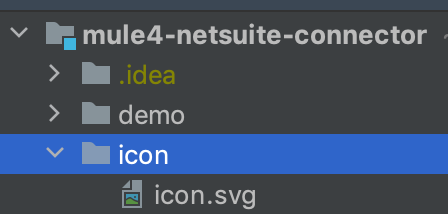
カスタムアイコンをコネクタに追加したら、アイコンは Anypoint Exchange と Anypoint Studio に表示されます。
XML SDK Module からの Mule プラグインのコンシューム
XML SDK Module 内から Mule プラグインをコンシュームする手順は、次のとおりです。
-
連動関係を XML SDK Module の POM ファイルに追加します。
たとえば、XML SDK Module で HTTP Connector と OAuth Module を使用するには、POM に次の連動関係を含める必要があります。
<dependencies> <dependency> <groupId>org.mule.connectors</groupId> <artifactId>mule-http-connector</artifactId> <version>1.2.1</version> <classifier>mule-plugin</classifier> <scope>compile</scope> </dependency> <dependency> <groupId>org.mule.modules</groupId> <artifactId>mule-oauth-module</artifactId> <version>1.1.2</version> <classifier>mule-plugin</classifier> <scope>compile</scope> </dependency> </dependencies> -
スキーマの場所を
<module> ルート要素に追加します。次に例を示します。<module name="Hello XML SDK" prefix="module-hello" ... xmlns:httpn="http://www.mulesoft.org/schema/mule/http" xmlns:oauth="http://www.mulesoft.org/schema/mule/oauth" xsi:schemaLocation=" ... http://www.mulesoft.org/schema/mule/http http://www.mulesoft.org/schema/mule/http/current/mule-http.xsd http://www.mulesoft.org/schema/mule/oauth http://www.mulesoft.org/schema/mule/oauth/current/mule-oauth.xsd"> ... <!-- use of the HTTP and OAuth connector --> </module>
操作の再利用
場合によって、繰り返されるメッセージプロセッサーが操作に含まれることがあります。このメッセージプロセッサーが新しい操作でカプセル化され、他の場所からコールされている場合、このメッセージプロセッサーに依存できます。
操作に循環連動関係がない場合、<module> で定義された各 <operation> を同じ <module> 内で再利用できます。
たとえば、挿入や更新を実行する前に <module> で入力パラメーターを検証するとします。次の例では、検証が操作 validate-and-insert および validate-and-update 内で繰り返されています。
<?xml version="1.0" encoding="UTF-8"?>
<module name="module-calling-operations-within-module"
        xmlns="http://www.mulesoft.org/schema/mule/module"
        xmlns:mule="http://www.mulesoft.org/schema/mule/core"
        xmlns:xsi="http://www.w3.org/2001/XMLSchema-instance"
        xsi:schemaLocation="
           http://www.mulesoft.org/schema/mule/module http://www.mulesoft.org/schema/mule/module/current/mule-module.xsd
           http://www.mulesoft.org/schema/mule/core http://www.mulesoft.org/schema/mule/core/current/mule.xsd">

    <operation name="validate-and-insert">
        <parameters>
            <parameter name="name" type="string"/>
        </parameters>
        <body>
            <!-- validate the 'name' != null -->
            <!-- validate the 'name' wasn't already added -->
            <!-- validate the 'name' matches some criteria -->
            <!-- validate the 'name' ... and so on -->
            <db:insert config-ref="dbConfig..">
                <db:sql>INSERT INTO PLANET(NAME) VALUES (:name)</db:sql>
                <db:input-parameters>#[{ 'name' : vars.name }]</db:input-parameters>
            </db:insert>
        </body>
    </operation>

    <operation name="validate-and-update">
        <parameters>
            <parameter name="originalName" type="string"/>
            <parameter name="newName" type="string"/>
        </parameters>
        <body>
            <!-- validate the 'newName' and 'originalName' != null -->
            <!-- validate the 'newName' and 'originalName' wasn't already added -->
            <!-- validate the 'newName' and 'originalName' matches some criteria -->
            <!-- validate the 'newName' and 'originalName' ... and so on -->
            <db:update config-ref="dbConfig..">
                <db:sql>update PLANET set NAME= :newName where NAME=':originalName'</db:sql>
                <db:input-parameters>#[{'originalName' : vars.originalName, 'newName' : vars.newName}]</db:input-parameters>
            </db:update>
        </body>
    </operation>
</module>
前述の例のこのプロセスを簡素化するには、他の操作からコールする validate 操作を追加することができます。次に例を示します。
    <operation name="validate">
        <parameters>
            <parameter name="aParameter" type="string"/>
        </parameters>
        <body>
            <!-- validate the 'aParameter' != null -->
            <!-- validate the 'aParameter' wasn't already added -->
            <!-- validate the 'aParameter' matches some criteria -->
            <!-- validate the 'aParameter' ... and so on -->
        </body>
    </operation>
<module> 内から他の操作をコンシュームする手順は、次のとおりです。
-
XML 名前空間の
xmlns:tns 属性と schemaLocation の新しい値を <module> に追加します。値は現在のモジュールの対象の名前空間をマップする必要があります。
-
操作の名前の前に
tns プレフィックスを付けて操作をコールします。完全なモジュールは次のようになります。<?xml version="1.0" encoding="UTF-8"?> <module name="module-calling-operations-within-module" xmlns="http://www.mulesoft.org/schema/mule/module" xmlns:mule="http://www.mulesoft.org/schema/mule/core" xmlns:tns="http://www.mulesoft.org/schema/mule/module-calling-operations-within-module" xmlns:xsi="http://www.w3.org/2001/XMLSchema-instance" xsi:schemaLocation=" http://www.mulesoft.org/schema/mule/module http://www.mulesoft.org/schema/mule/module/current/mule-module.xsd http://www.mulesoft.org/schema/mule/core http://www.mulesoft.org/schema/mule/core/current/mule.xsd http://www.mulesoft.org/schema/mule/module-calling-operations-within-module http://www.mulesoft.org/schema/mule/module-calling-operations-within-module/current/mule-module-calling-operations-within-module.xsd"> <operation name="validate-and-insert"> <parameters> <parameter name="name" type="string"/> </parameters> <body> <tns:validate aParameter="#[vars.name]"/> <db:insert config-ref="dbConfig.."> <db:sql>INSERT INTO PLANET(NAME) VALUES (:name)</db:sql> <db:input-parameters>#[{ 'name' : vars.name }]</db:input-parameters> </db:insert> </body> </operation> <operation name="validate-and-update"> <parameters> <parameter name="originalName" type="string"/> <parameter name="newName" type="string"/> </parameters> <body> <tns:validate aParameter="#[vars.originalName]"/> <tns:validate aParameter="#[vars.newName]"/> <db:update config-ref="dbConfig.."> <db:sql>update PLANET set NAME= :newName where NAME=':originalName'</db:sql> <db:input-parameters>#[{'originalName' : vars.originalName, 'newName' : vars.newName}]</db:input-parameters> </db:update> </body> </operation> <operation name="validate"> <parameters> <parameter name="aParameter" type="string"/> </parameters> <body> <!-- validate the 'aParameter' != null --> <!-- validate the 'aParameter' wasn't already added --> <!-- validate the 'aParameter' matches some criteria --> <!-- validate the 'aParameter' ... and so on --> </body> </operation> </module>
config-ref は同じモジュールへの参照であるために含まれていません。つまり、すべてのグローバルインスタンスが操作間で共有されることを意味します。
操作内の操作の再利用
use=CONTENT コンテンツパラメーターを使用して別の操作内の操作を再利用するには、内部タグ名の use=CONTENT パラメーターを参照します。
use=CONTENT を使用してその requiredParameter パラメーターを定義する shared-operation 操作があるとします。
別の操作 sample-operation は、次のように独自の定義内で shared-operation を再利用します。
<operation name="shared-operation" doc:description="A shared operation">
  <parameters>
    <parameter name="requiredParameter" type="ExampleType" role="CONTENT" doc:description="A required parameter" />
  </parameters>
  <body>
    <mule:set-payload value='#[output application/json --- {"parameterValue": vars.requiredParameter}]' doc:name="Set Payload" />
  </body>
</operation>

<operation name="sample-operation" doc:description="A sample operation">
    <parameters>
      <parameter name="requiredParameter" type="ExampleType" role="CONTENT" doc:description="A required parameter" />
    </parameters>
    <body>
      <tns:shared-operation>
        <tns:required-parameter>
          #[vars.required-Parameter]
        </tns:required-parameter>
      </tns:shared-operation>
      <mule:logger level="INFO" message="#[output application/json --- {payload: payload}]" category="${app.name}"/>
    </body>
    <output type="ExampleType"/>
</operation>| パラメーターである requiredParameter はキャメルケースの命名規則を使用していますが、参照である vars.required-Parameter はケバブケースの命名規則を使用しています。パラメーターや操作に名前を付けるときは、ケバブケースの命名規則を使用してプロジェクトの一貫性を維持します。XML SDK の制限事項を参照してください。 |
requiredParameter 値は、sample-operation の内部タグとして参照される必要があります。
それ以外の場合、プロジェクトは Attribute 'required-parameter' is not allowed to appear in element 'tns:shared-operation'. などのビルドエラーをスローします。
コネクタの XML 定義は、内部タグとして use=CONTENT を使用して設定されたパラメーターを生成します。content というパラメーターが内部タグ <file:content> として use=CONTENT に設定されている File Connector を参照してください。
テスト接続の提供
設計時には、グローバル要素の属性に間違った値 (間違ったユーザー名やパスワード、不適切な URL など) が提供された場合にフィードバックを提供すると便利です。このフィードバックを提供するには、接続テストをサポートするグローバル要素をモジュールに組み込む必要があります。
たとえば、file:connection 要素をモジュールに組み込むことで、XML SDK Module <module name="module-using-file"> で File Connector からの接続テスト機能を使用できます。デフォルトでは、モジュールはファイル設定から接続テスト機能を取得し、サポートします。
<?xml version="1.0" encoding="UTF-8"?>
<module name="module-using-file"  xmlns:xsi="http://www.w3.org/2001/XMLSchema-instance"
        xmlns="http://www.mulesoft.org/schema/mule/module"
        xmlns:file="http://www.mulesoft.org/schema/mule/file"
        xsi:schemaLocation="
           http://www.mulesoft.org/schema/mule/module http://www.mulesoft.org/schema/mule/module/current/mule-module.xsd
           http://www.mulesoft.org/schema/mule/file http://www.mulesoft.org/schema/mule/file/current/mule-file.xsd">

    <property name="workingDir" type="string"/>
    <file:config name="fileConfig">
        <file:connection workingDir="#[vars.workingDir]"/>
    </file:config>
</module>
接続テストは、UI から、fileConfig でカプセル化されたグローバル要素に委任されます。
テスト接続を提供する 2 つ以上のグローバル要素がモジュールに含まれる場合、使用するグローバル要素を xmlns:connection="true" 属性でマークしていないと、モジュールを作成したときにエラーが発生します。次に例を示します。
<?xml version="1.0" encoding="UTF-8"?>
<module name="module-using-file"  xmlns:xsi="http://www.w3.org/2001/XMLSchema-instance"
        xmlns="http://www.mulesoft.org/schema/mule/module"
        xmlns:file="http://www.mulesoft.org/schema/mule/file"
        xsi:schemaLocation="
           http://www.mulesoft.org/schema/mule/module http://www.mulesoft.org/schema/mule/module/current/mule-module.xsd
           http://www.mulesoft.org/schema/mule/file http://www.mulesoft.org/schema/mule/file/current/mule-file.xsd">

    <property name="workingDir" type="string"/>

    <!-- notice how the following global element is marked for test connection -->
    <file:config name="fileConfig" xmlns:connection="true">
        <file:connection workingDir="#[vars.workingDir]"/>
    </file:config>

    <file:config name="anotherFileConfig">
        <file:connection workingDir="#[vars.workingDir]"/>
    </file:config>
</module>
xmlns:connection="true" を使用して複数のグローバル要素をマークすると、1 つしか許容されないため、コンパイルに失敗します。
|
エラーの処理
場合によって、<body> 内の操作により、そのままの形で伝播すべきでないエラーコードがスローされることがあります。この場合、エンドユーザーにとってわかりやすいものにコードを再マップする必要があります。また、問題が <operation> 内の条件に関連する場合があります。
前者の場合、XML SDK はエラーマッピングを使用します。後者の場合、Raise Error コンポーネントが使用されます。
次の例は、2 つの数値を除算する操作でエラーマッピングを実行します。
<module name="Math XML SDK"...>
  ...
  <operation name="div" doc:description="Takes two numbers and returns the division of them">
    <parameters>
      <parameter name="numberA" type="number"/>
      <parameter name="numberB" type="number"/>
    </parameters>
    <body>
      <mule:set-payload value="#[vars.numberA / vars.numberB]"/>
    </body>
    <output type="number"/>
  </operation>
</module>
除数 numberB がゼロの場合、div 操作は MULE:EXPRESSION ランタイムエラーになりますが、エラーの詳細が十分に説明されていません。
より詳細なエラーを作成するには、エラーマッピングを使用して、div 操作で MATH-XML-SDK:DIVISION_BY_ZERO エラーを生成することができます。次に例を示します。
<module name="Math XML SDK"...>
  ...
  <operation name="div" doc:description="Takes two numbers and returns the division of them">
    <parameters>
      <parameter name="numberA" type="number"/>
      <parameter name="numberB" type="number"/>
    </parameters>
    <body>
      <mule:set-payload value="#[vars.numberA / vars.numberB]">
        <mule:error-mapping targetType="DIVISION_BY_ZERO" sourceType="MULE:EXPRESSION"/>
      </mule:set-payload>
    </body>
    <output type="number"/>
      <errors>
        <error type="DIVISION_BY_ZERO"/>
      </errors>
  </operation>
</module>
式 #[vars.numberA / vars.numberB] の評価の前に検証を実行することで、同じエラーを生成できます。式が失敗した場合、MATH-XML-SDK:DIVISION_BY_ZERO エラーが発生します。次に例を示します。
<module name="Math XML SDK"...>
  ...
  <operation name="div" doc:description="Takes two numbers and returns the division of them">
    <parameters>
      <parameter name="numberA" type="number"/>
      <parameter name="numberB" type="number"/>
    </parameters>
    <body>
      <mule:choice>
        <mule:when expression="#[vars.customError]">
          <mule:raise-error type="MATH-XML-SDK:DIVISION_BY_ZERO" description="Division by zero"/>
        </mule:when>
      </mule:choice>
      <mule:set-payload value="#[vars.numberA / vars.numberB]" />
    </body>
    <output type="number"/>
    <errors>
      <error type="DIVISION_BY_ZERO"/>
    </errors>
  </operation>
</module>
XML SDK カタログ
<property> と <parameter> の標準データ型はプリミティブ型 (string、boolean、number、date、datetime、localdatetime、time、localtime、timezone、binary、any、regex) です。
プリミティブ型よりも複雑な構造の型を定義するには、モジュールに挿入するデータ型のカタログを作成します。この例では、次のコンテンツのカタログファイル (hello-smart-connector/smart-connector/src/main/resources/module-Hello-catalog.xml) を作成します。
<?xml version="1.0" encoding="UTF-8"?>
<catalogs xmlns="http://www.mulesoft.org/schema/mule/types" >
    <catalog name="PersonXsdType" format="application/xml">
        <schema format="application/xml+schema" location="./person-schema.xsd" />
    </catalog>
    <catalog name="PersonJsonType" format="application/json">
        <schema format="application/json+schema" location="./person-schema.json" />
    </catalog>
</catalogs>
このカタログファイルは XSD および JSON スキーマファイルを参照します。
-
person-schema.xsd。次のコンテンツが含まれます。<xs:schema targetNamespace="http://uri" attributeFormDefault="unqualified" elementFormDefault="qualified" xmlns:xs="http://www.w3.org/2001/XMLSchema"> <xs:element name="Person"> <xs:complexType> <xs:sequence> <xs:element type="xs:string" name="name"/> <xs:element type="xs:string" name="lastName"/> <xs:element type="xs:integer" name="age"/> </xs:sequence> </xs:complexType> </xs:element> </xs:schema> -
person-schema.json。次のコンテンツが含まれます。{ "type": "object", "properties": { "age": { "type": "integer" }, "name": { "type": "string" }, "lastname": { "type": "string" } }, "additionalProperties": false }
tree hello-smart-connector/smart-connector フォルダーの構造は次のようになります。
➜  ~ tree hello-smart-connector/smart-connector
hello-smart-connector/smart-connector
├── pom.xml
└── src
    └── main
        └── resources
            ├── module-Hello-catalog.xml
            ├── module-Hello.xml
            ├── person-schema.json
            └── person-schema.xsd
スキーマの準備ができたら、関連付けられたカタログ (PersonXsdType および PersonJsonType) を参照することで、定義された型を使用します。次に例を示します。
<module name="Hello XML SDK" prefix="module-hello" ... >
  ...
  <operation name="person-xml-to-json" doc:description="Takes a Person in XML format and translates it to JSON">
    <parameters>
      <parameter name="content" type="PersonXsdType::{http://uri}Person"/>
    </parameters>
    <body>
      <ee:transform>
        <ee:set-payload><![CDATA[
          %dw 2.0
          %output application/json encoding='UTF-8'
          ---
          {
            "name" : vars.content.person.name,
            "lastname" : vars.content.person.lastName,
            "age" : vars.content.person.age as Number
          }
          ]]></ee:set-payload>
      </ee:transform>
    </body>
    <output type="PersonJsonType"/>
  </operation>
  <operation name="person-json-to-xml" doc:description="Takes a Person in JSON format and translates it to XML">
    <parameters>
      <parameter name="content" type="PersonJsonType"/>
    </parameters>
    <body>
      <ee:transform>
        <ee:set-payload><![CDATA[
          %dw 2.0
          %output application/xml
          ---
          person : vars.content
          ]]></ee:set-payload>
      </ee:transform>
    </body>
    <output type="PersonXsdType::{http://uri}Person"/>
  </operation>
<module/>
JSON スキーマの type 属性の値が、そのスキーマ (PersonJsonType) を含むカタログの名前になっています。ただし、XML スキーマの場合、type 属性の値では 2 つのコロン :: と qname (修飾名) 参照が Person 要素に付加されます (PersonXsdType::{http://uri}Person)。
JSON から XML への DataWeave 変換 (<ee:transform/> 内で示されている) を実行するには、モジュールで必須スキーマ (mule-ee.xsd) を見つけることができるように次の連動関係を POM ファイルに追加する必要があります。
<dependency>
    <groupId>com.mulesoft.mule.runtime.modules</groupId>
    <artifactId>mule-module-spring-config-ee</artifactId>
    <version>${mule.version}</version>
    <scope>provided</scope>
</dependency>上記の例の操作を Mule アプリケーションで使用するには、値を操作に提供する必要があります。次に例を示します。
<mule ...>
  <flow name="person-xml-2-json-flow">
    <!-- create an XML Person and store it in the payload -->
    <ee:transform>
      <ee:set-payload><![CDATA[
        %dw 2.0
        %output application/xml
        ---
        person : {
          name : "Lautaro",
          lastName: "Fernandez",
          age : 54
        }
        ]]></ee:set-payload>
    </ee:transform>
    <!-- call the operation -->
    <module-hello:person-xml-to-json content="#[payload]"/>
    <!-- at this point, the payload is a JSON Person -->
  </flow>

  <flow name="person-json-2-xml-flow">
    <!-- create a JSON Person and store it in the payload -->
    <ee:transform>
      <ee:set-payload><![CDATA[
        %dw 2.0
        %output application/json
        ---
        {
          name : "Lautaro",
          lastName: "Fernandez",
          age : 54
        }
        ]]></ee:set-payload>
    </ee:transform>
    <!-- call the operation -->
    <module-hello:person-json-to-xml content="#[payload]"/>
    <!-- at this point, the payload is an XML Person -->
  </flow>
</mule>
プリミティブ型ではない値をパラメーター化すると、定義済みの <operation> で値を role="CONTENT" として宣言できるため、<flow> 内で追加のプロセッサーを使用して操作をコールする必要がなくなります。この例の person-xml-to-json 操作でこの属性を content パラメーターに追加します。
<module name="Hello XML SDK" prefix="module-hello" ... >
  ...
  <operation name="person-xml-to-json" doc:description="Takes a Person in XML format and translates it to JSON">
    <parameters>
      <parameter name="content" type="PersonXsdType::{http://uri}Person" role="CONTENT"/>
    </parameters>
    <body>
      <ee:transform>
        <ee:set-payload><![CDATA[
          %dw 2.0
          %output application/json encoding='UTF-8'
          ---
          {
            "name" : vars.content.person.name,
            "lastname" : vars.content.person.lastName,
            "age" : vars.content.person.age as Number
          }
          ]]></ee:set-payload>
      </ee:transform>
    </body>
    <output type="PersonJsonType"/>
  </operation>
  ...
<module/>上記の例の操作を Mule アプリケーションで使用するには、値を操作に提供する必要があります。次に例を示します。
<mule ...>
  <flow name="person-xml-2-json-using-content-flow">
    <!-- call the operation -->
    <module-hello:person-xml-to-json>
      </module-hello:content><![CDATA[
        %dw 2.0
        %output application/xml
        ---
        person : {
          name : "Lautaro",
          lastName: "Fernandez",
          age : 54
        }]]>
      </module-hello:content>
    </module-hello:person-xml-to-json>
    <!-- at this point, the payload is a JSON Person -->
  </flow>
  ..
</mule>
XML SDK Module の稼働サンプル
https://github.com/mulesoft-labs/smart-connectors-integration-tests には、次のディレクトリが含まれます。
-
apps-using-smart-connectors: XML SDK Module を使用する Mule アプリケーション。 -
smart-connectors: DataWeave、HTTP Connector、File Connector、Validation Module などを組み込む XML SDK Module。
このいくつかの例を以下のサブセクションで説明します。
例: コアコンポーネントの使用
この例では、Set Payload (mule:set-payload) などのコアコンポーネントを組み込みます。
GitHub の場所: smart-connectors/smart-connector-using-core
<?xml version="1.0" encoding="UTF-8"?>
<module name="module-using-core"
        doc:description="This module relies entirely in runtime provided components (no other Plugin dependencies)"

        xmlns="http://www.mulesoft.org/schema/mule/module"
        xmlns:mule="http://www.mulesoft.org/schema/mule/core"
        xmlns:doc="http://www.mulesoft.org/schema/mule/documentation"
        xmlns:tns="http://www.mulesoft.org/schema/mule/module-using-core"
        xmlns:xsi="http://www.w3.org/2001/XMLSchema-instance"
        xsi:schemaLocation="
           http://www.mulesoft.org/schema/mule/module http://www.mulesoft.org/schema/mule/module/current/mule-module.xsd
           http://www.mulesoft.org/schema/mule/core http://www.mulesoft.org/schema/mule/core/current/mule.xsd
           http://www.mulesoft.org/schema/mule/module-using-core http://www.mulesoft.org/schema/mule/module-using-core/current/mule-module-using-core.xsd">

    <operation name="set-payload-hardcoded" doc:description="Sets the payload to the String value 'Wubba Lubba Dub Dub'">
        <body>
            <tns:private-set-payload-hardcoded/>
        </body>
        <output type="string" doc:description="Payload's output"/>
    </operation>

    <operation name="set-payload-hardcoded-two-times" doc:description="Sets the payload to the String value 'Wubba Lubba Dub Dub Dub Dub' (uses references to local operation)">
        <body>
            <tns:set-payload-hardcoded/>
            <mule:set-payload value="#[payload ++ ' Dub Dub']"/>
        </body>
        <output type="string" doc:description="Payload's output"/>
    </operation>

    <operation name="fail-raise-error">
        <parameters>
            <parameter name="customError" type="boolean" defaultValue="true"/>
        </parameters>
        <body>
            <mule:choice>
                <mule:when expression="#[vars.customError]">
                    <mule:raise-error type="MODULE-USING-CORE:XML_SDK_CUSTOM_ERROR" description="A custom error occurred in the module."/>
                </mule:when>
                <mule:otherwise>
                    <mule:raise-error type="CONNECTIVITY" description="#['A module error ' ++ 'occurred.']"/>
                </mule:otherwise>
            </mule:choice>
        </body>
        <output type="string"/>
        <errors>
            <error type="XML_SDK_CUSTOM_ERROR"/>
        </errors>
    </operation>

    <operation name="fail-raise-error-with-mapping">
        <parameters>
            <parameter name="customErrorMapping" type="boolean" defaultValue="true"/>
        </parameters>
        <body>
            <tns:fail-raise-error customError="#[vars.customErrorMapping]">
                <mule:error-mapping targetType="MODULE-USING-CORE:XML_SDK_CUSTOM_ERROR_REMAPPED" sourceType="MODULE-USING-CORE:XML_SDK_CUSTOM_ERROR"/>
                <mule:error-mapping targetType="SECURITY" sourceType="CONNECTIVITY"/>
            </tns:fail-raise-error>
        </body>
        <output type="string"/>
        <errors>
            <error type="XML_SDK_CUSTOM_ERROR_REMAPPED"/>
        </errors>
    </operation>

    <operation name="private-set-payload-hardcoded" visibility="PRIVATE">
        <body>
            <mule:set-payload value="Wubba Lubba Dub Dub"/>
        </body>
        <output type="string"/>
    </operation>
 </module>
例: JSON カスタム型の使用
この例では JSON 型を組み込みます。
<?xml version="1.0" encoding="UTF-8"?>
<module name="module-using-custom-types-json"
        doc:description="This module relies entirely in runtime provided components (no other Plugin dependencies)"

        xmlns="http://www.mulesoft.org/schema/mule/module"
        xmlns:mule="http://www.mulesoft.org/schema/mule/core"
        xmlns:doc="http://www.mulesoft.org/schema/mule/documentation"
        xmlns:xsi="http://www.w3.org/2001/XMLSchema-instance"
        xsi:schemaLocation="
           http://www.mulesoft.org/schema/mule/module http://www.mulesoft.org/schema/mule/module/current/mule-module.xsd
           http://www.mulesoft.org/schema/mule/core http://www.mulesoft.org/schema/mule/core/current/mule.xsd">

    <operation name="set-payload-hardcoded" doc:description="Sets the payload to the String value 'Wubba Lubba Dub Dub'">
        <parameters>
            <parameter name="anEnumParameter" type="an-enum-type"/>
        </parameters>
        <body>
            <mule:set-payload value="Wubba Lubba Dub Dub"/>
        </body>
        <output type="a-custom-type" doc:description="Payload's output"/>
    </operation>

</module><?xml version="1.0" encoding="UTF-8"?>
<catalogs xmlns="http://www.mulesoft.org/schema/mule/types" >
<catalog name="a-custom-type" format="application/json">
<schema format="application/json+schema" location="./a-custom-type-schema.json" />
</catalog>
<catalog name="an-enum-type" format="application/json">
<schema format="application/json+schema" location="./an-enum-type-schema.json" />
</catalog>
</catalogs>{
"type": "object",
"properties": {
"number": {
"type": "number"
},
"street_name": {
"type": "string"
},
"street_type": {
"type": "string",
"enum": [
"Street",
"Avenue",
"Boulevard"
]
}
},
"additionalProperties": false
}例: カスタム XML 型の使用
この例ではカスタム XML 型を組み込みます。
<?xml version="1.0" encoding="UTF-8"?>
<module name="module-using-custom-types-xsd"
        doc:description="This module relies entirely in runtime provided components (no other Plugin dependencies)"

        xmlns="http://www.mulesoft.org/schema/mule/module"
        xmlns:mule="http://www.mulesoft.org/schema/mule/core"
        xmlns:doc="http://www.mulesoft.org/schema/mule/documentation"
        xmlns:xsi="http://www.w3.org/2001/XMLSchema-instance"
        xsi:schemaLocation="
           http://www.mulesoft.org/schema/mule/module http://www.mulesoft.org/schema/mule/module/current/mule-module.xsd
           http://www.mulesoft.org/schema/mule/core http://www.mulesoft.org/schema/mule/core/current/mule.xsd">

    <operation name="operation-with-custom-types">
        <parameters>
            <parameter name="value" type="XsdType1::Root"/>
            <!--extra parameter without targetNamespace in the schema under XsdType3-->
            <parameter name="value2" type="XsdType3::{http://validationnamespace.raml.org}objectName"/>
        </parameters>
        <body>
            <mule:set-payload value="#[vars.value]"/>
        </body>
        <output type="XsdType2::{http://uri}Root0"/>
    </operation>

</module><?xml version="1.0" encoding="UTF-8"?>
<catalogs xmlns="http://www.mulesoft.org/schema/mule/types" >
<catalog name="XsdType1" format="application/xml">
<schema format="application/xml+schema" location="./type1-schema.xsd" />
</catalog>
<catalog name="XsdType2" format="application/xml">
<schema format="application/xml+schema" location="./type2-schema.xsd" />
</catalog>
<catalog name="XsdType3" format="application/xml">
<schema format="application/xml+schema" location="./type3-schema-from-raml-type.xsd" />
</catalog>
</catalogs><xs:schema attributeFormDefault="unqualified" elementFormDefault="qualified" xmlns:xs="http://www.w3.org/2001/XMLSchema">
<xs:element name="Root">
<xs:complexType>
<xs:annotation>
<xs:documentation xml:lang="en">
A user with all the information
</xs:documentation>
</xs:annotation>
<xs:sequence>
<xs:element type="xs:string" name="name"/>
<xs:element type="xs:string" name="lastName"/>
<xs:element type="xs:boolean" name="male"/>
<xs:element type="xs:integer" name="age"/>
</xs:sequence>
</xs:complexType>
</xs:element>
</xs:schema>例: リソースのエクスポート
この例では、リソースがコネクタと共にエクスポートされてパッケージ化されるように、リソースをプロジェクトに追加する方法を説明します。
目的はリソースをエクスポートして主要な Mule アプリケーションで使用できるようにすることです。このため、モジュールファイル module-exporting-resources.xml に機能は含まれません。
<?xml version="1.0" encoding="UTF-8"?>
<module name="module-exporting-resources"
        doc:description="This module relies entirely in runtime provided components (no other Plugin dependencies) and exports resources"
        xmlns="http://www.mulesoft.org/schema/mule/module"
        xmlns:doc="http://www.mulesoft.org/schema/mule/documentation"
        xmlns:xsi="http://www.w3.org/2001/XMLSchema-instance"
        xsi:schemaLocation="http://www.mulesoft.org/schema/mule/module http://www.mulesoft.org/schema/mule/module/current/mule-module.xsd">

    <!--To make this module 4.1.1 compliant, we will add a property with no further use.
    From 4.1.3 this is not necessary =] -->
    <property name="__hiden_property_backward_compatible_do_not_use" type="string" defaultValue="do not use" />

 </module>
次のリソースファイルがエクスポートされます。
%dw 2.0

/******************************************************************************************************************************
 NOTICE:
    This file, `dwModule.dwl`, must be referenced in the META-INF/mule-artifact/mule-artifact.json file to properly export the
    resource so that the the functions being consumed (`five()`, `echo(String)`, `toUpper(Person)`, `toUpper(Array<Person)`) in
    the module `module-using-dw.xml` are accessible in the application using it (remember that smart connectors are macro
    expanded, thus the resources must be reached by the main app)
 ******************************************************************************************************************************/

// zero-ary operation
fun five() = 5

// unary operation with simple type
fun echo(name:String): String = name

// unary operation with complex type
type Person = {name: String, lastname: String}
fun toUpper(p: Person): Person =
    {
        name:upper(p.name),
        lastname:upper(p.lastname)
    }

// unary operation with array of complex type
fun toUpper(persons: Array<Person>): Array<Person> =
    persons map toUpper($)
リソースファイルは、モジュールの名前 (メインモジュールファイルで定義) にちなんだ名前が付けられた新しいフォルダー内に配置する必要があります。
この例では、モジュールの名前は module-exporting-resources のため、フォルダーの名前は module_exporting_resources である必要があります。ハイフンはアンダースコアに置き換えられます。
この新しいフォルダーまたはそのサブフォルダーに含まれるすべてのファイルが XML SDK により自動的にエクスポートされます。
この例では、フォルダー構造は次のようになります。
smart-connector-exporting-resources
├── pom.xml
└── src
    └── main
        └── resources
            ├── module-exporting-resources.xml
            └── module_exporting_resources
                └── weirdFolder
                    └── myMappings.dwl
最終的に、エクスポートされたファイルを Mule フローで使用できます。この最初の例は、エクスポートされたファイルで定義されている dataweave 関数を使用する方法を示しています。
<flow name="set-payload-invoking-directly-dw-fun-flow">
    <!-- showing that the application also has access to the DW functions located in the weirdFolder/myMappings.dwl
    file defined in the module's code-->
    <set-payload value="#[module_exporting_resources::weirdFolder::myMappings::five()]"/>
</flow>
この 2 番目の例は、たとえば、 Parse Template コンポーネントで使用される場所を介してファイルにアクセスする方法を示しています。
<flow name="read-exported-file">
    <mule:parse-template location="module_exporting_resources/weirdFolder/myMappings.dwl" target="template"/>
</flow>
例: DataWeave の使用
この例では、Transform (ee:transform) コンポーネントを使用して DataWeave を組み込みます。
GitHub の場所: smart-connectors/smart-connector-using-dw
<?xml version="1.0" encoding="UTF-8"?>
<module name="module-using-dw"
        category="SELECT"
        doc:description="This module relies entirely in runtime provided components (no other Plugin dependencies) and DW"

        xmlns="http://www.mulesoft.org/schema/mule/module"
        xmlns:ee="http://www.mulesoft.org/schema/mule/ee/core"
        xmlns:doc="http://www.mulesoft.org/schema/mule/documentation"
        xmlns:xsi="http://www.w3.org/2001/XMLSchema-instance"
        xsi:schemaLocation="
           http://www.mulesoft.org/schema/mule/module http://www.mulesoft.org/schema/mule/module/current/mule-module.xsd
           http://www.mulesoft.org/schema/mule/ee/core http://www.mulesoft.org/schema/mule/ee/core/current/mule-ee.xsd">

    <operation name="set-payload-through-dw" doc:description="Sets the payload to the structure of PersonJsonType">
        <body>
            <ee:transform>
                <ee:message>
                    <ee:set-payload><![CDATA[
                    %dw 2.0
                    output application/json encoding='UTF-8'
                    ---
                    {
                        'name' : 'Rick',
                        'lastname' : 'Sanchez'
                    }
                    ]]></ee:set-payload>
                </ee:message>
            </ee:transform>
        </body>
        <output type="PersonJsonType" doc:description="Payload's output"/>
    </operation>

    <operation name="set-payload-through-dw-fun" doc:description="Sets the payload to the structure of PersonJsonType through a function call">
        <body>
            <ee:transform>
                <ee:message>
                    <ee:set-payload><![CDATA[
                    %dw 2.0
                    output application/json encoding='UTF-8'
                    ---
                    {
                        'number' : module_using_dw::weirdFolder::dwModule::five()
                    }
                    ]]></ee:set-payload>
                </ee:message>
            </ee:transform>
        </body>
        <output type="number" doc:description="Payload's output"/>
    </operation>

    <operation name="set-payload-through-dw-fun-with-string-type" doc:description="Sets the payload to the parameterized string 'name' through a function call passing through parameters">
        <parameters>
            <parameter name="name" type="string"/>
        </parameters>
        <body>
            <ee:transform>
                <ee:message>
                    <ee:set-payload><![CDATA[
                    %dw 2.0
                    output application/json encoding='UTF-8'
                    ---
                        module_using_dw::weirdFolder::dwModule::echo(vars.name)
                    ]]></ee:set-payload>
                </ee:message>
            </ee:transform>
        </body>
        <output type="string" doc:description="Payload's output"/>
    </operation>

    <operation name="set-payload-through-dw-fun-with-person-type" doc:description="Sets the payload to the structure of PersonJsonType through a function call passing through parameters">
        <parameters>
            <parameter name="person" type="PersonJsonType"/>
        </parameters>
        <body>
            <ee:transform>
                <ee:message>
                    <ee:set-payload><![CDATA[
                    %dw 2.0
                    output application/json encoding='UTF-8'
                    ---
                        module_using_dw::weirdFolder::dwModule::toUpper(vars.person)
                    ]]></ee:set-payload>
                </ee:message>
            </ee:transform>
        </body>
        <output type="PersonJsonType" doc:description="Payload's output uppercased"/>
    </operation>

    <operation name="set-payload-through-dw-fun-with-persons-type" doc:description="Sets the payload to the structure of PersonsJsonType through a function call passing through parameters">
        <parameters>
            <parameter name="persons" type="PersonsJsonType"/>
        </parameters>
        <body>
            <ee:transform>
                <ee:message>
                    <ee:set-payload><![CDATA[
                    %dw 2.0
                    output application/json encoding='UTF-8'
                    ---
                        module_using_dw::weirdFolder::dwModule::toUpper(vars.persons)
                    ]]></ee:set-payload>
                </ee:message>
            </ee:transform>
        </body>
        <output type="PersonsJsonType" doc:description="Payload's output uppercased"/>
    </operation>

 </module>
例: File Connector の使用
場所 smart-connectors/smart-connector-using-file: File Connector により異なる (file:list など)
<?xml version="1.0" encoding="UTF-8"?>
<module name="module-using-file"

        xmlns="http://www.mulesoft.org/schema/mule/module"
        xmlns:file="http://www.mulesoft.org/schema/mule/file"
        xmlns:xsi="http://www.w3.org/2001/XMLSchema-instance"
        xsi:schemaLocation="
           http://www.mulesoft.org/schema/mule/module http://www.mulesoft.org/schema/mule/module/current/mule-module.xsd
           http://www.mulesoft.org/schema/mule/file http://www.mulesoft.org/schema/mule/file/current/mule-file.xsd">

    <property name="workingDir" type="string"/>
    <property name="filenamePattern" type="string"/>

    <file:config name="file">
        <file:connection workingDir="#[vars.workingDir]"/>
    </file:config>
    <file:matcher name="globalMatcher" directories="REQUIRE" filenamePattern="#[vars.filenamePattern]" />

    <operation name="list">
        <parameters>
            <parameter name="path" type="string"/>
        </parameters>
        <body>
            <file:list directoryPath="#[vars.path]" config-ref="file" matcher="globalMatcher"/>
        </body>
        <output type="string"/>
    </operation>

 </module>
HTTP Connector の使用
この例では、HTTP 要求 (http:requester) を使用して HTTP Connector を組み込みます。
GitHub の場所: smart-connectors/smart-connector-using-http
<?xml version="1.0" encoding="UTF-8"?>
<module name="module-using-http"
        xmlns="http://www.mulesoft.org/schema/mule/module"
        xmlns:http="http://www.mulesoft.org/schema/mule/http"
        xmlns:xsi="http://www.w3.org/2001/XMLSchema-instance"
        xsi:schemaLocation="
           http://www.mulesoft.org/schema/mule/module http://www.mulesoft.org/schema/mule/module/current/mule-module.xsd
           http://www.mulesoft.org/schema/mule/http http://www.mulesoft.org/schema/mule/http/current/mule-http.xsd">

    <property name="host" type="string"/>
    <property name="port" type="string"/>
    <property name="protocol" type="string"/>

    <http:request-config name="httpreq-config" basePath="/">
        <http:request-connection host="#[vars.host]" protocol="#[vars.protocol]" port="#[vars.port]"/>
    </http:request-config>

    <operation name="do-get">
        <parameters>
            <parameter name="path" type="string"/>
        </parameters>
        <body>
            <http:request config-ref="httpreq-config" path="#[vars.path]" method="GET" />
        </body>
        <output type="any"/>
    </operation>

 </module>
例: 別の XML SDK の使用
この例は、XML SDK Module module-using-core (「例: コアコンポーネントの使用」を参照) を使用する 1 つの XML SDK Module (module-using-smart-connector) を示しています。
<?xml version="1.0" encoding="UTF-8"?>
<module name="module-using-smart-connector"

        xmlns="http://www.mulesoft.org/schema/mule/module"
        xmlns:module-using-core="http://www.mulesoft.org/schema/mule/module-using-core"
        xmlns:xsi="http://www.w3.org/2001/XMLSchema-instance"
        xsi:schemaLocation="
           http://www.mulesoft.org/schema/mule/module http://www.mulesoft.org/schema/mule/module/current/mule-module.xsd
           http://www.mulesoft.org/schema/mule/module-using-core http://www.mulesoft.org/schema/mule/module-using-core/current/mule-module-using-core.xsd">

    <operation name="proxy-set-payload-hardcoded">
        <body>
            <module-using-core:set-payload-hardcoded/>
        </body>
        <output type="string"/>
    </operation>

 </module>
Validation Module の使用
この例では、Validation Module、具体的には validation:is-email を使用します。
<?xml version="1.0" encoding="UTF-8"?>
<module name="module-using-validation"

        xmlns="http://www.mulesoft.org/schema/mule/module"
        xmlns:validation="http://www.mulesoft.org/schema/mule/validation"
        xmlns:xsi="http://www.w3.org/2001/XMLSchema-instance"
        xsi:schemaLocation="
           http://www.mulesoft.org/schema/mule/module http://www.mulesoft.org/schema/mule/module/current/mule-module.xsd
           http://www.mulesoft.org/schema/mule/validation http://www.mulesoft.org/schema/mule/validation/current/mule-validation.xsd">

    <operation name="is-really-email">
        <parameters>
            <parameter name="inputEmail" type="string"/>
        </parameters>
        <body>
            <validation:is-email email="#[vars.inputEmail]"/>
        </body>
    </operation>

 </module>
XML SDK の制限事項
現在、SDK には次の制限事項があります。
-
XML SDK では、ソース (
<scheduler> など) やルーターではなくアウトバウンド操作のみが提供されます。 -
操作では、再帰的コールはサポートされません。
-
name や config-ref は予約済みのキーワードであるため、操作ではこれらの名前のパラメーターを使用できません。 -
ケバブケースの命名規則を使用すると、名前値の変換時に単語間にハイフンが挿入されるため、XML SDK プロジェクトでパラメーターや操作に名前を付けるときにケバブケースの命名規則を使用すると、XML タグの生成中にエラーが生じることがありません。