
Change the Correlation ID During Flow Execution with Tracing Module
You might want to change the correlation ID of the event for a given scope or a set of operations if:
-
You are processing the results of a database query inside a For Each scope and you want to correlate the event with the register you are processing.
-
You are consuming a JMS message queue and you want to proceed using the JMS correlation ID for traceability purposes.
For these scenarios, the Tracing module With CorrelationID scope enables you to modify the correlation ID during the execution of that scope.
Configure the With CorrelationID Scope
In the following Mule app example, you configure the With CorrelationID scope in Anypoint Code Builder:
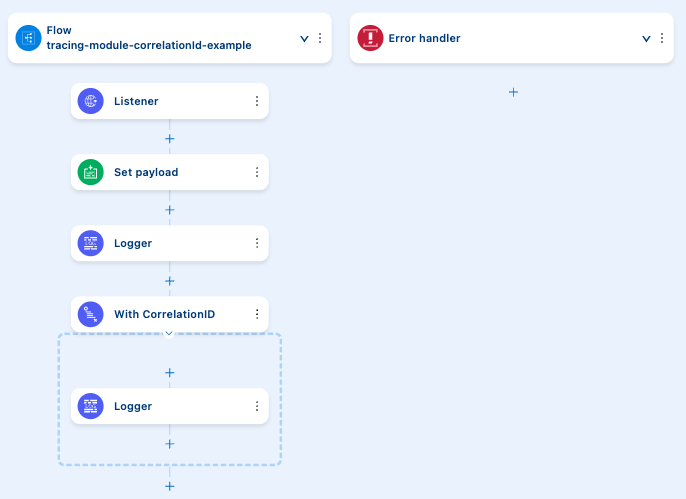
-
In the canvas UI, click the
 (Add component) icon, search for
 Listener, and select Listener from the HTTP results. -
On the General tab, set Path to
/test. -
Add an HTTP Listener configuration (
<http:listener-config>) that listens on port8081. See Add a Global Configuration. -
Click the
(Add component) icon after Listener, search for Set Payload, and select it. -
On the General tab, set Value to
some. -
Click the
(Add component) icon after Set Payload, search for Logger, and select it. -
On the General tab, set Message to
#[payload]and Level toWARN. -
Click the
(Add component) icon after Logger, search for Tracing, and select With CorrelationID. -
On the General tab, set Correlation id to
#[correlationId ++ '-Example']: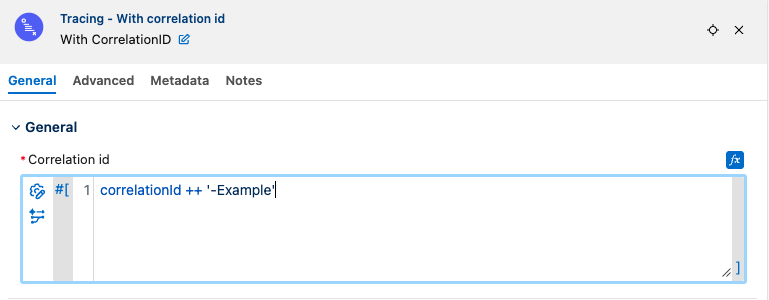
-
Inside the With CorrelationID scope, click the
(Add component) icon, search for Logger, and select it. -
On the General tab, set Message to
#[payload]and Level toWARN. -
Run your application in debug mode.
-
In a terminal, run
curl localhost:8081/test.
The application output logs are:
WARN  2021-03-30 16:46:11,269 [[MuleRuntime].uber.05: [test-project-app].example.CPU_LITE @6d3b5ad] [processor: example/processors/1; event: bad0e5b0-9191-11eb-a0b3-36548d51aeee] org.mule.runtime.core.internal.processor.LoggerMessageProcessor: some
WARN  2021-03-30 16:46:11,271 [[MuleRuntime].uber.05: [test-project-app].example.CPU_LITE @6d3b5ad] [processor: example/processors/2/processors/0; event: bad0e5b0-9191-11eb-a0b3-36548d51aeee-Example] org.mule.runtime.core.internal.processor.LoggerMessageProcessor: some
WARN  2021-03-30 16:46:11,274 [[MuleRuntime].uber.05: [test-project-app].example.CPU_LITE @6d3b5ad] [processor: example/processors/3; event: bad0e5b0-9191-11eb-a0b3-36548d51aeee] org.mule.runtime.core.internal.processor.LoggerMessageProcessor: some
XML for Configuring With CorrelationID Scope
Paste this code into the configuration XML file of your integration project to quickly load the flow for this example into your Mule app:
<?xml version="1.0" encoding="UTF-8"?>

<mule xmlns:json="http://www.mulesoft.org/schema/mule/json" xmlns:tracing="http://www.mulesoft.org/schema/mule/tracing"
	xmlns:http="http://www.mulesoft.org/schema/mule/http"
	xmlns="http://www.mulesoft.org/schema/mule/core" xmlns:doc="http://www.mulesoft.org/schema/mule/documentation" xmlns:xsi="http://www.w3.org/2001/XMLSchema-instance" xsi:schemaLocation="http://www.mulesoft.org/schema/mule/core http://www.mulesoft.org/schema/mule/core/current/mule.xsd
http://www.mulesoft.org/schema/mule/http http://www.mulesoft.org/schema/mule/http/current/mule-http.xsd
http://www.mulesoft.org/schema/mule/tracing http://www.mulesoft.org/schema/mule/tracing/current/mule-tracing.xsd
http://www.mulesoft.org/schema/mule/json http://www.mulesoft.org/schema/mule/json/current/mule-json.xsd">
	<http:listener-config name="HTTP_Listener_config" >
		<http:listener-connection host="0.0.0.0" port="8081" />
	</http:listener-config>
	<flow name="tracingmodule2Flow"  >
		<http:listener config-ref="HTTP_Listener_config" path="/test"/>
		<set-payload value="some" />
		<logger level="WARN" message="#[payload]"/>
		<tracing:with-correlation-id correlationId="#[correlationId ++ '-Example']">
			<logger level="WARN"  message="#[payload]"/>
		</tracing:with-correlation-id>
	</flow>
</mule>