
OAuth 2.0 Access Token Enforcement Using Mule OAuth Provider Policy
Policy Name |
OAuth 2.0 Access Token Enforcement Using Mule OAuth Provider Policy |
Summary |
Allows access only to authorized client applications |
Category |
Security |
First Mule version available |
v4.1.1 |
Returned Status Codes |
400 - Invalid token |
401 - Unauthorized access or error when connecting to the authorization server |
|
403 - Forbidden, invalid client application credentials |
|
500 - Bad response from authorization server, or WSDL SOAP fault error. |
Summary
The OAuth 2.0 Access Token Enforcement policy, which works exclusively with the Mule OAuth provider, restricts access to a protected resource to only those HTTP requests that provide a valid OAuth 2 token belonging to a client application with API access. The policy does not generate tokens but only validates them.
This policy is designed to be used exclusively with Mule OAuth provider. Using the policy with any other OAuth 2.0 provider (for example, Facebook, Google, or Microsoft Azure) is not supported.
Configuring Policy Parameters
Mule Gateway
When you apply the policy to your API from the UI, these parameters are displayed:
| Element | Description | Example |
|---|---|---|
Scopes |
Displays a space-separated list of supported scopes. |
|
Scope Validation Criteria |
Determines if the token must contain all defined scopes or just one.
The values are |
If the ‘Contains all scopes’ value is selected, the tokens with the scopes |
Access Token validation endpoint url |
The URL of the Access Token validation endpoint of the external OAuth 2 provider. |
The link to a Mule provider hosted by the client: http://client-hostetd-mule-provider-url.cloudhub.io/validate. |
Validate TLS Certificate |
Enables third-party authentication server TLS validation. |
If selected, the communication with the token validation endpoint uses the TLS protocol. |
Expose Headers |
In a proxy scenario, specifies whether headers must be exposed in the request to the backend. User properties returned by the federation server are prefixed with 'X-AGW-' and sent as headers to the backend. |
See Leveraging Token Validation Endpoint Information for Mule Applications for more information about this element. |
Skip Client Id Validation |
Skips the client application’s API contract validation. |
If selected, Step 4 of the diagram in the How This Policy Works section is skipped. |
Authentication request timeout |
Sets the maximum time, in milliseconds, to wait for a response when authenticating with the Access Token validation endpoint. |
|
How This Policy Works
The following diagram illustrates the OAuth 2.0 Token Enforcement using Mule OAuth Provider policy workflow:
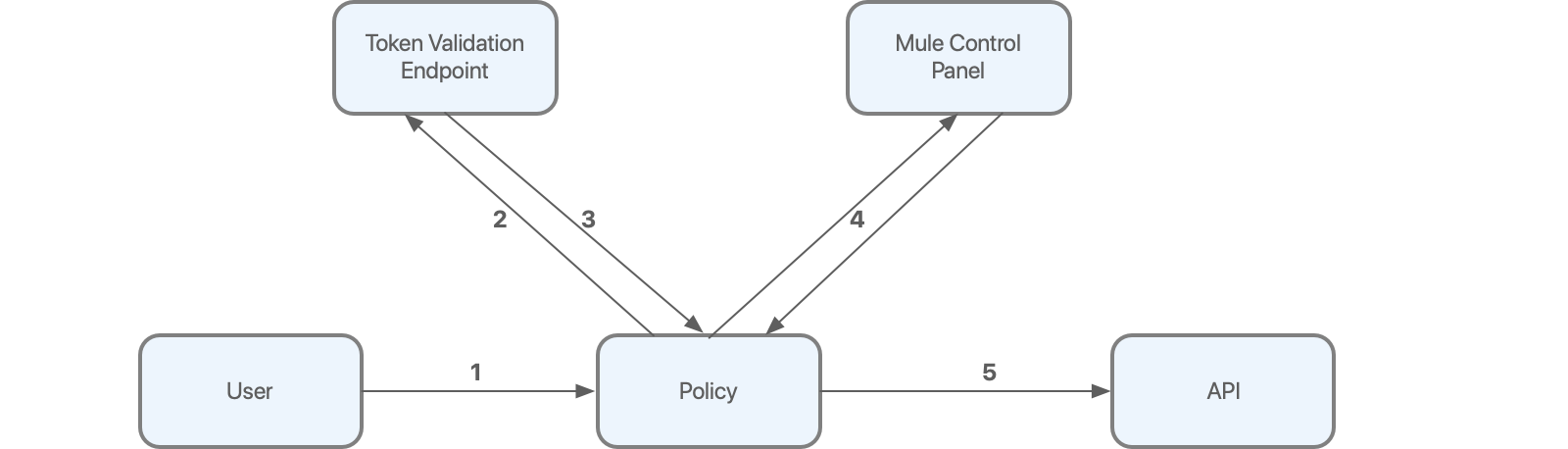
As shown in the diagram:
-
The user first sends an HTTP request to the API protected by the policy.
-
The policy extracts the token from the request and sends it to the validation endpoint to verify the integrity of the token.
-
The token validation endpoint returns token metadata, including the client ID of the client application.
-
Using a local database updated with contracts previously obtained from Anypoint Platform, the policy verifies whether the client ID has access to the API.
-
If all the validations are successfully completed, the request is allowed to reach the backend.
Leveraging Token Validation Endpoint Information for Mule Applications
When a token validation endpoint successfully validates a token, certain information, such as configurable fields from Mule OAuth provider, are returned to the policy.
The following example illustrates the token validation response from the authorization server:
---
{
    "uid":"john.doe",
    "mail":"john.doe@example.com"
    "token_type":"Bearer",
    "expires_in":3600,
    "alias" : ["Jhon", "Jhonny", "Mr Doe"],
    "address" : {
        "city": "london",
        "road": “abbey road"
    }
} --- The fields returned by the OAuth provider are processed by the policy, propagated throughout the Mule flow, and finally exposed to the backend if the application requesting the access uses an HTTP requester.
Token Caching
After the system validates a token, that token is cached (by default), until it expires, thereby improving the performance of the policy. In certain cases, such as in the case of revoked tokens, you might want to minimize or even disable caching.
The validation endpoint sends multiple properties to the policy, including the expiration time of the token. If the expiration information is not available, tokens are not cached.
To control the time taken to cache the tokens, before you attempt revalidating against the token validation endpoint, specify the following property when starting Mule runtime engine:
anypoint.platform.max_federation_expiration_time=<expiration time in seconds>
Alternatively, you can specify this parameter in the wrapper.conf file. Setting this property caches the token for the specified amount of time or until the tokens expire, whichever occurs first. If you have enabled this property and the validation endpoint does not send the expiration information, tokens are not cached.
To control the number of tokens that can be cached simultaneously, specify the following property when starting Mule runtime engine:
anypoint.platform.oauth2_cache_max_size=<amount of tokens to be cached; default value is 10.000; specify 0 to disable caching>
Alternatively, you can specify this parameter in the wrapper.conf file.
Configuring the Expose Headers Option
If you configured the Expose Headers option in the policy and if the application (for example, out-of-the-box proxies) uses the HTTP requester, the properties are redirected to the backend as headers.
For each field, the original request to the protected resource is enriched with the HTTP headers using the format X-AGW- + <key>=<value>. For the example response from the previous section, the following headers are added:
---
X-AGW-uid=john.doe
X-AGW-mail=john.doe@example.com
X-AGW-token_type=Bearer
---
The propagated properties do not include the scope and expires_in objects and arrays.
For further processing within the flow, the original unparsed response from the validation endpoint is made available. The information is stored in an authentication object.
For example, if a mail field is returned to the policy, you can access the value of this field by using the following DataWeave 2.0 expression:
#[authentication.properties.userProperties.mail]
You can obtain the client ID of the OAuth2 token by using the following DataWeave 2.0 expression:
#[authentication.principal]
Communicating with the Token Validation Endpoint Using a Proxy
You can enable the OAuth 2.0 Access Token Enforcement using Mule OAuth Provider policy to use the gateway proxy settings by specifying the following property when starting Mule runtime engine:
anypoint.platform.external_authentication_provider_enable_proxy_settings=<true|false(default)>
When you enable this property, the policy uses the Mule proxy settings if you have configured the following parameters:
-
anypoint.platform.proxy_host=localhost -
anypoint.platform.proxy_port=8080
FAQs
Can I generate OAuth 2.0 tokens with the policy?
No. The policy only validates the tokens.
Can I use other OAuth providers with the policy?
No. This policy is designed to work exclusively with the Mule OAuth provider. Using the policy with any other OAuth provider (for example, Facebook, Google, or Azure) is not supported.
What should I do if the Mule OAuth provider validation endpoint is rejecting the requests sent by the policy?
If the validation endpoint is rejecting requests, verify whether the URL configured in the policy is reachable from the machine where the policy is running and that no authentication is required to successfully complete the request. If your use case requires the validation endpoint to be protected, you can switch to the Open ID Connect policy.
Where are the OAuth tokens cached?
OAuth 2.0 tokens are cached only in memory and are never written to disk.
Does the policy communicate with Anypoint Platform on a per-request basis?
No, the policy uses client applications previously retrieved by Mule runtime engine. This enables the policy to continue working even if the connection with the management plane is lost. If you want the client application information that is written on disk to be encrypted, configure gateway encryption in your runtime.
Can I configure the Rate-Limiting SLA policy after I configure the OAuth 2.0 Access Token Enforcement using Mule OAuth Provider policy?
Yes, you can. Apply the Rate-Limiting SLA policy after the OAuth 2.0 access token enforcement using Mule OAuth provider policy and provide a Client ID Expression value using the following DataWeave 2.0 expression:
#[authentication.principal]
Because the identity of the requester is already validated by the OAuth 2.0 Access Token Enforcement using Mule OAuth Provider policy, you can leave the Client Secret Expression field empty.
Where can I find the information associated with the token after it has been validated? The information is available in the authentication object. For more information, see Token Validation Endpoint Information for Mule Applications.