
Configure an Oracle TLS Database Connection
Anypoint Connector for Database (Database Connector) enables you to connect to an Oracle database in a secure way through its dedicated Oracle connection.
You can configure the following levels of security for an Oracle connection:
-
TCPS - connection through secure TCP tunnel (not recommended)
-
TLS - with Truststore validation only
-
mTLS - with Truststore and Keystore validations
-
mTLS - without user and password (role is given by certificates)
Configure a Secure Oracle Connection
The following example shows how to configure a secure Oracle connection in Anypoint Studio:
-
In Studio, navigate to the Global Elements view.
-
Click Create to open the Choose Global Type view.
-
In the Filter field, type
database, select Database Config and click OK. -
In the Database Config window, for the Connection field, select Oracle Connection.
-
Click Configure to add the required Oracle JDBC driver and select either:
-
Use local file
Install the library using a local file. -
Add Maven dependency
Install a Maven dependency to add to the project.
-
-
Set Host to
localhost, Port to1522, User tosystem, Password tooracle, and Instance/Service Name toxe. -
Click TLS.
-
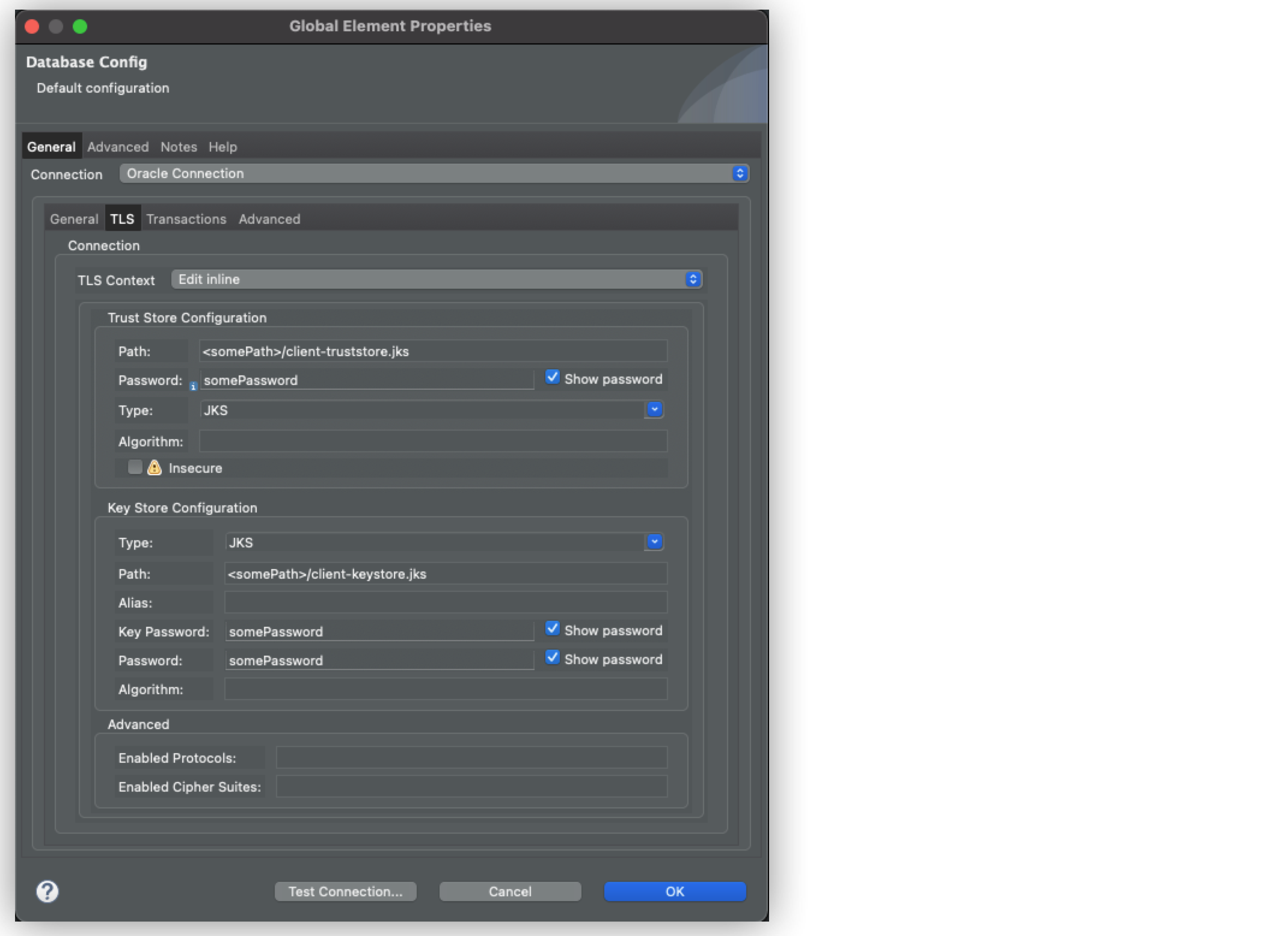
In the Trust Store Configuration section, set the following fields:
-
Path:
<somePath>/client-truststore.jks -
Password:
somepassword -
Type:
JKS
-
-
In the Key Store Configuration section, set the following fields:
-
Path:
<somePath>/client-keystore.jks -
Password:
somepassword -
Key Password:
somepasswordDue to Java Secure Socket Extension (JSSE), you must set the Password and Key Password fields with the same password value for the Key Store Configuration. -
Type:
JKS
-
-
Click Test Connection to confirm that Mule can connect to the database.
-
Click OK.
The following screenshots show the secure Oracle connection General and TLS configuration windows in Studio:
In the Configuration XML editor, the tls:context configuration looks like this:
	<db:config name="oracle-mtls-with-user-pass">
		<db:oracle-connection host="localhost" port="1522" user="system" password="oracle" serviceName="XE">
			<tls:context>
				<tls:trust-store path="<somePath>/client-truststore.jks" password="<somePassword>" type="jks"/>
				<tls:key-store path="<somePath>/client-keystore.jks" password="<somePassword>" keyPassword="<somePassword>" type="jks"/>
			</tls:context>
		</db:oracle-connection>
	</db:config>
Secure Oracle Connection Levels Examples
The following examples show the XML configuration for each secure Oracle connection level:
TCPS Connection Through Secure TCP Tunnel
In the Configuration XML editor, the configuration looks like this:
	<db:config name="oracle-tcps">
		<db:oracle-connection host="localhost" port="1522" user="system" password="oracle" serviceName="XE" >
			<tls:context>
				<tls:trust-store insecure="true"/>
			</tls:context>
		</db:oracle-connection>
	</db:config>
TLS with Truststore Validation Only
In the Configuration XML editor, the configuration looks like this:
	<db:config name="oracle-tls-with-truststore-only">
		<db:oracle-connection host="localhost" port="1522" user="system" password="oracle" serviceName="XE" >
			<tls:context>
				<tls:trust-store path="<somePath>/client-truststore.jks" password="<somePassword>" type="jks"/>
			</tls:context>
		</db:oracle-connection>
	</db:config>
mTLS with Truststore and Keystore Validations
In the Configuration XML editor, the configuration looks like this:
	<db:config name="oracle-mtls-with-user-pass">
		<db:oracle-connection host="localhost" user="system" password="oracle" port="1522" serviceName="XE">
			<tls:context>
				<tls:trust-store path="<somePath>/client-truststore.jks" password="<somePassword>" type="jks"/>
				<tls:key-store path="<somePath>/client-keystore.jks" password="<somePassword>" keyPassword="<somePassword>" type="jks"/>
			</tls:context>
		</db:oracle-connection>
	</db:config>
mTLS without User and Password
Note that for this configuration the role is given by certificates. In the Configuration XML editor, the configuration looks like this:
	<db:config name="oracle-mtls-with-user-pass">
		<db:oracle-connection host="localhost" port="1522" serviceName="XE">
			<tls:context>
				<tls:trust-store path="<somePath>/client-truststore.jks" password="<somePassword>" type="jks"/>
				<tls:key-store path="<somePath>/client-keystore.jks" password="<somePassword>" keyPassword="<somePassword>" type="jks"/>
			</tls:context>
		</db:oracle-connection>
	</db:config>