
CloudHub High Availability and Disaster Recovery
CloudHub provides high availability (HA) and disaster recovery (DR) that protect your applications from application and hardware failures.
CloudHub runs on Amazon AWS, so its availability depends on Amazon. CloudHub maps each deployment region to an Amazon region. If an Amazon region goes down, applications in that region become unavailable, and CloudHub doesn’t replicate them to other regions.
High Availability Versus Disaster Recovery
High availability (HA) measures a system’s ability to remain accessible when a component fails. You implement HA by building multiple levels of fault tolerance and load balancing into a system. On CloudHub, you achieve HA by deploying your application with multiple workers and by enabling persistent queues where appropriate.
Disaster recovery (DR) restores a system to an acceptable previous state after a natural or man-made disaster, such as flooding, fires, power failures, server failures, or misconfigurations.
Both strategies increase availability but differ in scope: on CloudHub, HA keeps your application serving requests through worker and availability-zone failures with no loss of service, whereas DR restores service and data after a region-level disruption but usually incurs a brief loss of service while the DR plan runs.
Two measurable objectives drive your DR plan:
- Recovery Time Objective (RTO)
-
The maximum downtime a business tolerates. RTO is the time the system takes to recover after a disruption.
- Recovery Point Objective (RPO)
-
The maximum data loss a business accepts after a disaster. RPO drives how often you back up data.
High Availability in CloudHub
CloudHub builds high availability into its default deployment model, and MuleSoft manages it for you.
When your application uses multiple workers, CloudHub deploys the workers in separate availability zones by default, which provides HA across availability zones. The distance between availability zones varies and generally stays under 350 miles.
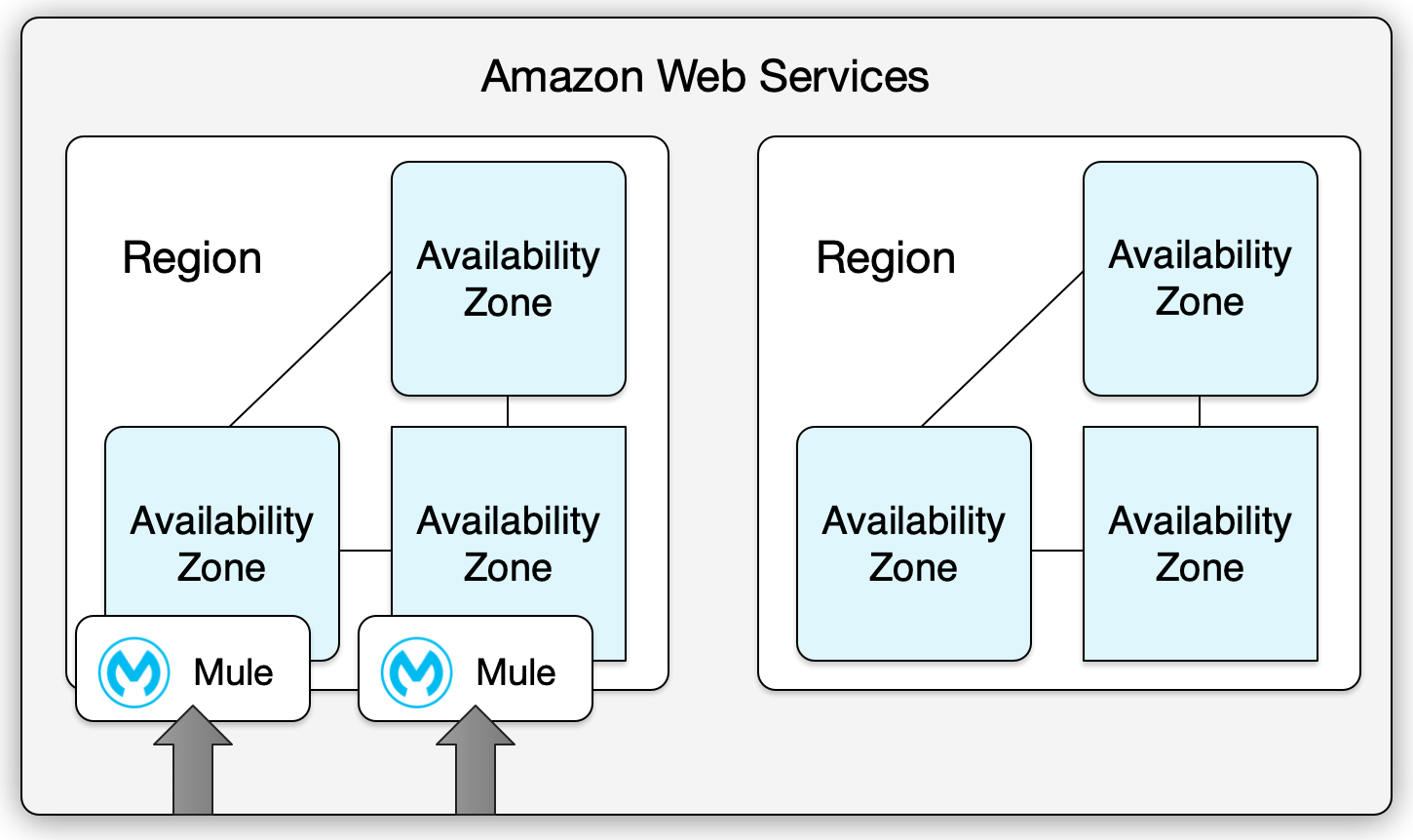
When your application uses a single worker and that availability zone goes down, CloudHub restarts the application in a different availability zone. The application can experience downtime during the restart.
To receive alerts when a failure occurs in an availability zone or region, set up status.mulesoft.com.
Disaster Recovery in CloudHub
MuleSoft manages the CloudHub control plane and worker infrastructure within each region. You own the cross-region strategy, application-level failover, and data synchronization. Disaster recovery responsibilities on CloudHub divide between MuleSoft and you:
| Party | Responsibility |
|---|---|
MuleSoft |
Keeps the control plane available, including the Anypoint Platform UI, deployment APIs, and platform services within the provisioned region. |
MuleSoft |
Patches infrastructure, applies security updates, and maintains the worker cloud. |
MuleSoft |
Distributes workers across two or more availability zones within the same region when you use multiple workers. |
MuleSoft |
Restarts applications automatically in a different availability zone when a worker or availability zone fails. |
You |
Define and implement a cross-region DR strategy for your primary and backup regions. |
You |
Decide when to trigger a regional failover, for example, based on health checks or business criteria. |
You |
Configure Global Server Load Balancing (GSLB) or a Dedicated Load Balancer (DLB), and set routing rules that direct traffic to a backup region during a disaster. |
You |
Deploy and maintain applications in more than one region when you need cross-region DR. |
You |
Replicate and back up the external data stores that your applications use across regions, such as databases and object stores. |
You |
Set up Anypoint VPC in each region where you need network connectivity for DR. |
MuleSoft keeps the platform and workers resilient within a region, and you own everything that spans regions: when to fail over, how to route traffic, which applications to run in a backup region, and how to replicate data.
Your Responsibilities for Disaster Recovery
If your organization needs cross-region DR, design and operate your applications for it. MuleSoft doesn’t automatically replicate applications or fail over traffic to another region. You own these areas:
-
Regional failover strategy - Decide when to switch traffic to a backup region, for example, after a region outage or based on health checks.
-
Traffic management - Route traffic across regions with a cloud-based or on-premises load balancer, such as a Dedicated Load Balancer (DLB) or an external GSLB, and switch to the backup region as part of your DR plan.
-
Application deployment - Deploy the same or equivalent applications in a backup region, and keep their configuration and code in sync.
-
Data and state - Replicate or back up the external data stores that your integrations use, such as databases, caches, and object stores, so that applications in a DR region access the data they need. Anypoint Object Store v1 and v2 are regional and don’t provide cross-region failover.
Design your HA and DR topology based on your recovery-time and recovery-point objectives, using active-active, warm standby, or cold standby as appropriate.
Restoring After a Disaster
Your restoration steps depend on the DR strategy you put in place. After you confirm that the primary region or application is unavailable, generally follow these steps:
-
Switch traffic to the backup region.
Use your load balancer, such as a GSLB or a Dedicated Load Balancer (DLB), to route traffic to the backup region. The health checks you configured mark the primary as unhealthy and direct traffic to the backup endpoints.
-
Bring backup applications online when you use cold or warm standby.
If the control plane is available, use Anypoint Runtime Manager or the CloudHub API to start or scale up the backup application. If the control plane sits in the same region as the failed primary, it’s unavailable, and you can’t start or scale applications until the control plane recovers, unless you use automation that doesn’t depend on the control plane.
-
Verify that the backup region serves traffic and that dependent systems use the correct endpoints and data stores.
-
Fail back when the primary region recovers, switching traffic from the backup region to the primary and resyncing data as needed.
Your RTO depends on how quickly you complete these steps and, for cold or warm standby, on how long the backup application takes to start or scale. For active-active setups, traffic continues on the remaining region without a switch. For more on CloudHub 2.0 recovery, see CloudHub 2.0 High Availability and Disaster Recovery.
Considerations and Limitations
Account for these CloudHub behaviors when you plan HA and DR:
- Control plane availability
-
When the US East region goes down, the CloudHub management UI and the REST services that enable deployments stay unavailable until the region recovers, and you can’t deploy new applications during that time.
- Log and telemetry buffering
-
While the control plane is unavailable, the runtime plane sends log and telemetry data, and the worker buffers up to 1 GB of data until the control plane recovers.
- Persistent queues
-
Within a region, persistent queues stay highly available. When the region or part of it goes down, usually for seconds or minutes, the queues become inaccessible and you might lose some data. CloudHub resumes communication with the queues after the region recovers.
- Object stores
-
Anypoint Object Store v1, application settings, and insight-related information reside in the US East region for all applications, and Anypoint Object Store v2 resides in the same region as the deployed application. For both versions, data persists during a region outage and becomes available again when the region returns to service. Neither version provides cross-region failover.
- Anypoint VPC
-
Anypoint Virtual Private Cloud (Anypoint VPC) applies at the region level. When a region goes down, that region’s VPC goes down unless you set up a VPC instance in another region.
Suggested Alternative Deployment Model
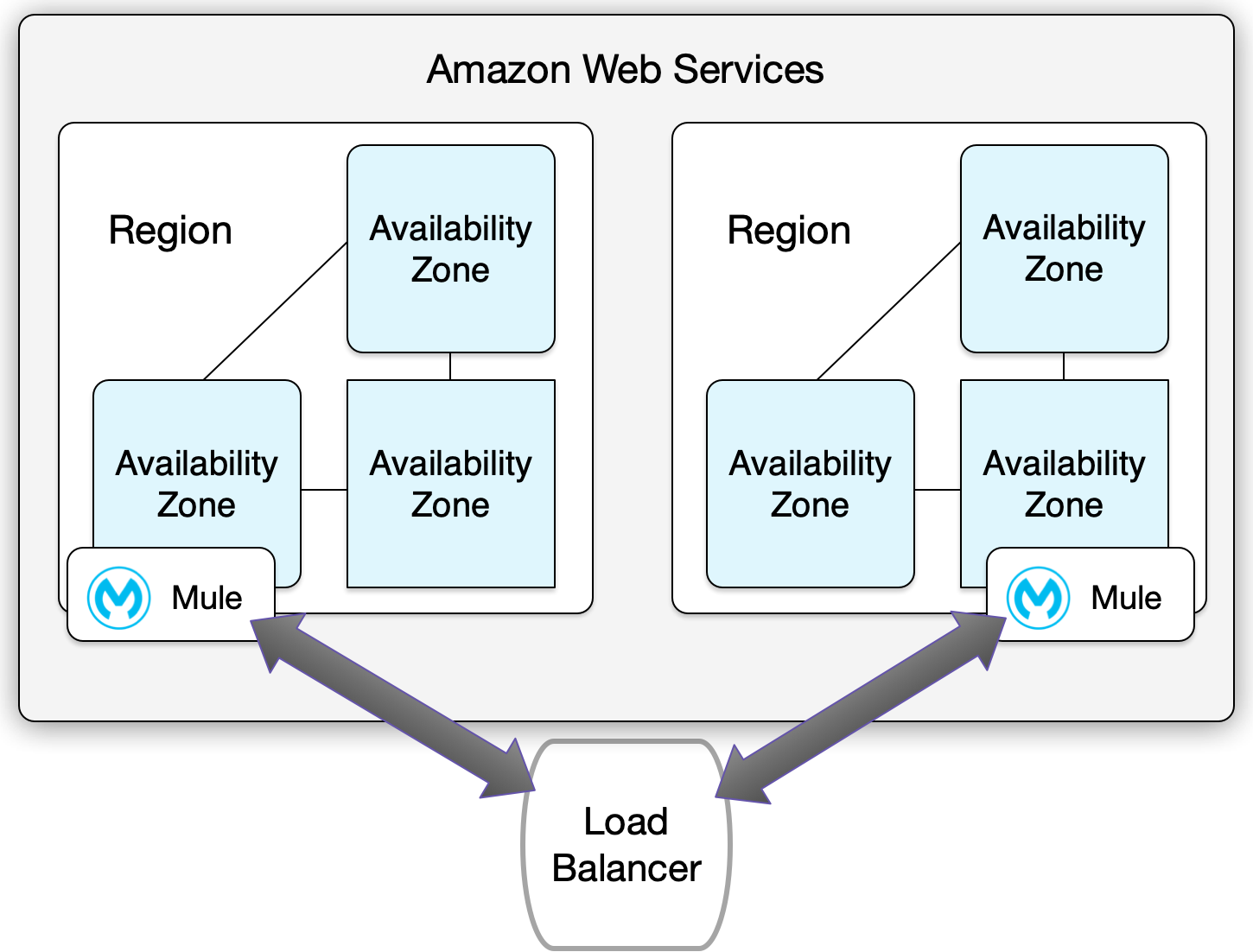
To strengthen your DR strategy, route traffic across regions with a cloud-based or on-premises load balancer. Configure the load balancer to run health checks and to route traffic to your backup region when the primary region goes down. For CloudHub-specific options, see CloudHub Load Balancers and Dedicated Load Balancers.
Best Practices
-
Keep your integrations stateless.
-
Don’t share transactional information between client invocations or scheduled runs.
-
When the middleware must retain data because of a system limitation, store it in an external store, such as a database or a messaging queue, rather than in the middleware infrastructure or memory.
-
As you scale, especially in the cloud, keep each worker’s state and resources independent of the other workers to deliver better performance, scalability, and reliability.